
There is a specific frustration that anyone who has ever tried to deliver a scripted line on camera knows: you look down at a monitor, the audience sees you look away, and the entire illusion of a natural, confident presenter collapses. Teleprompters solve that problem, but the category is surprisingly wide, ranging from clip-on smartphone attachments that shake on a tripod to full-rig systems that mount in front of a broadcast lens. Choosing between them without testing is genuinely difficult because the specs sheet tells you almost nothing about how the device behaves under studio lights, whether the text stays crisp at a glance, or how quickly you can adjust speed mid-sentence when a live segment runs long.
What separates a good teleprompter from a mediocre one comes down to three things: the quality of the beam-splitter glass, the usability of the companion software, and how securely the unit holds its position once locked on a camera or monitor. A system with cheap glass introduces a visible ghost image that pulls focus from your presenter’s face. A system with clunky software forces you to fumble with a remote during a live read, which is worse than no prompter at all. Below, we break down the best professional teleprompter systems for studio productions available in 2026, covering everything from portable kit setups to presidential-grade rigs built for large conference stages.
As an Amazon Associate we earn from qualifying purchases at no extra cost to you.


Our Top Picks
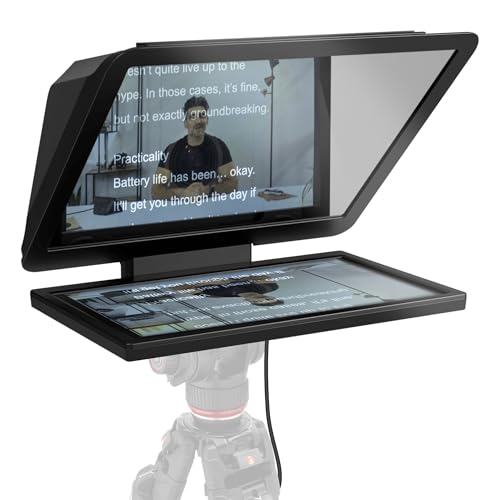


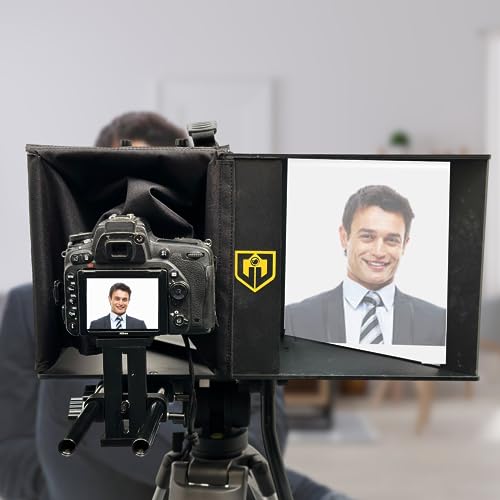
Top 3 picks at a glance
Quick Picks
| Product | Best for | Price |
|---|---|---|
| Elgato Prompter XL | Full-size studio presentations | Check on Amazon |
| Padcaster Parrot Teleprompter Kit | Mobile and iPhone-based creators | $149 |
| TELEPROMPTER PAD iPresent PRO | Live events and public speaking | $449 |
| Glide Gear Face 2 Face | Interview and dual-mode productions | Check on Amazon |
How We Compared
We evaluated each system on beam-splitter glass quality, software responsiveness, physical build under studio conditions, and adaptability across camera and monitor setups. Price-to-configuration flexibility mattered too: a teleprompter that only works with one screen size or one mounting method limits a studio’s ability to reuse it across different productions. We prioritized units where the remote control or companion app allowed real-time speed adjustments without breaking the presenter’s flow, since that is the single most common complaint we hear from operators who have spent time behind a prompter during live broadcasts.
The 4 Best Professional Teleprompter Systems For Studio Productions in 2026
Elgato Prompter XL
The Prompter XL is Elgato’s answer to people who need a full-sized, removable prompter that sits in front of a monitor in a fixed studio position. The glass panel is large enough to display comfortable text without forcing you to zoom into a small window, and the unit detaches from its base for transport between setups. The companion software integrates cleanly with Stream Deck, which means speed controls, start, and stop sit on physical buttons rather than a buried menu.
- Removable from the monitor mount without tools, making it easy to clear a desk between sessions
- Native Stream Deck integration for tactile speed and scroll control
- The XL panel, while generous, is not compatible with every monitor depth; verify clearance before purchasing for curved or ultra-thin displays
Skip it if your studio uses small monitors or laptop-based setups where the full panel creates a physical obstruction.
Padcaster Parrot Teleprompter Kit
This is a compact, portable teleprompter built specifically around iPhone use. The beam-splitter sits directly over the front camera lens, and text is reflected back at a reading distance that works well for close-up framing. For creators shooting solo or running a two-person interview with one camera on each subject, it removes the need for a dedicated prompter operator entirely. The whole kit folds flat and fits in a bag without worry.
- True plug-and-play portability: no tripod adapter or monitor arm required
- Front-camera alignment means the presenter’s eyeline lands directly on the lens
- Text size on a phone screen limits readability at any distance beyond a close head-and-shoulders shot
Skip it if your production requires teleprompter text readable from more than a few feet, or if you use a dedicated camera body rather than a phone.
TELEPROMPTER PAD iPresent PRO
The iPresent PRO is a presidential-grade portable system that supports iPad, tablet, and external monitor inputs. It ships with a hard case, a wireless remote, and its own companion app. The unit is designed for large stages where a speaker might be ten or more feet from the prompter and still need to track text smoothly. The hard case is not an afterthought: it doubles as a briefcase-style carry solution, which matters for traveling speakers who set up and tear down between venues.
- Multi-input design accepts iPad, tablet, or a dedicated monitor for redundancy
- Included remote control and hard case make it genuinely event-ready out of the box
- Setup takes noticeably longer than simpler clip-on systems due to the multi-component assembly
Skip it if you need a prompter for a single-camera fixed studio where a simpler, lighter unit would save you ten minutes of setup per shoot.
Glide Gear Face 2 Face Hybrid Interview Periscope and Teleprompter
The Face 2 Face is a dual-mode system that functions both as a teleprompter and as a periscope for maintaining eye contact during interviews without a physical prompter. This is its most distinctive feature: in periscope mode, the interviewer can read notes or see the subject on a hidden monitor while maintaining a natural gaze into the lens. It accepts both DSLR and smartphone mounting, which makes it versatile across camera packages of different sizes.
- Dual-mode operation solves two problems with one purchase for interview-heavy productions
- DSLR and smartphone compatibility covers a wide range of camera bodies
- Periscope mode is a niche feature that adds cost if you only ever need standard prompter function
Skip it if you only need straightforward script reading and have no interest in interview eye-contact workflows.
Buying Guide
Beam-Splitter Glass Quality and Size
The glass is the single component that determines whether your prompter looks professional on camera or reads as a DIY attachment. Cheaper glass introduces reflections, color casts, and a faint mirror image visible to the audience. Look for units that specify optical-grade beam-splitters and check whether the panel size matches your typical reading distance. A presenter standing four feet from a small glass panel will squint or drift off script, which defeats the purpose entirely.
Software and Remote Control Responsiveness
A prompter that cannot adjust speed mid-sentence is a liability during live content. The best companion apps offer adjustable scroll speed, font size, and text alignment that respond immediately without stuttering. Physical remotes with a scroll wheel or directional buttons are more reliable than tap-based interfaces, which register inconsistently during fast reads. If you are operating solo, verify that the remote works at the distance you will actually be standing from the prompter.
Mounting Compatibility and Studio Workflow
Before purchasing, confirm what the unit mounts to: a monitor top, a camera shoe, a tripod, or a dedicated stand. Studio productions that rotate between camera bodies and monitor setups need a system with versatile mounting or quick-release mechanisms. A prompter that requires tools to reposition becomes a bottleneck during tight shooting schedules. Factor in how quickly you can go from storage to live read, especially for event-based work where setup windows are short.
Our Verdict
Our top pick for a dedicated studio environment is the Elgato Prompter XL, because its size, software integration, and removable design make it the most workflow-friendly option for repeat use in a fixed location. For creators working primarily from a phone or who need a prompter that fits in a backpack without disassembly, the Padcaster Parrot Teleprompter Kit is the best budget pick at its price point. However, the TELEPROMPTER PAD iPresent PRO wins outright if your primary use case is large-venue public speaking or conference stages, where its multi-input design, included remote, and hard case justify the additional setup time.
FAQ
Can a teleprompter work with any camera?
Most teleprompter systems designed for cameras use a universal shoe mount or adapter, but you need to confirm the specific mount type matches your body. Smartphone-based prompters are more restrictive since the beam-splitter is sized to a particular phone model’s camera position.
Do I need a separate monitor for a teleprompter?
Some units, like the iPresent PRO, accept a tablet or monitor as the display source, which means you already own the screen. Others, like the Elgato Prompter XL, are designed to sit in front of an existing computer monitor. Confirm which input method your chosen system expects.
What font size should I use on a teleprompter?
A practical rule is to use the largest font that fits your line length without wrapping awkwardly, then adjust based on your actual reading distance from the glass. If you find yourself drifting to look at the edge of the panel, increase the size; if lines wrap and break your rhythm, shorten your text chunks or reduce the width.
Is a teleprompter noticeable on camera?
A properly aligned teleprompter with quality glass is essentially invisible to the viewer. The presenter’s eyes appear to look directly at the lens while reading. A poorly positioned or cheaply built unit may show a visible frame, reflection, or misaligned eyeline that viewers will notice even if they cannot articulate why something looks off.









