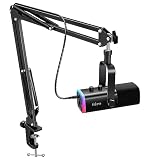
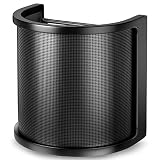
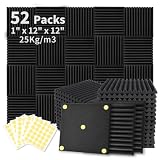
Of the six listings here, the Yamaha ZG01 Pack is the closest match to what streamers mean by a headset with a MixAmp: a compact mixer sits between your gear and a headset, and it lets you balance game sound against voice chat while also feeding a clean mix to your stream. A MixAmp is a small amplifier and mixer, made famous by Astro, that blends game and chat audio before it reaches your ears. None of these products carries that brand name, so this guide treats them as MixAmp-style setups and flags the ones that are really just headset kits.
If you want a mixer you can grow with, start with the Yamaha. If you only need a plug-and-play USB mixer and headset, the FIFINE bundles are worth a look.
Our Top Picks

Top 3 picks at a glance
Quick List
- FIFINE SC8 Mixer with H8 Headphones – best for a budget RGB mixer paired with over-ear headphones
- Audio-Technica ATH-M50xSTS StreamSet – best as the headset half of a setup built around an XLR mixer or interface
- Yamaha ZG01 Pack – best for a purpose-built gaming mixer with headset and HDMI connections
- FIFINE USB Headset and Audio Mixer (H9W+SC3W) – best for a simple USB headset with a slider-fader mixer and XLR input
- FIFINE Mic and Headset Bundle (A6T+H9) – runner-up kit; best for a boom-arm mic plus 7.1 headset with a control box, no mixer
- FIFINE USB Mic Kit and Headset (A6TP+H9P) – runner-up kit; best for a USB mic plus headset set for consoles, no mixer
Which One Is Right for You?
| If you… | Choose |
|---|---|
| Want a gaming-specific mixer with its own headset and room to add an XLR mic | Yamaha ZG01 Pack |
| Need a USB headset and a mixer with a slider fader and an XLR input in one box | FIFINE USB Headset and Audio Mixer (H9W+SC3W) |
| Prefer an RGB mixer with a game/chat balance control and studio-style headphones | FIFINE SC8 Mixer with H8 Headphones |
| Already own or plan to buy an XLR interface and want a quality closed-back headset | Audio-Technica ATH-M50xSTS StreamSet |
| Want a mic, boom arm and headset together and can live without a mixer | FIFINE Mic and Headset Bundle (A6T+H9) |
| Play on console and want a USB mic plus headset kit with a control box | FIFINE USB Mic Kit and Headset (A6TP+H9P) |
The deciding question is whether you need a mixer at all. If you juggle game audio, party chat and stream audio at once, a mixer pays for itself. If you just want a headset and a decent mic, the last two kits are simpler, but they should be read as headset-and-mic bundles, not MixAmp replacements.
All 6 Picks in Detail
1. FIFINE SC8 Mixer with H8 Headphones – Best for a Budget RGB Mixer and Studio-Style Headphones
As an Amazon Associate we earn from qualifying purchases at no extra cost to you.
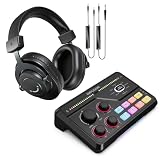
This bundle pairs the SC8 RGB gaming mixer with the H8 over-ear wired headphones. The listing highlights game/chat balance and 7.1 surround sound, which are the two features most people want from a MixAmp-style box. The headphones are described as studio-monitor style rather than a gaming headset with a boom mic, so check whether you will need a separate microphone.
- RGB gaming mixer (SC8)
- Game/chat balance control
- Over-ear wired headphones (H8) with 7.1 surround sound
- 3.5 mm wired connection for the headphones
- Marketed for video streaming and vocal recording
- Headphone microphone and mixer channel count: confirm on listing
In practice, a mixer like this sits on your desk and gives you knobs and faders instead of digging through software menus. The balance control is the part to learn first: turning it toward chat lowers the game, and turning it toward game does the opposite. Because the headphones are listed as studio-style, you will probably add a desk mic, which suits streamers who already own one and want a clean headphone setup.
Before you buy, decide where the microphone will come from. If the H8 headphones have no boom mic, a clip-on or desk microphone becomes part of the budget, and the mixer then needs an input for it. Look for a microphone jack or XLR input on the mixer, and read the manual to learn whether the 7.1 effect works through the headphone path only. A mixer with balance control is most useful on console, where in-game and party sound often fight each other.
Pros
- Physical balance control for game and chat
- Mixer and headphones sold together
Cons
- Microphone arrangement is unclear from the listing
- Virtual 7.1 is a software effect, not extra drivers
Compared with the ZG01, it has fewer connection options but a lower barrier to entry.
2. Audio-Technica ATH-M50xSTS StreamSet – Best as the Headset Half of an XLR Setup
This is a headset, not a mixer, and it is on this list because it is the best-built headset here for anyone assembling a MixAmp-style rig around an XLR interface or mixer. The analog version in the listing uses an XLR output for the boom microphone and a 3.5 mm plug for the headphones. It borrows the closed-back design that streamers know from the M50x headphone line.
- Closed-back headphones with 45 mm drivers
- Boom microphone with a cardioid pattern
- Microphone connects by XLR and needs phantom power (11 to 52 volts per the manufacturer)
- 3.5 mm headphone plug with a 6.3 mm adapter included
- Flipping the boom up mutes the mic
- Headphone impedance around 38 ohms per the manufacturer specs
It makes sense if you already own, or plan to buy, a mixer with a phantom-powered XLR input and a headphone output. Plugging it straight into a console or PC will not work for the microphone, since neither supplies phantom power on an XLR line. The upside is sound quality and comfort; the headset is built for hours of wear and ships with two interchangeable earpad types.
The XLR StreamSet shines in a layered studio-style desk. A typical chain is the headset into a small mixer, the mixer into the PC over USB, and a software router splitting game, chat and microphone into separate channels. Because the listing in this lineup is the XLR analog version, double-check that you are not looking for the USB version, which the manufacturer sells separately and which plugs straight into a computer without a mixer.
Pros
- Closed-back comfort for long sessions, with two earpad types
- Works with any XLR mixer or audio interface that has phantom power
Cons
- Not a standalone solution; needs a mixer or interface
- No game/chat balance of its own
Pair it with the Yamaha mixer’s phantom-powered input and you have a combination that neither listing sells as a single package.
3. Yamaha ZG01 Pack – Best for a Purpose-Built Gaming Mixer with Headset

The Yamaha ZG01 Pack is a mixer and a headset sold together and designed for voice chat and game streaming. Yamaha lists a USB-C connection to the computer, HDMI input and output, 3.5 mm analog headset jacks and an XLR and quarter-inch combo mic input with 48 volt phantom power. That mix of connections is why it works as a true MixAmp stand-in for console and PC setups.
- Gaming mixer plus the YH-G01 headset with a detachable boom mic
- USB-C to the PC, presenting separate voice and streaming devices
- HDMI in and out with passthrough
- XLR and quarter-inch combo mic input with 48 V phantom power
- DSP effects including surround and voice presets
- Exact game/chat balance controls: confirm on the manufacturer page
The separate USB devices matter for streamers. Your party chat can land in one device and your stream mix in another, so viewers hear game sound and your voice without hearing your friends. The headset connects over the mixer’s analog jacks, and only the mixer talks to the computer. Note the mixer itself does not capture video, so you would still need a capture card for console footage.
Yamaha built the ZG line specifically for people who stream and chat at the same time, which is why it includes HDMI passthrough and audio effects aimed at voice. Keep in mind that its USB connection supplies the computer with virtual devices, so your streaming software sees separate sources for voice and stream audio. That arrangement is the closest this lineup comes to the Astro-style workflow many players describe when they ask for a MixAmp.
Pros
- Most complete connection set in this group
- Separate voice and stream outputs on the computer
Cons
- More setup than a plug-in USB headset
- Does not capture video
If the FIFINE SC8 is the simple entry point, this is the step up when you want phantom power and HDMI routing.
4. FIFINE USB Headset and Audio Mixer (H9W+SC3W) – Best for a Simple USB Headset-and-Mixer Pairing

This bundle combines the H9W over-ear wired headset with the SC3W mixer. The listing mentions USB connectivity for a PC, a 3.5 mm audio jack, a detachable microphone, a slider fader and an XLR microphone interface. For a streamer who wants a mixer for the XLR mic they plan to add later, that makes it a flexible entry point.
- Over-ear wired streaming headset (H9W) with a detachable microphone
- Audio mixer (SC3W) with a slider fader
- XLR microphone interface for adding a desk mic
- USB connection to a PC and a 3.5 mm audio jack
- Marketed for gaming, streaming and podcasting
- Channel count and phantom power: confirm on listing
The slider fader is the main tool for adjusting levels, and the XLR input is what separates this mixer from a basic USB control box. Use the detachable headset mic for chat today, then add an XLR microphone when you want better voice quality, without replacing the mixer. Some features, such as how the fader maps to game and chat, are not spelled out in the listing, so read the manual before relying on it for a complex setup.
Mixers at this level usually include a handful of faders or knobs and a headphone output powerful enough for most over-ear headsets. The H9W headset is described as over-ear and wired with a detachable microphone, so you can leave the boom off when you are only listening. Because the title mentions both USB and a 3.5 mm audio jack, take a moment to learn which input carries which signal, so that chat and game audio do not end up on the same channel.
Pros
- Room to add a proper XLR mic later
- Single package for headset and mixer
Cons
- Fader behavior needs confirming
- Console compatibility is not stated in the title
Next to the SC8 bundle, it gives you an XLR input in exchange for less emphasis on RGB styling.
5. FIFINE Mic and Headset Bundle (A6T+H9) – Best as a Mic-and-Headset Kit, No Mixer

This product does not include a mixer, so it does not meet the MixAmp definition and is placed here as a runner-up kit. It combines the A6T condenser microphone on a boom arm with the H9 PC headset, 7.1 surround sound and a control box, all connected through a 3.5 mm jack. It suits streamers who need a mic and a headset at once.
- Condenser RGB microphone on a boom arm
- PC headset with 7.1 surround sound
- Control box included
- 3.5 mm jack connection
- Marketed for streaming, Twitch, PS4 and PS5
- Control box features such as game/chat balance: confirm on listing
The control box is the part to investigate. It might offer volume and mute controls, but the listing does not describe game/chat balance, so do not assume it replaces a mixer. As a bundle, it saves you from buying a mic, arm and headset separately, which is its real appeal.
If you are on a tight budget and your main complaint is a weak microphone, this kind of bundle can be a sensible upgrade path. The condenser mic on a boom arm captures more of your voice than a typical headset boom, and the 7.1 headset gives you positional cues in games that support it. Be realistic about the control box, though: unless the listing says it has a balance control, it is likely limited to volume and mute, which is a different job from a MixAmp.
Pros
- Three components in one purchase
- Boom arm included
Cons
- Not a mixer
- Condenser mics pick up more room noise
Compared with the USB version below, it uses a 3.5 mm connection instead of USB for the mic.
6. FIFINE USB Mic Kit and Headset (A6TP+H9P) – Best as a USB Mic-and-Headset Kit for Consoles

Another runner-up kit without a mixer: a USB RGB condenser microphone, an over-ear wired headset with 7.1 surround sound and a control box. The listing names PS4, PS5, Xbox and Switch compatibility, which makes it a plug-and-play option for console players who stream.
- USB RGB condenser microphone
- Over-ear wired headset with 7.1 surround sound
- Control box included
- Marketed for PC, PS4, PS5, Xbox and Switch
- Marketed for podcasting, YouTube and recording
- Control box functions: confirm on listing
Treat it as a starter kit. You get a decent voice setup quickly, but you do not get independent game and chat volume the way a mixer provides. If that matters later, you can move to the Yamaha or one of the FIFINE mixers.
Because this version of the kit uses USB for the microphone, it is the easier of the two FIFINE bundles for a plug-and-play desktop. The headset connects through the control box, so cable routing matters: keep the box within easy reach so you can mute quickly. If chat balance becomes a daily frustration, consider moving up to one of the mixer-based bundles in this guide rather than trying to adapt a kit that was not designed for it.
Pros
- Broad console and PC compatibility
- Simple USB mic with no interface needed
Cons
- Not a MixAmp-style product
- Mic and headset mixes are less flexible
It differs from the A6T+H9 bundle mainly in using a USB mic rather than a 3.5 mm jack connection.
Specs Compared
| Product | Mixer included | Headset or headphones | Mic | Connection |
|---|---|---|---|---|
| FIFINE SC8 + H8 | Yes (SC8, game/chat balance) | H8 over-ear, 7.1 surround | Confirm on listing | 3.5 mm headphones |
| Audio-Technica ATH-M50xSTS | No | Closed-back, 45 mm drivers | Boom, cardioid, XLR | XLR and 3.5 mm |
| Yamaha ZG01 Pack | Yes (ZG01) | YH-G01 headset | Detachable boom; XLR combo input on mixer | USB-C, HDMI, 3.5 mm |
| FIFINE H9W + SC3W | Yes (SC3W, slider fader) | H9W over-ear wired | Detachable; XLR interface | USB, 3.5 mm, XLR |
| FIFINE A6T + H9 | No (control box) | H9 PC headset, 7.1 | A6T condenser with boom arm | 3.5 mm |
| FIFINE A6TP + H9P | No (control box) | H9P over-ear, 7.1 | USB RGB condenser | USB |
How We Chose These
We selected and ordered these products from catalog listing titles, feature fields and the manufacturer pages for Audio-Technica and Yamaha. Our main filter was whether a product actually provides MixAmp-style behavior, meaning a hardware mixer or amplifier with a headset path. We then looked at connection types, microphone design, and what the listing says about balance and routing. Items that do not include a mixer are labeled as kits so you can see the difference. Where a listing did not state a spec, we say so instead of filling in a guess.
What to Look For
What a MixAmp does, and what substitutes for it
A MixAmp takes game audio and chat audio, lets you set the balance between them, and drives your headset. The same job can be done by a USB mixer, a gaming mixer with analog jacks, or an audio interface with software routing. The important feature is independent control, so you can drop the game under a teammate’s voice without touching the console volume.
Console compatibility
The PS5 has no optical audio output, which was how older MixAmps connected to a PS4, so modern setups lean on USB or analog connections. Check the product page for your console before you buy. A mixer that works as a USB audio device on PC may need a different connection on console, and chat routing on consoles often depends on a 3.5 mm headset jack on the controller.
Analog, USB and XLR connections
A 3.5 mm analog jack is universal but offers little control. USB audio gives the computer a clean digital path and often exposes separate devices for game and chat. XLR is the professional microphone connection, and it needs phantom power (usually 48 volts) for condenser mics. If you plan to add an XLR mic later, pick a mixer that has the input, not just a USB headset.
Impedance and headphone drive
Studio headphones like the Audio-Technica listing have an impedance around 38 ohms, which most mixers and even phones can drive. Higher-impedance studio headphones may sound quiet from a basic jack. If the listing does not state impedance, confirm it, and make sure the mixer’s headphone output has enough gain.
Worked example: setting a stream mix
Say you set game audio at 70 percent, party chat at 100 percent and your mic at about 80 percent in the mixer. Your stream feed might need a slightly different balance, with game at 60 percent so your voice stays clear. If your mixer exposes separate USB devices, route chat only to your headset, and send game plus mic to OBS. Adjust one slider at a time and listen to a short recording before going live.
One last point on surround sound. Virtual 7.1 is a software effect that tries to place sounds around you using two drivers, and some players love it while others find it muddies footsteps. The best approach is to switch it on and off during a familiar map and keep whichever setting helps you locate sound sources. Also remember that stereo is still the standard for music, voice chat and most streamed audio, so keep the effect off for those.
Questions
Do I need a MixAmp to stream?
No. You can stream with a simple headset and a software mixer in OBS. A hardware mixer becomes useful when you want to adjust game and chat volume by hand while playing.
Does a virtual 7.1 headset help with streaming?
Virtual surround is a processing effect that can widen sound in a game. It does not improve the stream itself, and it can make voices sound odd, so many streamers turn it off for chat and recording.
Can I use an XLR headset without a mixer?
Not for the microphone. An XLR microphone needs a mixer or interface with a preamp, and condenser types need phantom power. The headphone side uses a standard 3.5 mm plug and works with most devices.
Which of these work with a PS5?
Several listings name PS5 compatibility, but the exact support varies. The USB kits mention PS4, PS5 and Xbox, while the mixers may have different console behavior, so read the product page before you rely on one.
Is a mixer with RGB lighting worth it?
Lighting is cosmetic. Focus on the controls, inputs and outputs you will use every day. Lights are a bonus if you like the look of your desk, but they do not improve sound quality.
How do I avoid echo when I monitor my own voice?
Use the mixer’s monitor or sidetone control to hear a small amount of your own voice in the headphones, and keep your mic away from speakers. Turning off a duplicate monitor path in software removes most echo problems.
Update History
- October 20, 2026 – Initial publication; product set drawn from current catalog listings.
- Check the product page for current specifications and availability before buying.
Sources
- Manufacturer product and specification pages for Audio-Technica and Yamaha
- FIFINE product information and retailer listing titles and specification fields