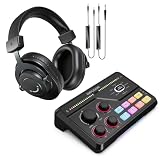
The MAONO PD200XS is the best overall pick in this group for most gamers, because its listing pairs a dynamic capsule with both USB and XLR outputs, a gain knob, a mute button, a boom arm and companion software, and MAONO’s specifications list 24-bit/48 kHz audio and a gain range of 0 to 42 dB. An XLR microphone connects through a three-pin balanced cable to an interface or mixer, which gives you room to upgrade later. Every mic here also has a USB mode, so you can plug in today and move to XLR when you buy an interface.
Dynamic mics reject room noise well, which suits loud gaming rooms and keyboards.
Our Top Picks
 FIFINE AmpliGame AM8 USB/XLR Dynamic Microphone for Gaming3.35 x 4.96 x 9.65 inches1.7 PoundsCheck on Amazon


Top 3 picks at a glance
Quick List
- FIFINE AmpliGame AM8T Kit – best for a USB/XLR dynamic mic that arrives with a boom arm
- FIFINE AmpliGame AM8 – best for a straightforward desktop dynamic mic with RGB lighting
- TONOR TD510 AIR S H+ – best for tap-to-mute and AI noise cancellation in a boom-arm kit
- MAONO PD200XS – best for software control, a gain knob and a published gain range
- FIFINE AmpliGame KS5 Bundle – best for a mic bundled with a streaming mixer and fader
- FIFINE AmpliGame AM8W – best for the same AM8 design with a gain knob, mute button and monitor jack
Which One Is Right for You?
| If you… | Choose |
|---|---|
| Want software EQ and compressor controls plus a boom arm in one kit | MAONO PD200XS |
| Need a mic that comes with a boom arm from the start | FIFINE AmpliGame AM8T Kit |
| Want tap-to-mute and AI noise cancellation for a noisy room | TONOR TD510 AIR S H+ |
| Prefer a mixer with faders in the same bundle as the mic | FIFINE AmpliGame KS5 Bundle |
| Have a stand or arm already and want the simplest desktop mic | FIFINE AmpliGame AM8 |
| Like the AM8 and want a white version with gain and mute controls | FIFINE AmpliGame AM8W |
If you already own a boom arm, the AM8 and AM8W save you from paying for hardware you do not need. If you do not, choose one of the kits. The mixer bundle is the choice for someone who wants physical faders while streaming, since it moves level control from software to a physical slider.
All 6 Picks in Detail
1. FIFINE AmpliGame AM8T Kit – Best for a USB/XLR Dynamic Mic with Boom Arm
As an Amazon Associate we earn from qualifying purchases at no extra cost to you.

The AM8T is the AM8 microphone sold as a set with a boom arm stand. FIFINE’s pages list a dynamic cardioid capsule, USB-C and XLR connections, a mute button, a headphone jack and RGB lighting. It suits a gamer who wants to get the microphone off the desk and in front of the face without hunting for a separate arm.
- Dynamic capsule with a cardioid pickup pattern
- USB and XLR connections
- Boom arm stand included
- Mute button and headphone jack for direct monitoring
- RGB lighting (FIFINE notes the lights and function keys do not work in XLR mode)
- XLR cable: not noted as included, confirm on listing
Since the boom keeps the mic close to your mouth, a dynamic capsule works as intended. Speak a few inches away, slightly off-axis, and use the mute button for coughs. When you move to an XLR interface later, the lights stop working, which is cosmetic but worth knowing.
If you plan to start on USB and move to XLR later, this is a comfortable way to do it. In USB mode you get the lights, the mute button and the headphone jack all working, and you can learn how gain and distance affect your voice. When you buy an interface, you can keep the same microphone and arm, and only lose the lights and function keys. That upgrade path is the main reason to pick a dual-output mic over a USB-only one.
Pros
- Boom arm and mic in one package
- Both USB and XLR from the same microphone
Cons
- Lighting and function keys disabled in XLR mode
- Arm quality varies, so check weight limits
It is nearly the AM8 plus an arm, so compare it with the plain AM8 based on whether you need the hardware.
2. FIFINE AmpliGame AM8 – Best for a Straightforward Desktop Dynamic Mic

The AM8 is the base model: a USB/XLR dynamic microphone with RGB light, a mute button, a headphone jack and a desktop stand. A well-known tech review lists a frequency response of 50 Hz to 16 kHz and a 120 dB maximum sound pressure level on the specification sheet. That is a speech-focused range, which suits gaming voice and chat.
- Dynamic cardioid microphone
- USB and XLR outputs
- 50 Hz to 16 kHz frequency response per FIFINE
- Desktop stand included; mute button and headphone jack
- RGB lighting
- Gain knob: not mentioned in the title, confirm on listing
It is the most economical way into the AM8 family. The desktop stand is fine for a quiet setup, though it can pick up keyboard thumps through the desk, so many people add a boom arm or shock mount over time. For streaming, the cardioid pattern and dynamic element ignore a lot of the room.
Because desk stands transmit vibration, a few small habits help. Place a folded towel or a foam pad under the stand, keep the mic away from your keyboard, and avoid touching the desk while speaking. If you later add a boom arm, the AM8 becomes much quieter in practice, since the capsule is isolated from the desk. The mic itself is the same, which is why this is the most economical entry point into the AmpliGame family.
Pros
- Simple, popular design with both connection types
- Monitoring jack avoids software latency
Cons
- Desktop stand transmits desk vibration
- No boom arm in the box
Compared with the AM8T, the only practical difference is the arm.
3. TONOR TD510 AIR S H+ – Best for Tap-to-Mute and AI Noise Cancellation

TONOR sells this kit as a dynamic gaming microphone with XLR and USB connections, AI noise cancellation, a boom arm, RGB lighting, a tap-to-mute surface, a 3.5 mm jack and gain control. For gamers in busy rooms, the AI noise feature and mute tap are the draws.
- Dynamic microphone with XLR and USB
- AI noise cancellation (applies in the USB path; confirm on listing)
- Boom arm set included
- Tap mute, RGB lighting and gain control
- 3.5 mm jack for monitoring
- Frequency response and sample rate: confirm on listing
Tap-to-mute is convenient mid-match, because a light touch silences the mic without feeling for a button. AI noise cancellation is software-style processing, so it likely does not carry over when you use XLR into an interface. The kit approach means one purchase covers arm and mic.
AI noise cancellation in microphones is usually processing that happens either in the device or in a companion app, which means its results can differ between USB and XLR use. Treat it as a bonus for streaming in a loud room, and still rely on distance and placement as your main tools. Tap-mute is also easy to hit by accident, so learn where the sensitive area is before relying on it during a game.
Pros
- Tap mute and gain control on the mic
- Boom arm included
Cons
- AI features may vary between USB and XLR use
- Specifications are thin in the listing title
It gives up the published gain range that MAONO provides in exchange for the tap mute feature.
4. MAONO PD200XS – Best for Software Control and a Published Gain Range

The PD200XS is a USB/XLR dynamic microphone kit with RGB lighting, a mute button, a gain knob, volume control and a boom arm. MAONO’s specifications list a cardioid pattern, 24-bit/48 kHz resolution, a 40 Hz to 16 kHz response, a 0 to 42 dB gain range and a built-in windscreen and shock mount. MAONO Link software adds EQ, limiter and compressor.
- Dynamic cardioid capsule, USB-C and XLR
- 24-bit/48 kHz audio and 40 Hz to 16 kHz response per MAONO
- Gain range of 0 to 42 dB
- 2-in-1 knob for gain and headphone volume
- Mute button, 3.5 mm headphone jack, RGB lighting
- Boom arm and shock mount; XLR cable not included per MAONO
MAONO recommends staying within about 15 cm (6 inches) because this is a relatively insensitive dynamic mic. That matters: speak close and keep it near your mouth, rather than pushing the gain to the maximum. The software gives you a quick way to shape the sound on USB, which is the easiest path for beginners.
Software control is the other thing to value here. EQ, a limiter and a compressor are the three tools most streamers eventually add in OBS, and having them built into the mic software gives you a head start. A limiter protects you from sudden loud shouts, and a gentle compressor evens out voice levels. On XLR, you would use your interface software or OBS filters instead, so this advantage mostly applies to USB use.
Pros
- Software with EQ, limiter and compressor
- Clearly stated gain range and sample rate
Cons
- Needs close placement for best results
- Software features apply to USB mode
Next to the TONOR, it offers deeper audio control, whereas the TONOR is simpler to mute.
5. FIFINE AmpliGame KS5 Bundle – Best for a Mic Plus Streaming Mixer

This bundle pairs a dynamic XLR/USB gaming microphone with a streaming audio mixer, sold under the AmpliGame KS5 name. The listing mentions a volume fader and an XLR interface, so the mixer is what turns the XLR connection into something you can use without buying a separate interface.
- Dynamic XLR/USB gaming microphone
- Streaming audio mixer with a volume fader
- XLR interface on the mixer
- RGB gaming styling
- Marketed for podcasts, video and vocal recording
- Channel count, phantom power and boom arm: confirm on listing
The mixer is the reason to pick this bundle. A physical fader lets you adjust level mid-stream, and the XLR route into a mixer typically gives cleaner gain than a USB mic’s built-in preamp. If you want to learn how an XLR chain works, this kit teaches the basics in one box.
A mixer bundle suits streamers who run more than one audio source, such as a game, music and a mic. With a physical fader you can change levels without alt-tabbing out of a game. Look for what the mixer exposes to the computer, because some mixers appear as a single USB device while others split channels. Because the listing is light on technical detail, read the manual or product page for channel count and phantom power before ordering.
Pros
- Mixer included, so XLR works out of the box
- Hardware fader for live level control
Cons
- More desk space and cabling than a single mic
- Specification details are sparse in the listing
It makes sense over the AM8T only if you want the mixer; otherwise the kit is more hardware than you need.
6. FIFINE AmpliGame AM8W – Best for the AM8 Design with Gain Knob and Mute
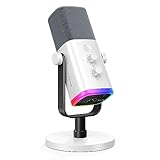
The AM8W appears to be the white edition of the AM8: a dynamic USB/XLR RGB microphone with a gain knob, a mute button and a monitoring jack. The retailer part number points to the same underlying microphone, so expect the same capsule and connections. Confirm the details on the product page, since model naming across the AM8 family can overlap.
- Dynamic microphone with USB and XLR
- Gain knob and mute button
- Headphone monitoring jack
- RGB lighting
- Color version: white
- Stand type and accessories: confirm on listing
The gain knob is a useful addition over the base listing. On USB you can tune level on the mic itself without opening software. White suits a desk with white or light accessories, and otherwise there is no functional difference to chase.
Color choice is the main reason to pick this model over its siblings. A white mic looks clean next to a white desk or PC build, and the gain knob and mute button make it easy to use without opening software. Because the AM8 family shares its core design, the sound should be in the same range as the others, which means you can choose by accessories, price and style instead of agonizing over tiny differences.
Pros
- On-mic gain and mute controls
- Same dual USB/XLR flexibility as the other AM8 models
Cons
- Overlaps heavily with the AM8 and AM8T
- No boom arm unless noted on the listing
Choose it for the color and the on-mic gain control, and pick the AM8T if the boom arm matters more.
Specs Compared
| Microphone | Capsule | Connections | Controls | Included hardware | Extras |
|---|---|---|---|---|---|
| FIFINE AM8T | Dynamic, cardioid | USB-C, XLR | Mute button, headphone jack | Boom arm stand | RGB (off in XLR mode) |
| FIFINE AM8 | Dynamic, cardioid | USB, XLR | Mute button, headphone jack | Desktop stand | RGB |
| TONOR TD510 AIR S H+ | Dynamic | XLR, USB, 3.5 mm | Tap mute, gain control | Boom arm set | AI noise cancellation, RGB |
| MAONO PD200XS | Dynamic, cardioid | USB-C, XLR, 3.5 mm | Mute, gain and volume knob | Boom arm, shock mount | MAONO Link software, RGB |
| FIFINE KS5 Bundle | Dynamic | XLR, USB | Mixer with volume fader | Streaming mixer | RGB |
| FIFINE AM8W | Dynamic | USB, XLR | Gain knob, mute button, monitor jack | Confirm on listing | RGB, white finish |
How We Chose These
We started with catalog listing titles for each microphone and checked FIFINE and MAONO manufacturer pages for published specifications. We compared capsule type, connection options, onboard controls, included hardware and extras such as software or a mixer. Several of the models share an underlying design, so we noted the differences rather than inflating them. Where a spec was missing from the listing, we mark it to confirm, and we avoid any audio-quality claims that cannot be backed by published data or by a named source.
What to Look For
Why a dynamic mic fits gaming
Dynamic microphones are less sensitive than condensers, which means they pick up less of the room, your fans and your keyboard. That is why most gaming and streaming mics here are dynamic. The trade-off is that they need to be close to your mouth, usually 2 to 6 inches, and they need more gain.
USB mode versus XLR mode
USB mode uses the microphone’s internal converter, so you plug in and go. XLR mode bypasses it and sends an analog signal to an audio interface or mixer, which then supplies gain and conversion. XLR needs a cable, an interface and usually more gain than a quiet interface can provide, so dynamic mics pair best with an interface that offers 50 dB or more of clean gain. Dynamic mics do not require phantom power.
Gain, sensitivity and distance
FIFINE lists sensitivity around -50 dB for the AM8, and MAONO lists -52 dBV on XLR. Those are low figures, which is normal for a dynamic mic. In practice you will set gain until your speaking voice peaks around the upper-middle of the meter, and then use distance to fine-tune. Close placement beats a high gain setting, because gain amplifies noise along with your voice.
Monitoring and mute controls
A headphone jack on the mic lets you hear yourself with no delay, which avoids the echo you get from software monitoring. A mute button saves you during a clutch moment, and tap-to-mute is faster than a button. Check whether these controls work in both USB and XLR modes, since some mics disable lights and function keys on XLR.
Worked example: setting levels
Say your voice peaks at -30 dBFS in your recording software at a mic distance of 4 inches. A good target is peaks around -12 dBFS, so you need about 18 dB more level. Each 6 dB doubles the signal, so that is about three doublings, or eight times the amplitude. Raise the gain in steps, speak at your normal volume, and stop when peaks reach about -12 dBFS. If gain is maxed out, move the mic closer instead.
Finally, think about the room. A dynamic mic reduces echo, but a bare room with hard walls still reflects sound. Hanging a blanket behind your monitor, adding a rug and putting books on shelves all absorb reflections for almost nothing. Combine that with a close mic position and you will get a cleaner stream than a more expensive microphone in an echoey room, and your viewers will notice the difference immediately.
It also pays to listen to a recording before you stream. Record 30 seconds of normal speech, 30 seconds of loud excitement and a few lines read at a whisper. Check that the loud part does not clip, the quiet part is still audible, and background noise from fans or keyboards is low. Adjust gain, distance and mute settings until all three sound balanced, and save the settings in OBS as a profile so they are easy to restore.
Questions
Do I need an audio interface to use these microphones?
No. All six listings include a USB connection, so you can plug straight into a computer. An interface or mixer is only required if you want to use the XLR output.
Does an XLR cable come in the box?
Manufacturer pages for FIFINE and MAONO note that an XLR cable is not included for the models they describe. Check each listing and buy a standard three-pin XLR cable if you plan to use the XLR output.
Is a dynamic microphone better than a condenser for gaming?
For noisy rooms, yes. A dynamic mic picks up less background sound, so you hear your voice more than the room. A condenser can sound more detailed in a quiet, treated space.
Why do the RGB lights turn off in XLR mode?
The lights and function buttons rely on power and electronics from the USB connection. When the mic is used purely as an analog XLR device, those features have no power source. Some manufacturers note this limit on their product pages.
Do I need a boom arm?
It helps. An arm lets you place the mic close to your mouth, out of the way of your keyboard and mouse, and it isolates the mic from desk vibration. Two of the listings here include one.
What is the difference between the AM8, AM8T and AM8W?
Based on FIFINE’s pages and retailer part numbers, they appear to be the same microphone sold in different colors and bundles. The AM8T adds a boom arm stand, and the AM8W is a white version. Confirm the contents on each listing before you decide.
Update History
- October 20, 2026 – Initial publication; product set drawn from current catalog listings.
- Check the product page for current specifications and availability before buying.
Sources
- Manufacturer product and specification pages for FIFINE and MAONO
- Retailer listing titles and specification fields for each microphone and bundle
- TechPowerUp’s published review of the FIFINE AmpliGame AM8