
The Short Answer
Depends, but here is the one condition that decides it: you need a green screen for a faceless streaming setup only if you want a clean, fully replaceable background without relying on software to guess what to cut out.
If you are streaming gameplay, digital art, VTuber avatars, hands-only crafts, or overhead desk shots where your face never appears, a physical green screen gives you the most reliable chroma key. Your background becomes a solid color that OBS, Streamlabs, or Discord can remove frame-by-frame with almost no edge flicker. If you are just blurring your messy room or swapping in a static image and you do not mind the occasional halo around your shoulders, hands, or chair, modern AI background removal is good enough in 2026 to skip the extra gear.
As an Amazon Associate we earn from qualifying purchases at no extra cost to you. Product prices and availability are accurate as of the date shown and are subject to change.

For faceless creators, the decision is less about privacy and more about production quality. AI tools crop you out; a green screen deletes everything behind you cleanly. Choose based on how perfect you need that cut to look.
What You Actually Get
A faceless streaming green screen is not just a sheet of green fabric. The kits marketed for this use case fall into two very different categories, and understanding what is in the box explains the price gap.
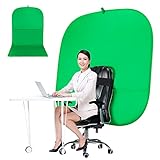
On the budget end, you have chair-mounted and portable pop-up options. A typical example is the 59-inch portable green screen chair backdrop with a collapsible frame that wraps around your gaming chair or office chair. These usually measure around 52 to 59 inches wide and 48 to 56 inches tall when deployed, weigh between 3 and 5 pounds, and fold down to about 20 to 24 inches for storage. They are double-sided, often green on one side and blue on the other for different keying needs, and include a lightweight aluminum or fiberglass stand. Prices generally run from $55 to $75, with the most common portable model sitting around $59.89. They are designed to cover just the area directly behind your head and shoulders visible in a webcam, which is ideal for a tight, shoulders-up faceless shot.
On the premium end, you have large collapsible backdrops like the RAUBAY 78.7 x 82.7-inch model. This style is a full wall-sized panel, roughly 6.5 feet wide and 6.9 feet tall, that pops open like a large reflector and collapses into a circular carry case about 30 to 32 inches in diameter. It weighs around 9 to 12 pounds, requires no separate stand, and has a wrinkle-resistant, stretchable fabric skin over a spring-steel frame. Expect to pay $180 to $230 for this class, with that specific large size priced at $219.99. It is built to hide an entire room behind you, including your desk, shelves, and chair, which matters if you pull back to a wider angle for hands-and-desk streams.
Neither kit includes lighting, and lighting is what makes or breaks the chroma key. To light a green screen evenly you typically need at least two lights: one soft key light for yourself at 30 to 60 watts and one to wash the green fabric at 30 to 45 watts, placed 3 to 6 feet away. Without even lighting, you will see shadows and color variation that software cannot key out cleanly, no matter how expensive the fabric is.
Pros
- Cleaner key with fewer artifacts: A solid green provides a single, uniform color for OBS or Streamlabs to remove. You avoid the shimmering edges, missing fingers, and hair halo that AI segmentation still creates during fast hand movements or when holding objects up to the camera.
- Lower CPU and GPU load: Software background removal runs in real time on your processor. Chroma key with a physical green screen uses a simple color filter that takes significantly less processing power, which helps maintain stable frame rates while gaming or recording at 1080p60.
- Total background control for faceless branding: You can replace the green with gameplay, a branded loop, an animated overlay, or a clean virtual studio without your real room ever leaking through. This is critical if you stream from a bedroom, shared space, or small apartment.
- Consistent results across platforms: Zoom, Google Meet, Discord, TikTok Live, and YouTube all handle a well-lit green screen better than their built-in blur or virtual background. You get the same clean cut everywhere instead of re-tuning AI settings per app.
- Professional look for monetization: For channels that rely on hands-only demos, unboxings, or art streams, a wrinkle-free key reads as intentional and polished to sponsors and viewers.
Cons
- Space and setup time: Even a portable 59-inch chair screen needs 2 to 3 feet of clearance behind you and a minute to unfold and align. A large 78.7 x 82.7-inch collapsible panel needs a full 7 feet of vertical space and about 6 to 7 feet of width, plus floor space to store the 30-inch carry circle when not in use.
- Lighting is non-negotiable: An unevenly lit green screen is worse than no screen at all. You will likely spend an additional $50 to $120 on one or two LED panels and diffusers to kill shadows and hot spots. Without them, you get blotchy keys and green spill on your shoulders.
- Color spill and wardrobe limits: Green reflects onto your skin, hair, and light-colored clothing if you sit too close, typically within 2 to 3 feet. You also cannot wear green or yellow-green without parts of your clothing disappearing.
- Wrinkles and maintenance: Fabric greens, especially larger ones, show wrinkles and creases that create darker green lines the software cannot remove. Collapsible styles resist wrinkles better but still need steaming and careful folding.
- Not portable for every setup: If you stream from different rooms or travel, carrying even a 4-pound chair screen plus lights is more gear than most faceless creators want to manage.
Who Should Buy It
You should buy a green screen if your faceless stream depends on showing your hands, your desk, or an object clearly without background distractions. This includes VTubers who want a transparent background for their avatar, gamers who use a webcam cutout over gameplay, artists and makers filming overhead, ASMR or keyboard channels, and anyone monetizing a faceless YouTube or Twitch channel where production value directly affects watch time and sponsorships.
It also makes sense if your computer is already near its limit. If you are gaming and encoding on a single PC, especially on a mid-range CPU or without a dedicated GPU, offloading background removal from AI to a simple chroma key can save 5 to 15 percent CPU usage and prevent dropped frames.
Choose the large 78.7 x 82.7-inch collapsible style if you shoot wider than a head-and-shoulders crop or if your room is cluttered. Choose the 59-inch portable chair style if you stream in a small space, rent, or need something you can set up and tear down daily in under two minutes.
Who Should Skip It
Skip the green screen if you are just starting out, stream casually, or are happy with a blurred background. If your webcam is 720p, your room lighting is a single overhead bulb, and you sit 5 feet from a plain wall, AI background blur will hide enough without adding gear.
Also skip it if you cannot add lighting. A dark, shadowy green screen will look worse than your real wall and will force you to crank up the keying threshold until your hands look crunchy.
Finally, skip it if you need to wear green for branding or if you stream with highly reflective objects, like glossy product packaging or instruments, where green spill will tint the edges. In those cases, software segmentation, even with its flaws, gives you more flexibility.
Cheaper Alternatives
| Option | Cost | Trade-off |
|---|---|---|
| Software AI Background Removal (OBS, NVIDIA Broadcast, XSplit) | $0 to $15 per month | Free and zero setup, but produces edge flicker on hands and objects and uses more CPU/GPU; quality drops in low light. |
| Plain Wall + Good Lighting | $30 to $80 for lights | Clean if wall is matte white or light gray, but cannot be replaced with custom images; any wall art or shelves remain visible. |
| Budget Fabric Backdrop (5×7 ft green muslin) | $20 to $45 | Cheapest physical key, but wrinkles badly, needs a stand or wall hooks, and requires steaming before every stream. |
| Collapsible Chair-Mounted Green Screen | $55 to $75 | Covers only the webcam frame, not the whole room; lightweight and fast to deploy but can shift if your chair moves. |
| Room Divider or Curtain | $40 to $90 | Hides clutter without keying; you still see fabric texture on camera and cannot overlay gameplay or graphics behind you. |
FAQ
Can I do faceless streaming without any background?
Yes. Most faceless creators use one of two methods: they either frame only their hands and desk so the background is cropped out entirely, or they use software to blur or replace the background. A green screen is only needed when you want that replacement to be perfectly clean, with no cut-off fingers or wobbly outlines when you move.
Does a green screen work if I never show my face?
It works even better. Faceless setups usually show movement from hands, arms, controllers, or products. Those fast-moving edges are exactly where AI struggles most. A green screen gives the software a fixed color to remove, so your hands and objects stay sharp and fully visible, even when you bring them close to the camera.
Do I need an expensive camera to use a green screen?
No, but you do need decent, even lighting. A standard 1080p webcam from $40 to $100 is sufficient if you light both yourself and the green fabric separately. A poorly lit green screen will key badly even on a $300 camera, while a well-lit budget green screen will key cleanly on a basic webcam.
Will a green screen hide my entire room?
Only if it is large enough and positioned correctly. A 59-inch chair-mounted screen hides what the webcam sees directly behind you, about a 4 to 5-foot wide slice. To hide a full wall, doorway, or shelving unit, you need a large panel around 78 x 82 inches that sits 2 to 4 feet behind you and is lit evenly from the sides.
