
Streaming a church service is not the same as streaming from a desk. You are dealing with a large, dim room, long distances, quiet speaking mixed with loud music, and volunteers running the system. The best camera for live streaming church is the one your team can run reliably every Sunday, not the one with the best specs on paper.
Most churches end up with one of four setups: a mounted PTZ camera, a camcorder on a tripod, a mirrorless camera, or a basic webcam. The right choice depends on room size, whether you have an operator, and how far the camera sits from the pulpit.
Our Top Picks

What churches actually need
Distance is the main problem. A pastor 40-60 feet away is a tiny speck to a wide-angle webcam. You need real optical zoom, not digital zoom. Digital zoom just crops the image and turns faces into mush.
Low light is second. Sanctuaries are often darker than they look, especially during worship with stage lights. Small sensors struggle here. You will see grain, soft focus, and colors that shift when lights change.
Third is unattended operation. If you do not have a dedicated camera operator every week, you need presets, autofocus you can trust, and a camera that does not overheat or shut off after 30 minutes. Battery life, clean HDMI output, and remote control matter more than 4K.
For most small to mid-size churches, 1080p done well beats 4K done poorly. A stable 1080p30 stream with good exposure and clean audio will hold viewers far better than a stuttering 4K feed.
PTZ cameras: Best for volunteer teams and no operator
A PTZ (pan-tilt-zoom) camera mounts on a wall or ceiling and is controlled remotely with presets. Press 1 for pulpit, 2 for worship team, 3 for wide shot. One volunteer can run slides, sound, and camera from a laptop.
This is why so many churches choose a PTZ camera for church streaming. With 12x to 20x optical zoom, it can get a tight shot from the back of the room without anyone touching the camera.
Trade-offs are real. Affordable PTZ cameras often have smaller sensors, so low-light image is flatter than a good camcorder. Motion can look robotic if you pan too fast during live moves. Cheap models also have noticeable delay on IP control, and autofocus can hunt when stage lights flash.
Who it suits: churches with 100-400 seats, no regular camera operator, and a desire to mount once and leave it. If you buy one, buy one with HDMI plus USB or IP output, PoE support to simplify wiring, and a real remote or software controller. Test the presets before Sunday.
Camcorders: The reliable workhorse
A traditional video camcorder with 20x optical zoom is still the most forgiving option for image quality per dollar. They are built to record or output video for an hour or more without overheating, have power zoom rockers that are easy to learn, and handle mixed stage lighting better than webcams.
Look for a camcorder with clean HDMI output so you can feed it into a capture device or switcher without menus and icons burned into the stream. Unlimited video output, manual focus option, mic/headphone jacks, and power via AC adapter are must-haves.
Failure modes: volunteers leave it on autofocus and it pulses during sermons when someone walks in front. Image stabilization left on while on a tripod can cause drift. And if you run it on battery, it will die mid-service. Always run AC power and lock exposure if lighting is stable.
Who it suits: churches that have one operator with a tripod at the back, or need better low-light than a budget PTZ. Cheaper is often fine here — a mid-range 1080p camcorder with good zoom will outperform a cheap 4K mirrorless setup that overheats.
Mirrorless cameras: Best image, most hassle
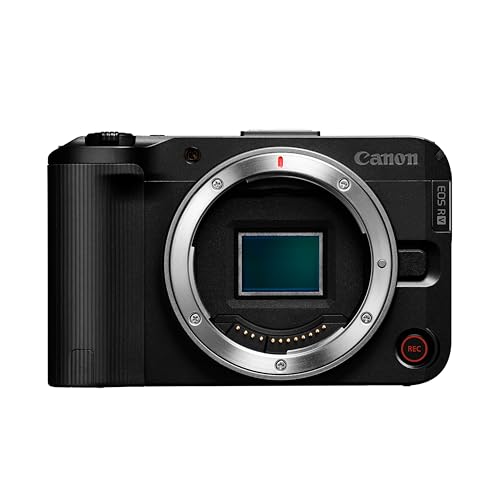
A mirrorless camera gives you the nicest picture — shallow depth of field, great low light, interchangeable lenses. For churches that also shoot announcements, testimonies, or YouTube videos, it pulls double duty.
For weekly livestreaming, though, it adds work. Many models have 30-minute recording limits (less relevant if you use HDMI out), overheat after 45-90 minutes, and eat batteries. You will need continuous power with a dummy battery, a lens with enough reach, and a capture card. Autofocus is excellent on newer models but can still get confused by stained glass backlight or haze from stage lights.
A mirrorless camera for live streaming makes sense if you already own lenses, you have someone who understands exposure, and your camera position is relatively close — under 30 feet. Beyond that, you will pay a lot for a long zoom lens.
Who it suits: larger churches with a media team, or small churches that want one camera for both streaming and creative video. Not ideal as a set-and-forget Sunday camera for rotating volunteers.
Webcams and when the cheaper option is fine
If you stream a small chapel, Bible study, or a pastor speaking from a desk 6-10 feet away, you do not need PTZ or a camcorder. A good 1080p webcam plugged directly into a laptop running OBS or Zoom is enough and far more reliable.
The failure mode is using it past its range. At 30+ feet, faces become unreadable and the built-in auto exposure blows out when a bright window is behind the speaker. Audio is the other problem — the built-in mic will pick up HVAC and room echo. Use a USB boundary mic or connect to your soundboard instead.
Who it suits: midweek studies, youth rooms, overflow rooms, or churches testing streaming before investing. Do not try to cover a full sanctuary with one.
Quick comparison
Use this to match your room and team, not just budget.
| Type | Best for | Optical zoom | Ease for volunteers | Main weakness |
|---|---|---|---|---|
| PTZ, wall-mounted | No operator, presets | 12x-20x typical | High once set up | Weaker low light, robotic moves |
| Camcorder + tripod | One operator, best value | 20x+ common | Medium, needs operator | Needs AC power, manual setup |
| Mirrorless + capture card | Best image, dual-use video | Depends on lens, costly long | Low, needs skilled op | Heat, battery, cost, complexity |
| Webcam + laptop | Small rooms, close distance | None / digital only | Very high | Useless at distance, bad audio |
Setup mistakes that ruin church streams
Most bad church streams are not the camera sensor, they are setup. Mount the camera too high and you get tops of heads. Leave it on auto and the image breathes every time lights change. Stream over weak Wi-Fi and you get drops during worship when the room fills with phones.
Run wired Ethernet or at least a dedicated connection for streaming. Take audio from the mixer, not the camera mic — viewers will tolerate soft video but leave over echoey, distant audio. Set exposure for skin tones under your normal service lighting and lock it, then save PTZ presets tight enough to read facial expressions.
Have a backup plan: AC power, a second HDMI cable run, and a simple wide shot you can cut to if tracking fails. Test a full 90-minute run on a weekday. Overheating, autofocus hunting, and network drops rarely show up in a 5-minute test.
FAQ
Do we need 4K for church streaming?
No, for most churches. YouTube and Facebook compress heavily, and most viewers watch on phones. A clean, stable 1080p30 feed with good lighting and board audio looks better than unstable 4K. Only go 4K if you want to crop a wide shot into close-ups later.
How many cameras do we need?
Start with one good camera centered for the pastor plus a wide preset for worship. Two angles — pulpit tight and stage wide — covers 90 percent of services. Add a second camera only when you have someone to switch it.
PTZ or camcorder for a 200-seat sanctuary?
If you have no regular operator, get PTZ with presets. If you have one reliable volunteer who likes to run camera, a camcorder on a tripod will usually give you better low-light image for less money.
Why does our stream look dark and grainy?
Sanctuary lights are dimmer than they appear, and small sensors compensate with gain that adds grain. Add front light on faces, open the iris, slow the shutter to 1/60 at 30fps, and lock exposure. If that still fails, move the camera closer or move to a larger-sensor camera.









