
Our Top Picks


Why music is harder to shoot than talking streams
Talking-head streaming is forgiving. You sit still, face a window, and almost any webcam looks fine. Music is not like that. You move, your hands move, lighting changes when you dim the room for mood, and viewers want to see detail on strings, keys, sticks, or faders — not just your face.
From testing music setups, three things break most streams: autofocus hunting during fast hand movement, blown-out highlights from a window or practical lamp behind you, and overheating or focus drift on long 90- to 120-minute sets. Audio is separate — your camera mic should be muted — but video latency matters. If your hands and the audio are even 150ms out of sync in OBS or Streamlabs, drummers and pianists look wrong immediately.
That means you should shop for clean HDMI output, reliable continuous autofocus with face/eye priority you can lock, decent low-light performance, and no 30-minute record limit or overheat shutdown. Resolution matters less than people think. A stable 1080p60 with good light beats a noisy 4K feed every time for music.
The easiest option: a good USB webcam
If you stream guitar lessons, singing with backing tracks, or DJ sets from a desk, a high-end webcam is honestly enough. You get plug-and-play USB, no capture card, and direct control in OBS. Look for 1080p60 or 4K downscaled to 1080p, a larger sensor rather than just more megapixels, and a standard tripod thread so you can get it off the top of your monitor.
Trade-offs are real. Most webcams have small sensors, so dim rooms turn grainy. Autofocus can pulse when hands come toward the lens. Fixed wide lenses also distort guitar necks and piano keyboards at close range. Failure mode I see most: people leave auto-exposure on, then every time a white guitar or bright window enters frame, the whole image pumps brighter and darker.
Who it suits: solo singer-songwriters, teachers doing Zoom + Twitch, and anyone who wants one cable and no fuss. A current 4K webcam for streaming with manual exposure lock will handle 80% of bedroom music streams if you add one soft key light. Do not buy a cheap 1080p no-name webcam and expect to crop in — you will just magnify noise.
Best image quality: mirrorless camera with clean HDMI
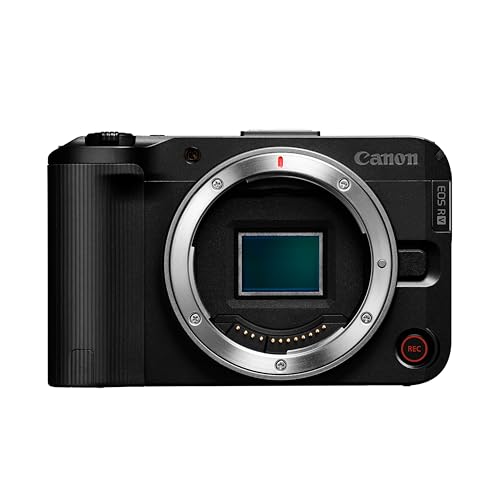
If you want that soft background, accurate skin tones under stage lights, and sharp close-ups of instruments, this is the jump that actually matters. A mirrorless interchangeable-lens camera used as a webcam via USB streaming mode or, better, clean HDMI into a capture card looks in a different league from any webcam.
What to check before you buy: unlimited video/time with no overheating shutdown, clean HDMI with no menus/icons, continuous autofocus that can be set to a narrow zone on your hands, and power via USB-C PD or dummy battery so you do not swap batteries mid-set. A 24-35mm equivalent lens is good for a room shot; 35-50mm is better for a tight piano or acoustic guitar crop without distortion.
Trade-offs: cost and complexity. You need a tripod or boom arm, a capture card, and often a separate power solution. Autofocus can still lock onto a mic stand instead of your face — use single-zone AF and lock it. Overheating is the classic failure on long gigs, especially in 4K. Many streamers run 1080p60 output even on a 4K-capable body because it runs cooler and matches Twitch/YouTube anyway. If you perform regularly, a used or entry-level mirrorless camera for live streaming plus light is a better investment than upgrading your microphone again.
Second angle: overhead and instrument cams
One camera on your face is fine for vibe. Two cameras sell musicianship. Viewers stay longer when they can see both your expression and your hands. For piano, fingerstyle guitar, drums, and modular synths, an overhead or side camera is more valuable than upgrading the main camera.
Action cameras and small camcorders work well here because they have deep depth of field — hands stay in focus without hunting — and they mount easily on mic stands, cymbal stands, or ceiling arms. Downsides: small sensors struggle in low light, wide lenses need to be pulled back to avoid bending straight piano keys, and batteries die fast. Always power them via USB and run them at 1080p60 or 1440p, not max 4K120, to avoid heat shutdown.
Practical setup that works: main camera at eye level 4-6 feet away for the performance shot, second camera directly overhead or over your shoulder focused tight on hands. Switch in OBS with hotkeys, do not leave both full-screen picture-in-picture the whole time. You will need good mounting — a sagging overhead arm ruins more takes than any camera setting.
Compare your options
Most music streamers fall into one of these three setups. Pick based on room, set length, and how much gear you want to manage.
| Type | Best for | Strengths | Watch out for |
|---|---|---|---|
| High-end USB webcam | Lessons, vocals, DJ, practice streams | Simple USB, no capture card, low cost | Noisy in dim light, autofocus pulsing on hands |
| Mirrorless with HDMI | Regular performers, piano, guitar, vocals | Shallow depth of field, good low light, lens choice | Needs capture card + power solution, possible overheating in 4K |
| Action cam / camcorder as 2nd angle | Overhead keys, drums, pedalboards | Deep focus, easy to mount, wide shot | Distortion up close, weak low light, short battery life |
| Camcorder with clean HDMI | Long sets, bands, rehearsal rooms | Runs cool for hours, smooth zoom, good stabilization | Smaller sensor look, less background blur, bulkier rig |
If you stream 2-hour band rehearsals or church sets, a camcorder is underrated. It will not overheat, zoom is parfocal, and you can leave it on a tripod at the back of the room. Image looks flatter than mirrorless, but reliability wins for long shows.
Setup matters more than the camera
I have seen a $200 webcam beat a $1,200 mirrorless because of light and placement. For music, put a large soft light at 45 degrees in front of you, not overhead. Lock exposure and white balance manually once your stage lights are set — auto modes will breathe every time a red or blue LED hits. Keep the brightest window or lamp out of frame behind you.
Sync your sources: if you use an HDMI camera plus a USB audio interface, add a 100-200ms delay to audio or video in OBS and clap-test it. Record 30 seconds and check sticks hitting drums against the sound. Use 1080p60 for fast hand work; 30p smears strumming and drum rolls. And bring power: dummy batteries, USB-C PD, and an HDMI capture card for camera streaming that supports 1080p60 without adding half a second of latency are not optional for serious sets.
When is the cheaper option fine? If you stream daylight lessons under an hour and you already have decent room light, stay with a webcam and spend the money on a mic arm, stand, and one softbox. Only move to interchangeable-lens cameras when you are limited by low light, want background separation, or need reliable multi-angle switching.
FAQ
Do I need 4K for streaming music?
No. Twitch and YouTube usually show viewers 1080p60 or lower. Shoot 4K only if you want to crop into hands in post or in OBS without losing sharpness. For live, stable 1080p60 with good light and locked exposure looks better and runs cooler.
Why does my camera shut off after 30 minutes?
That is usually a record time limit, overheating protection, or USB power saving. Use clean HDMI output instead of internal recording, power with a dummy battery or USB-C PD, lower to 1080p, and turn off in-body stabilization if on a tripod.
How do I keep guitar or piano hands in focus?
Use single-zone continuous autofocus placed on the hands, not wide-area face tracking. Lock focus distance if your camera allows it, stop down to f/4 to f/5.6 for more depth, and keep mic stands out of the AF zone.
Can I use two cameras on one computer?
Yes. Run your main camera via HDMI capture and your second angle via USB. In OBS add them as separate sources, match them to 1080p60 and 30 or 60 fps consistently, then clap-sync audio delay. Avoid two cheap USB cameras on the same hub — they can fight for bandwidth and drop frames.









