
Most streamers asking for the best digital camera for streaming do not actually need a traditional camera. A good webcam is sharper, simpler, and far more reliable for daily Twitch, YouTube, or Zoom use than a mirrorless body left running for six hours. A real camera only makes sense when you want shallow depth of field, better low light, interchangeable lenses, or a larger sensor look your webcam cannot fake.
Buy based on how long you stream, where you stream from, and how much setup pain you tolerate. Get the webcam if you want to plug in and go live. Get the interchangeable-lens camera if image quality is part of your brand and you are willing to manage power, heat, and audio separately.
Our Top Picks


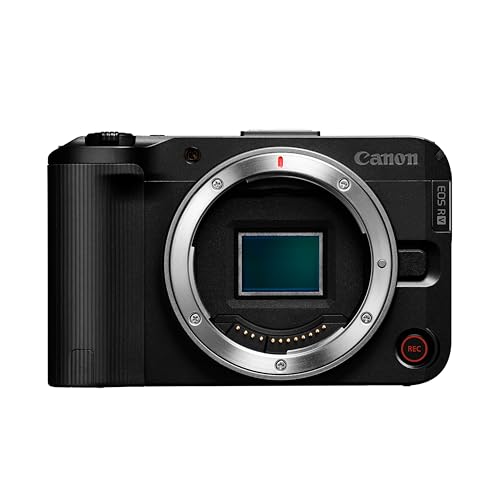
Quick comparison: which type fits you
This covers the four categories streamers actually buy. Price and complexity go up fast after the first row, while reliability often goes down unless you set the camera up correctly.
| Type | Best for | Image quality | Setup hassle | Biggest failure mode |
|---|---|---|---|---|
| 4K USB webcam | Daily gaming, Just Chatting, office streaming | Good in bright light, flat in dim rooms | Low – USB only | Small sensor falls apart in low light |
| Mirrorless / DSLR with clean HDMI or USB streaming | Face-cam focused creators, podcasts, product demos | Excellent – real bokeh, low-light detail | High – power, lens, capture, tripod needed | Overheating and 30-minute shutoff on older bodies |
| Action camera as webcam | Overhead rigs, travel IRL, wide desk shots | Very sharp, very wide, harsh look up close | Medium – needs power and HDMI or app mode | Overheats and crops hard when stabilized |
| Compact point-and-shoot | Small desks, second angle, beginners who want simplicity | Better than webcam, worse than mirrorless | Medium – often USB plug-and-play | Many models lack clean HDMI and overheat |
When a webcam is still the right answer
If you stream three to five times a week from the same desk, buy a modern autofocus webcam and spend the savings on light. A key light does more for a $150 webcam than a $1,200 sensor does in a dark room. Webcams also win on autofocus consistency, auto-framing, and software. You get background blur, noise removal, and exposure control without touching an HDMI chain.
The trade-off is physics. The sensor is tiny, so low light looks noisy, colors look thin, and you will never get real background separation. Wide-angle 4K webcams also soften detail when you sit far back and then digitally zoom. For most gaming and reaction layouts where your face is a small box, that does not matter. A current 4K webcam for streaming is fine and you do not need a camera upgrade until lighting and placement are already dialed in.
Failure mode to know: webcams mounted on top of a 34-inch monitor look down at your forehead and pick up monitor flicker. Mount at eye level on a separate arm or mini-tripod, lock exposure instead of leaving it on auto, and turn off auto white balance if your skin tone shifts mid-stream.
Mirrorless and DSLR: best image, most work
A mirrorless camera with a fast prime lens is visibly better than any webcam. Skin looks smoother, backgrounds melt, low light stays clean to ISO 3200 and beyond, and you can change framing with lenses instead of digital crop. This is the choice for full-screen face cams, interviews, and creators who sell on look.
The cost is not just the body. You need a constant power solution with a dummy battery, a tripod or desk mount that does not vibrate when you type, and either USB streaming mode or an HDMI video capture for streaming in between camera and PC. Many USB webcam modes on cameras are limited to 1080p30 or heavy crop, so HDMI plus a capture dongle is still the reliable route for 1080p60 or 4K.
Check three specs before you buy any mirrorless camera for streaming: clean HDMI output with no menus or focus box burned in, no recording time limit or a dedicated streaming mode that bypasses it, and tested continuous-run heat performance. Older DSLRs and early mirrorless bodies shut off after 29:59 or overheat in 45 to 90 minutes, which kills a long stream. Newer creator-focused bodies handle this, but verify unlimited video and overheating tests, not just the marketing sheet.
Autofocus is the other trap. Contrast-detect autofocus hunts and breathes on camera, especially in low light. For streaming you want fast phase-detect with eye AF, and you should set a narrow AF area, limit AF speed if the menu allows, and use f/2.0 to f/2.8 instead of f/1.4 to keep your whole face sharp when you lean.
Action cameras and compacts as second angles
Action cameras work best as overhead or wide cameras, not main face cams. They are sharp, have huge depth of field so everything stays in focus, and mount anywhere. For cooking, unboxings, art, or keyboard builds, that is ideal. As a main camera two feet from your face, the wide lens distorts your nose and the small sensor blows out windows and ring lights.
They also run hot. Stabilization, 4K60, and charging while recording will overheat many action cameras in under an hour. If you use one for streaming, run 1080p or 4K30, turn stabilization off on a locked-off mount, power externally, and remove the battery if the manufacturer allows pass-through power.
Compact point-and-shoots sit in the middle. Better sensor than a webcam, simpler than mirrorless, often with USB webcam mode. The catch is that many were not designed for long video runs. No clean HDMI, aggressive autofocus hunting, and overheating warnings are common. Only buy a compact for streaming if you confirm clean output, continuous power support, and at least two-hour run times from other streamers, not just reviewers shooting five-minute clips.
What to check before you pay
Resolution matters less than you think. Twitch and YouTube transcodes flatten most 4K camera detail to 1080p anyway. Prioritize 1080p60 with clean color and stable focus over 4K30 with hunting and overheating. If you record locally for YouTube while you stream, then 4K internal recording is worth paying for.
Audio does not come from the camera. Camera mics pick up fans, keyboards, and room echo. Plan on a USB or XLR mic close to your mouth and sync in OBS. If you use HDMI capture, set audio to your mic, not the capture device, or you will get echo and delay drift.
Lighting and mount change results more than brand. A $200 webcam at eye level with a soft key light and locked exposure beats a $900 camera on auto in a dark corner. Budget for a sturdy mount first. Mirrorless bodies plus lenses are heavy, and cheap tripods sag mid-stream and ruin focus.
FAQ
Do I need a capture card to stream with a digital camera?
Not always. Many newer cameras have USB webcam mode that works without extra hardware, but it is often limited to 1080p30 with crop. For 1080p60, 4K, or older cameras with HDMI only, you need an HDMI capture device.
Why does my camera turn off after 30 minutes?
Many stills cameras have a video recording limit for tax or heat reasons. Use the camera’s USB streaming or webcam mode, HDMI live-view output without recording internally, or choose a body rated for unlimited video. External power also helps because internal batteries add heat.
Is 4K worth it for Twitch streaming?
Usually no for live image alone, since most viewers watch at 1080p or lower. 4K helps if you crop to multiple framings, record for YouTube, or want sharper downscaled 1080p. Stable 1080p60 with good light looks better than unstable 4K.
Will a better camera fix a dark, grainy stream?
Rarely by itself. Add a key light, pull blinds to control backlight, move closer to the camera, and lock exposure. If the image is still noisy after that, then a larger-sensor camera is a real upgrade.









