
If you want that soft background and sharp face look on Twitch, YouTube, or Zoom calls, a DSLR still does it better than almost any webcam. But DSLRs were not designed to run for 4 hours straight, and picking the wrong one means overheating, autofocus hunting, or a feed that shuts off mid-stream.
For most streamers in 2026, a used or entry-level crop-sensor DSLR with clean HDMI plus a capture card beats buying new full-frame. You get 90% of the look for a third of the price, with fewer heat and lens-cost headaches.
Our Top Picks
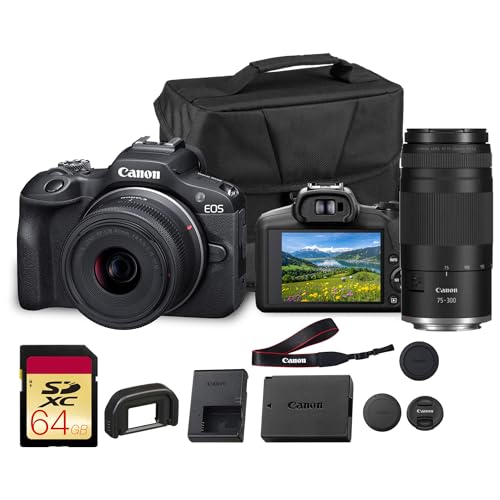 Canon EOS R100 Mirrorless Camera with 18-45mm &Compact2.7 x 4.6 x 3.4 inches4.16 poundsCheck on Amazon

What actually matters for streaming
Forget megapixels. For streaming you are outputting 1080p most of the time, so sensor size, lens aperture, and video features matter far more than stills resolution.
First is clean HDMI output. That means the camera can send video without all the battery icons and focus boxes overlaid. Most Canon and Nikon DSLRs from the last 8 years can do it, but some entry models need you to dig into menus to turn info display off, and a few will still leave autofocus squares on screen. Check this before you buy.
Second is continuous autofocus in live view. DSLRs use contrast or older phase-detection in video mode, which is slower than mirrorless. Canon’s Dual Pixel AF models are noticeably better at holding focus without pulsing. Older Nikon DSLRs will hunt, especially in low light, which looks amateur on stream. If you sit still 3 feet from camera, you can just use manual focus and avoid the issue entirely.
Third is runtime. DSLRs have two failure modes: the 29:59 video recording limit and overheating. The limit does not apply if you use HDMI to a capture card – you are not recording internally, just sending a live preview. Heat still applies. A crop DSLR with flip screen pulled out will run 2-3 hours in a cool room, but put it in a hot office with a dummy battery and small kit lens at f/5.6 and it will get soft or shut down. Full-frame bodies run hotter and cost more to cool.
DSLR vs mirrorless vs high-end webcam
A $200-300 webcam like a 4K Logitech or Elgato Facecam Pro is fine if you just want plug-and-play, good autofocus, and no extra gear. Where it loses is depth of field and low light. Even at f/2.8, the tiny sensor keeps everything in focus, so your messy room stays sharp.
Mirrorless is technically better for video than DSLR now – better autofocus, no mirror, longer runtimes, USB streaming without capture card. The trade-off is price. A new mirrorless body plus lens is often $800-1,200. A used DSLR body plus 50mm f/1.8 can be $350-500 total and look almost identical at 1080p.
Choose DSLR if: you already own Canon/Nikon lenses, you want the cheapest way to get blurry-background 1080p, and you don’t mind a capture card and dummy battery. Choose mirrorless or webcam if you stream 5+ hours daily and want zero fuss.
Quick comparison: which type of DSLR for streaming
| Type | Typical used price (body) | Strengths | Weak points | Best for |
|---|---|---|---|---|
| Entry crop DSLR (24MP Canon / Nikon) | $250-$400 | Cheap, light, clean HDMI on most models, works well with 24mm or 50mm f/1.8 | Weak live-view AF, small view, mini-HDMI port fragile | First camera upgrade from webcam |
| Enthusiast crop DSLR (prosumer body) | $500-$700 | Better Dual Pixel AF, headphone/mic jacks, longer battery, more reliable for 2-3 hour streams | Still needs capture card, heavier, needs better lens to shine | Daily Twitch / YouTube creators |
| Full-frame DSLR (used) | $700-$1,100 | Best low light, shallowest depth of field, pro color | Runs hotter, full-frame f/1.8 lenses expensive, overkill for 1080p | Studio setup, podcasts with controlled lighting |
| High-end webcam | $200-$300 | USB plug-and-play, no overheating, good AF | No real bokeh, noisy in dim rooms | Work calls, simple streams |
What to buy by budget
Cheap and good enough: entry crop DSLR + 50mm f/1.8
This is the sweet spot. An entry-level Canon crop DSLR with a 50mm f/1.8 STM gives you that blurred background webcam users want, for less than a new mirrorless body alone. Pair it with a basic HDMI capture card for streaming and you have a real camera chain for around $400 if you buy used.
Who it suits: talking-head streamers, teachers, podcasters who sit in one spot. Set focus manually once, lock exposure, and you avoid the hunting issue entirely. Failure mode to watch: mini-HDMI port. Use a cable with a right-angle adapter and strain relief, and never yank it. That port breaking is the number one killer of streaming DSLRs.
Daily streamer pick: prosumer crop body with Dual Pixel AF
If you move around, unbox products, or have guests, pay up for a mid-tier Canon crop body with Dual Pixel AF. Focus breathing is far less distracting, face tracking actually holds, and the larger body dissipates heat better. Look for a used Canon DSLR with Dual Pixel autofocus with flip touchscreen, mic input, and clean HDMI.
Match it with a 24mm f/2.8 pancake if your desk is close to the camera, or 35mm f/2 for a small room. A 50mm on crop is actually ~80mm equivalent, which is too tight unless you have 6-8 feet of distance. This is the mistake most first-time buyers make – they buy too long a lens and end up with just their nose in frame.
When full-frame makes sense (and when it doesn’t)
A used full-frame Nikon or Canon DSLR looks amazing in a dark studio, but for streaming it is often wasted money. Twitch compresses to 6-8 Mbps anyway, so the extra dynamic range mostly disappears. You also pay double for lenses and need more light control because f/1.8 on full-frame has razor-thin focus – lean 2 inches forward and you are soft.
Only go full-frame if you also shoot photos/video offline and already own glass. Otherwise put that $400 difference into lighting and audio. A $150 key light will improve your image more than moving from crop to full-frame.
The gear you still need to make it work
A DSLR alone does not stream. Budget $120-180 extra for: 1) capture card – USB 3.0 HDMI dongle is fine for 1080p60, no need for internal PCIe unless you run dual-PC, 2) dummy battery AC adapter for your specific battery type – stock batteries die in 60-90 minutes and swapping mid-stream is a pain, 3) sturdy tripod or desk mount plus continuous LED key light for streaming.
Set the camera to manual video mode: 1080p30, 1/60 shutter, f/2.0-2.8, ISO 400-1600, manual white balance 5600K to match your light. Turn off auto power-off, image stabilization if on tripod, and Wi-Fi. Pull the flip screen out to shed heat. If your room is over 78F / 26C, point a small USB fan at the body – it sounds silly but adds an hour of runtime.
Common failure: audio out of sync. Run your mic into your PC/interface, not into the camera, then add 100-200ms delay to the camera source in OBS to match. Test with a clap before you go live.
FAQ
Do I need a capture card to stream with a DSLR?
Yes for most DSLRs. Only a few newer models do clean USB webcam mode. For reliable 1080p with no recording limit, use HDMI out to a USB capture card and set the camera to its live-view preview, not record.
Will a DSLR overheat if I stream for 3 hours?
It can, especially full-frame in a warm room. Crop bodies with flip screen open, dummy battery, and manual focus typically manage 2-3 hours. Keep exposure off auto, avoid 4K output if you only stream 108oP, and add airflow.
Can I use the kit 18-55mm lens for streaming?
You can start with it, but at f/5.6 on the long end it looks flat and noisy indoors. A cheap 24mm f/2.8 or 50mm f/1.8 is a much bigger upgrade than a better body. Buy the lens first.
Is a cheaper webcam fine instead?
Yes. If you stream in a bright room, don’t need background blur, or hate tinkering, stick with a good webcam and spend on lighting and mic. Only go DSLR if you specifically want shallow depth of field and are okay with extra cables and settings.









