
Our Top Picks

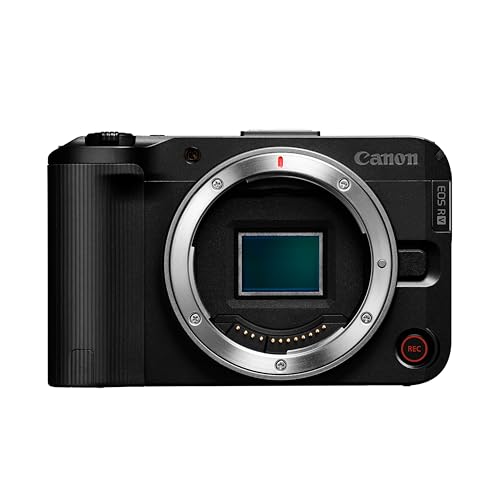
Why stream with a DSLR or mirrorless camera?
A good webcam is fine for Discord and meetings. For Twitch, YouTube Live, or talking-head content where you are on camera for hours, a larger-sensor camera looks noticeably different. You get shallower depth of field, cleaner low light, better color, and lenses you can actually choose. That blurred background streamers want is optical, not software blur that chews up your hair.
The trade-off is complexity. A webcam is plug in and forget. A DSLR or mirrorless camera for streaming needs power, a video signal path, and heat management. If you just want to go live fast twice a week, the image upgrade may not be worth the cables. If streaming is your main content format, it is usually the single biggest visual upgrade after lighting.
What you actually need to make it work
Almost every modern interchangeable-lens camera can stream, but not the same way. Check these three things before you buy anything. First, clean HDMI or USB webcam mode. Clean HDMI means the camera can output video without menus, autofocus boxes, and battery icons burned into the image. USB webcam mode means you can plug USB-C directly into your PC and show up as a webcam, no extra hardware.
Second, continuous power. The stock battery will die in 60 to 90 minutes of live view, usually right in the middle of a stream. You need a dummy battery coupler that matches your camera battery type plus a wall adapter, or USB-C PD power delivery if your camera supports powering while streaming. Third, unlimited video time. Some older DSLRs still have a 29:59 recording limit or overheat in live view after 40 minutes. That matters less if you are only using it as a live HDMI feed and not recording internally, but overheating can still shut you down.
Most streamers end up with one of two signal paths: USB direct to PC, or HDMI to a USB capture device. USB direct is simpler and cheaper. HDMI plus a 4K HDMI USB capture card for streaming usually gives you higher resolution, less compression, and lower latency, but adds cost and another point of failure.
Comparing your realistic options
Do not shop by megapixels. For live streaming you care about autofocus in video, heat handling, clean output, and lens cost. Here is how the categories break down in practice:
| Setup type | Typical cost | Image quality | Hassle factor | Best for |
|---|---|---|---|---|
| High-end webcam | Low | Decent in good light, soft in low light | Very low, USB plug-and-play | Beginners, travel, second angle |
| Entry mirrorless with USB streaming | Medium | Much better color and low light | Low to medium, needs power solution | Most solo streamers |
| Mid-range mirrorless + capture card | Medium-high | Excellent 1080p, very clean 4K downscaled | Medium, HDMI + power + settings | Full-time creators, podcasts |
| Used DSLR + capture card | Low-medium used | Good, but worse autofocus video | High, older menus, heat, limits | Tight budgets who already own lenses |
| Full-frame for streaming | High | Best low light, shallowest depth of field | Medium-high, expensive lenses | Studio setups, IRL alternative to cinema cameras |
For most people, the sweet spot is an entry or mid-range mirrorless camera with reliable face and eye autofocus in video, flip screen for framing, and a mic/headphone jack if you also record. You do not need 4K60 or 6K to stream on Twitch or YouTube. You need stable 1080p60 that does not overheat and does not hunt focus every time you lean forward.
Failure modes no one tells you about
Overheating is the number one stream killer. Mirrorless cameras left in 4K output mode in a warm room will get hot, especially with a dummy battery and bright video light nearby. Many streamers run the camera in 1080p output mode even if the sensor can do 4K, flip the screen out for airflow, and keep auto power-off temperature on the high setting if available. If your room hits 80 degrees, plan for it.
Autofocus hunting is second. Contrast-only autofocus on older DSLRs in live view will pulse in and out during a stream, which looks amateur. Look for phase-detect autofocus that works in video, set a narrow AF area on your face, and limit how much the background moves. A busy bookshelf with LED strips behind you will confuse cheap systems.
Third is audio sync and power loss. HDMI capture adds 80 to 200ms delay. If you use a USB mic, your lips will be out of sync unless you add delay to the mic in OBS. It takes two minutes to fix in OBS under Advanced Audio Properties, but you have to know to do it. And if you rely on USB battery charging instead of a true dummy battery, many cameras will still slowly drain and shut off on a 3-hour stream. Test with a full-length dry run before you go live.
Lenses, lighting, and audio matter more than the body
A $500 camera with a fast prime lens and a $60 softbox will beat a $2,000 body with a slow kit lens in a dark room. For desk streaming 3 to 6 feet from camera, most creators do best with a 24mm to 35mm equivalent wide prime or a standard zoom at f/1.8 to f/2.8. Too long and your face fills the frame; too wide and your room looks distorted.
Do not buy a mirrorless camera for live streaming and skip light. Even an APS-C sensor looks noisy at ISO 6400 in a dim bedroom. One large diffused key light at 5600K lets you drop ISO to 800-1600, which cleans up noise more than any camera upgrade. Audio is the same story. Viewers will tolerate 1080p, they will leave for echoey room audio. A dynamic USB or XLR mic close to your mouth beats any camera mic.
Budget for extras: dummy battery for your specific model, a solid mini tripod or desk mount that does not vibrate when you type, a fast SD card only if you record backup, and a spare HDMI cable. Micro-HDMI ports on smaller bodies are fragile. Use a cable with a right-angle adapter and strain relief so a tug does not kill the port mid-stream.
When the cheaper option is fine
Be honest about your use case. If you stream gameplay where your face is a small circle in the corner, a $150-200 modern webcam in good light is fine. No one can see bokeh at 300 pixels wide. If you stream from different locations, travel, or do IRL, a DSLR rig is a liability. It needs AC power, it is heavy, and lenses break.
A used DSLR you already own can be a smart starter if it has clean HDMI and you add a cheap capture stick and a camera dummy battery AC adapter to match it. Just do not buy an old DSLR specifically for streaming in 2026 unless it is very cheap. Older live-view autofocus, rolling shutter, and heat handling are worse than a modern entry mirrorless, and you will spend the savings on workarounds.
If you are buying new primarily to stream, get a current entry mirrorless with USB webcam mode you can use on day one, then add a capture card later if you want full-quality HDMI. That gives you an upgrade path without forcing you to learn OBS, exposure, and HDMI settings all at once.
FAQ
Do I need a capture card to stream with a DSLR?
Not always. Many cameras made in the last 4-5 years have USB webcam mode that works without a capture card, usually limited to 1080p30. A capture card is still better for 1080p60, lower compression, and using the camera with consoles or two-PC setups, but start with USB if your camera supports it.
How do I power a camera for a 3-hour stream?
Use a dummy battery coupler made for your exact battery model plugged into the wall, or USB-C PD continuous power if the manufacturer certifies it for video use. Standard small phone chargers and regular USB charging often cannot keep up with live view drain.
Why does my DSLR shut off after 30 minutes?
That is usually the auto power-off, overheating protection, or old 29:59 video limit. Set the camera to HDMI output for monitoring rather than internal recording, extend auto power-off, lower output resolution to 1080p, and keep the screen open for cooling. If it still stops, that body is not ideal for long streams.
Is a DSLR better than a webcam for Twitch?
For image quality, yes, especially in low light and for background blur. For convenience, no. If your facecam is small, you move around a lot, or you hate tinkering with settings, a good webcam with proper lighting will make you happier and fail less often.









