
If your stream is mostly gameplay with a small facecam in the corner, you do not need an expensive camera. What matters is stable autofocus, clean exposure, and how it handles bad room light. A $70 webcam with decent light will look better on Twitch or YouTube than a $600 camera in a dark room.
Where streamers get disappointed is buying more resolution expecting a better image, then getting soft focus, noisy shadows, or overheating shutdowns. Pick based on your room, your PC load, and how large your facecam will be on screen.
Our Top Picks


What actually matters for a streaming facecam
Resolution is overrated. Most viewers watch at 1080p or 720p, and your facecam is often only 300-400 pixels wide. What shows up is light handling, color, and focus stability.
Autofocus is the first failure point. Cheap webcams hunt for focus when you lean in and out, and some refocus every time you pick up a controller. Look for face-tracking autofocus or reliable fixed focus if you sit at a consistent distance. Fixed focus is underrated for desk streaming because it never pulses.
Low-light performance is second. Small webcam sensors get noisy fast. If you stream at night with only a monitor and ceiling light, expect grain, smeared motion, and gray blacks. A larger sensor helps, but a $30 key light helps more.
Connection and load matter too. USB webcams are plug-and-play and barely touch your CPU if you let OBS or your streaming app handle them directly. Mirrorless cameras over HDMI or USB streaming modes look much better, but they add a capture card, extra power needs, dummy batteries, and heat to manage.
Budget 1080p webcams: fine for most beginners
A basic 1080p30 webcam is enough if your facecam is a small corner box and your room has even front light. Image will be a little soft and colors a little flat, but it is readable and reliable.
Trade-offs are real. Budget sensors blow out windows behind you, struggle with mixed LED and daylight, and usually max out at 30 fps. Motion looks slightly choppy if you move a lot. Built-in mics sound hollow and pick up keyboard noise, so plan on a separate USB mic.
Common failure modes: auto-exposure pumping when your game flashes bright to dark, white balance shifting orange under warm bulbs, and plastic mounts that droop over time. Mount it at eye level, turn off auto-exposure if your app allows it, and lock white balance.
Who it suits: new Twitch, Kick, or Discord streamers, VTubers who only need face tracking, and anyone testing whether they will stick with streaming. If you buy in this range, start with a 1080p webcam for streaming and spend the savings on lighting.
Mid-range 1080p60 webcams: the sweet spot for facecam
This is where most regular streamers should land. You still get 1080p, but with better lenses, 60 fps, and more usable manual controls for exposure, white balance, shutter, and ISO. Motion looks smoother, edges look cleaner, and skin tones are less waxy.
The practical difference is control. Good streaming software lets you fix shutter at 1/60, lock gain to avoid noise, and save presets for day and night. That consistency matters more than raw sharpness because viewers notice flicker and brightness jumps immediately.
Failure modes: aggressive noise reduction that makes you look plastic in low light, overheating on long 60 fps sessions in warm rooms, and USB bandwidth issues if you run the webcam, capture card, and USB mic through one cheap hub. Plug the camera into a direct motherboard USB port.
Who it suits: affiliate-level streamers, Just Chatting or reaction streamers where the face is half the screen, and coaches or podcasters who need reliable framing. The cheaper 1080p30 option is fine if you are mostly full-screen gameplay, but pay up here if your face stays large on screen.
4K webcams vs mirrorless cameras as a facecam
4K webcams sound like an upgrade, but for streaming they are mostly about cropping, not streaming in 4K. Almost no one streams their facecam in 4K. The benefit is you can digitally zoom or use auto-framing and still look sharp at 1080p output.
Downsides: higher price, more heat, larger files if you record locally, and in low light many 4K webcams are actually noisier than good 1080p models because the pixels are smaller. Auto-framing can also drift or cut off hands during unboxings or instrument streams.
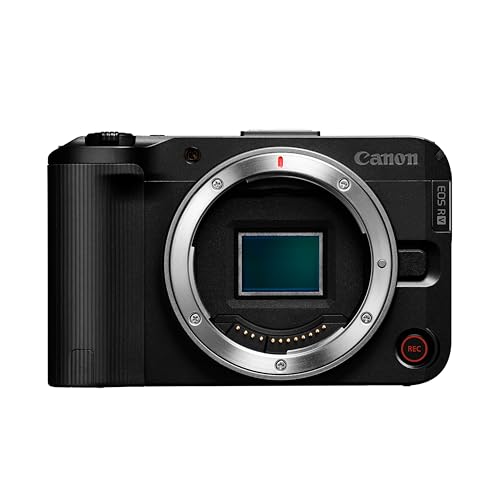
A mirrorless or compact camera with clean HDMI or USB video is a real step up. Larger sensor means softer background blur, cleaner shadows, and better color under mixed light. You can swap lenses and get that slightly out-of-focus background look webcams fake with software.
But it is a system, not a plug-in device. You need continuous power, a tripod or desk mount, and often a capture card. Autofocus can breathe during long talks, some cameras overheat after 45-90 minutes of video, and you have to manage batteries. Do not buy this route unless you also fix lighting and audio first.
If you go this way, browse a mirrorless camera for streaming with a clean HDMI output and unlimited video recording, plus a dummy battery. For simpler setup with cropping flexibility, a 4K webcam for streaming is less hassle.
Quick comparison
Use this to match the camera to your layout. Small corner cam hides flaws. Large cam or green screen exposes them.
| Type | Best for | Strengths | Weaknesses |
|---|---|---|---|
| Budget 1080p30 webcam | Small corner facecam, beginners | Cheap, simple USB, reliable | Noisy in low light, soft detail, exposure pumping |
| Mid-range 1080p60 webcam | Most regular streamers | Smooth motion, manual controls, better color | Needs good USB port, still noisy without light |
| 4K webcam | Cropping, auto-framing, recording | Sharp 1080p crop, digital zoom | More heat, often worse low light, higher cost |
| Mirrorless / compact camera | Large facecam, pro look | Best low light, blur, color | Needs power, mount, capture card, heat management |
Setup matters more than the camera
Put a soft light in front of you, slightly above eye level. A window works in daytime if it is in front, not behind. At night, a basic panel or ring light at low brightness beats maxing out camera gain. Keep the background dimmer than your face so exposure locks on you.
Set your webcam to 1080p or 720p output to match your canvas. Upscaling a small sensor to 4K in OBS just magnifies noise. Turn off beauty filters and auto-focus tracking if you sit still. Lock focus, lock white balance, then adjust exposure until highlights on your forehead do not clip.
For audio sync, USB webcams often lag 80-200 ms behind a separate mic. Add a small delay to your mic in OBS and clap-test it. For mirrorless cameras through a capture card, test again because HDMI adds its own delay.
FAQ
Is 60 fps worth it for a facecam?
Yes if your facecam is large or you move a lot. It looks smoother and more natural. If your cam is tiny in the corner and you sit still, 30 fps is fine and saves USB bandwidth and heat.
Do I need 4K for Twitch or YouTube streaming?
No. Both platforms compress heavily, and most viewers do not watch in 4K. Buy 4K only if you want to crop in without losing sharpness or you record local videos for editing.
Why does my webcam look grainy at night?
The sensor is boosting gain to compensate for low light. Add front light, lower the gain or ISO manually, fix shutter at 1/60, and avoid sitting with a bright screen as your only light source. A cheaper camera with good light beats an expensive camera in the dark.
Can I use a mirrorless camera without a capture card?
Sometimes. Many newer cameras offer USB webcam mode, which is fine for 1080p streaming. Quality and frame rate may be limited compared to HDMI, and long sessions can still overheat. For daily streaming, HDMI plus a capture card is more stable.









