
Fixed camera for live streaming means one thing in practice: a camera that sits in one place, stays framed, and doesn’t overheat, hunt for focus, or disconnect mid-stream. If you stream talking-head content, podcasts, worship services, classes, or a desk setup, that’s what you want. Not an action camera, not a pan-tilt-zoom that drifts.
The real choice is not brand. It’s type: a plug-and-play USB webcam, a higher-end 4K webcam, or a larger-sensor camera run as a fixed HDMI source. They look and fail very differently.
Our Top Picks


What “fixed” actually gets you
A good fixed camera holds exposure and focus without you touching it. Cheap webcams will pump exposure every time you move a white shirt or open a bright window. Larger cameras with manual exposure lock it down. If your lighting changes during the day, that difference matters more than resolution.
Fixed also means power and heat. USB webcams can run for 6-8 hours off USB power without issue. Mirrorless cameras and DSLRs used for streaming often overheat in 45-90 minutes unless they have an external power adapter and unlimited video recording. Camcorders are built for this and will run for hours, but give you a smaller sensor and flatter look.
Quick comparison
| Type | Best for | Strength | Weakness |
|---|---|---|---|
| 1080p USB webcam | Desk streamers, calls, beginners | Simple, cheap, no capture card | Soft in low light, noisy image, narrow dynamic range |
| 4K USB webcam | Fixed wide shot that you crop | Sharper, digital zoom without moving camera | Needs good USB port and CPU, still small sensor |
| Mirrorless camera + capture card | Face cam where look matters | Blurred background, clean low light | Needs dummy battery, capture device, manual settings |
| Camcorder with clean HDMI | Long streams, events, churches | Runs cool for hours, long zoom, stable autofocus | Less background blur, menu system is clunky |
When a basic 1080p webcam is enough
If you stream at 1080p to Twitch, YouTube, or Zoom and you have decent light, stop here. A basic 1080p streaming webcam with autofocus and a 78-90 degree field of view covers 80 percent of desk streamers. Look for 30fps at 1080p, manual white balance in software, and a standard tripod thread so you can get it off the top of your monitor.
Failure mode: low light. In a dim room these fall to 15-20fps, smear motion, and look grainy. The fix is not a more expensive webcam, it’s a $30-40 key light. Add light first. Also avoid digital “beauty” and auto-framing modes for streaming. They crop unpredictably and cause softness when you move.
Who it suits: new streamers, coaches, sellers doing fixed product demos, anyone who wants plug-and-play. Be honest about USB: plug directly into the PC, not a cheap hub. Hubs cause more dropouts than the camera itself.
The case for a 4K fixed webcam
A 4K streaming webcam with autofocus makes sense for one specific reason: you want to lock the camera wide and crop in software. Example: you film a desk plus whiteboard, then crop to just your face for vertical clips without moving the camera.
Trade-off: your PC does the work. 4K over USB needs a USB 3.0 port and real CPU headroom if you run noise removal, virtual background, and OBS at the same time. On older laptops, set the camera to 1080p output and let the higher-quality sensor downscale. You still get a cleaner image than a native 1080p sensor, with half the load.
Failure mode: heat and focus hunting. Some 4K webcams run hot and soften after an hour. Others hunt focus if you gesture with your hands. If you sit 2-3 feet away and don’t move much, turn off continuous autofocus and lock focus in the camera app. That one change fixes most complaints.
When to step up to a real camera
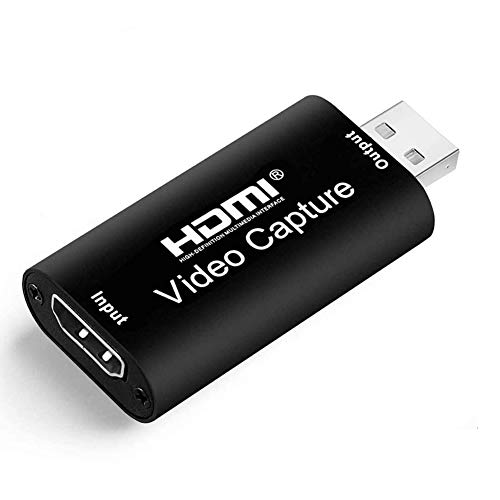
If your face is the product — YouTube talking head, podcast, music lessons — a larger sensor is visibly better. A used mirrorless body with clean HDMI out, a 24-35mm equivalent lens, dummy battery, and a USB capture stick will beat any webcam for skin tones and background separation.
But treat it as a system, not a camera. You need to set manual exposure, 1/60 shutter for 30fps, lock white balance to 5600K or your lights, turn off sleep and auto power-off, and enable clean HDMI with no overlays. Forget one of those and you get a black screen, blinking battery icon, or shutdown mid-stream. Test a full-length recording before you go live.
For streams over two hours, a camcorder is often the more reliable pick than mirrorless. No 30-minute recording limit to work around, better battery life, powered zoom you can set once and leave. Image looks more video-like and less cinematic, but it will not overheat in a warm church or classroom. Search for a camcorder with clean HDMI for live streaming and confirm “clean HDMI” and external power in the specs, not just “HDMI out.”
Audio note: do not rely on the fixed camera mic. Even good cameras pick up room echo from 6 feet away. Run a USB mic or lav close to your mouth and sync in OBS with a 100-200ms delay if needed.
Setup mistakes that kill fixed shots
Most fixed-camera problems are mounting and light, not the sensor. Clamp the tripod or mount to something solid. Desk-mounted arms transmit every keystroke. If viewers see micro-jitter, move the camera to a separate stand.
Second, lock everything down: exposure, focus, white balance. Auto exposure will breathe when you share a bright screen or wear black. Set exposure for your face, then leave it. Third, give the camera 3-4 feet of distance. Webcams at arm’s length distort faces. Pull back and use a narrower field of view for a more natural look.
FAQ
Do I need 4K for Twitch or YouTube Live?
No. Most live delivery is still 1080p or 720p after compression. 4K helps if you crop or record locally for later uploads, but for live sharpness, lighting and bitrate matter more.
Can I use a mirrorless camera over USB without a capture card?
Sometimes, via USB webcam mode, but it often limits resolution, adds lag, and disables charging. For a fixed rig you use daily, HDMI to a capture device plus a dummy battery is more stable.
Why does my fixed camera look worse than my phone?
Phones do heavy processing and have larger apertures. A webcam in a dim room can’t compete. Add a key light at 45 degrees, raise ambient light, and lock exposure. That closes most of the gap.
How far should a fixed streaming camera be?
For a head-and-shoulders shot, 3 to 5 feet with a 65-78 degree field of view. Closer than 2 feet looks distorted. Farther than 8 feet needs optical zoom or a larger sensor, otherwise your face turns to mush after compression.









