
Our Top Picks

What High Quality Actually Means on Stream
High quality for streaming is not the same as high resolution on the box. Twitch, YouTube, and TikTok Live all compress your video heavily, usually to 6 to 12 Mbps. At that bitrate, the difference between a good 1080p image and a soft 4K image is invisible to viewers. What they actually see is sensor size, lens sharpness, autofocus stability, color handling, and how you light the scene.
A larger sensor with a real lens will beat a small-sensor 4K webcam every time, especially in a dim bedroom or office. Edge detail stays cleaner, skin tones look more natural, and background blur looks optical instead of smeared by software. If you stream in a bright, white-lit room and sit close to the camera, a premium webcam is fine. If you stream at night, want a blurred background, or sit 4 to 6 feet away, you will see the jump to a mirrorless camera immediately.
Webcam vs. Mirrorless vs. Used DSLR
There are three practical paths. A high-end webcam is plug-and-play over USB, no extra power supply, no overheating timer, no lens to buy. The failure mode is small-sensor noise, aggressive noise reduction that makes you look waxy, and fixed wide lenses that distort your face if you sit too close.
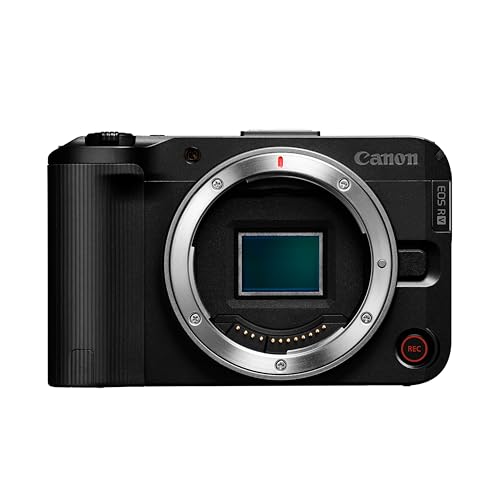
A mirrorless camera used as a webcam gives you a much larger sensor, interchangeable lenses, and real depth of field. You will need continuous power via dummy battery or USB-PD, a clean HDMI output, and usually a capture card unless the camera has reliable USB streaming. The failure modes here are overheating on long streams, autofocus hunting, and the 30-minute recording limit on some older models when not in webcam mode.
A used DSLR from five years ago is tempting because bodies are cheap, but it is often the worst choice for streaming. Many overheat faster, have worse live autofocus than modern mirrorless, and crop heavily in video mode. Unless you already own one and can test clean HDMI and autofocus for two hours straight, skip it.
What to Buy Based on How You Stream
For desk streamers who want zero fuss, get a premium 1080p60 or 4K webcam with a large-for-webcam sensor and good auto exposure. The Elgato Facecam Pro and Logitech Brio level cameras are the sweet spot. They handle white balance better than budget 1080p webcams, they do not hunt for focus during hand movements, and 60 fps makes hand-cam or card openings look much smoother. If you already have decent key lighting, this is where the cheaper option is honestly fine. Do not buy a mirrorless camera just for Discord and daytime Just Chatting.
For face-cam streamers who want that soft background and pro look, the best value is an entry APS-C vlogging camera like the Sony ZV-E10 with its kit lens, powered over USB and fed into your PC via HDMI to USB capture. Pair it with a fast prime later if you want more blur. The trade-off is complexity: you need to set exposure manually, lock white balance, turn off auto power-off and in-camera overlays, and keep a spare battery door dummy insert. When set right, it holds focus on your eyes for hours and looks clean at 1080p even after Twitch compression.
For IRL, cooking, or workshop streams where you move around, prioritize autofocus and overheating performance over megapixels. Look at a current mirrorless camera for streaming with phase-detect eye AF and no record time limit in USB streaming mode. You will also want a wider lens with stabilization and a small tripod or clamp that does not transmit desk vibration. Expect to spend more on mount, cable, and power than you plan. That support gear is what keeps a high-end camera running for four hours without dropping.
| Type | Best For | Image in Low Light | Hassle Factor | Typical Extra Cost |
|---|---|---|---|---|
| Premium webcam | Desk streaming, work calls, bright rooms | Average, relies on lighting | Low, USB plug-and-play | None, includes mount |
| APS-C mirrorless + capture card | Face-cam, podcasts, beauty/product close-ups | Very good with f/1.8 to f/2.8 lens | Medium, needs power and HDMI setup | Capture card, dummy battery, tripod |
| Full-frame mirrorless | Studio look, low light, lens flexibility | Excellent | High, heat and cost management | Lenses, cooling, stronger lighting control |
| Used older DSLR | Only if you already own it | Decent but soft video | High, AF and overheat issues | Often needs new battery, HDMI adapter |
Setup Matters More Than the Sensor
A $250 webcam with a $90 softbox key light will beat a $1,000 camera in a dark room with an overhead bulb. If your image is noisy, fix light and exposure before you upgrade. Place a diffused key light at 45 degrees, lock exposure so your face is not pulsing brighter and darker when you move, and set white balance to match your lights. Set your streaming software to 1080p60 from the camera and let the platform downscale, do not push 4K to Twitch unless you record locally.
Audio sync and framing also ruin more streams than resolution does. Mirrorless cameras over HDMI often lag 80 to 150 ms behind a USB mic. Add a sync offset in OBS and clap-test it. Frame chest-up, leave a little headroom, and keep the lens at eye level. If you buy interchangeable lenses, start with the kit zoom or a 24mm equivalent for arm’s-length desk use. A 50mm equivalent looks flattering but requires you to sit much farther back, which most desks cannot do.
Heat is the most common failure with high-quality cameras. Do not enclose the camera body, flip the screen out to vent heat, use the manufacturer’s USB power mode if available, and disable in-body stabilization if you are locked on a tripod. Test with a two-hour continuous stream before you go live. Many cameras that are fine for 20 minutes of YouTube video will overheat at minute 70 on Twitch.
What to Skip and When to Save Money
Skip 8K, interchangeable 4K/120 webcam modes, and heavy beauty filters marketed for streamers. Streaming platforms throw most of that data away, and beauty smoothing combined with compression makes skin look plastic. Skip cheap HDMI dummy batteries with no overheat protection, ultra-long unpowered USB cables, and no-name capture dongles that lock to 30 fps or desync audio.
If budget is tight, buy light first, then a current 4K webcam for streaming from a major brand, and only move to mirrorless when you are limited by depth of field or low-light noise. If you already own a modern mirrorless camera, try its USB webcam mode with a powered USB dummy battery camera power kit before you buy a capture card. For many creators that free test is enough to decide.
FAQ
Do I need 4K to look high quality on Twitch?
No. Twitch still delivers most streams at 1080p or lower after transcoding. A clean, well-lit 1080p60 feed with good autofocus looks better than a noisy 4K feed. Shoot 4K only if you record locally for YouTube while you stream.
Do I need a capture card for a mirrorless camera?
Sometimes. Many newer cameras offer USB streaming without a capture card, but it is often limited to lower resolution, higher crop, or more compression. A capture card using clean HDMI gives lower latency and more control over resolution and frame rate.
Why does my expensive camera look worse than my webcam?
Usually auto exposure, wrong picture profile, or bad lighting. Set manual exposure, lock white balance to your lights, turn sharpening and noise reduction down, and add a key light. Also check that OBS is actually receiving 1080p, not a 720p fallback over a bad cable.
Will a better camera fix a dark, noisy room?
Only partly. A larger sensor helps, but no camera fixes mixed overhead lighting and no key light. Add one soft key light and turn off colored LEDs behind you spilling onto your face before you upgrade bodies or lenses.









