Studio monitors are built to tell you the truth about a mix, not to make it sound pleasant. Where hi-fi speakers often add warmth or bass boost, a monitor aims for a flat, revealing response so that what you hear on your desk translates to headphones, cars, and phones. That is the decision behind “best studio monitor speakers”: do you need accuracy for music production, or a capable desktop speaker pair for gaming, movies, and streaming that borrows the monitor look? This guide compares five powered near-field options, from palm-sized 3.5-inch speakers to a five-inch reference pair, and explains which spec differences really change what you hear.
It is written for home producers building a first rig, podcasters and video editors who want a neutral reference, and desktop listeners who like the clear, direct sound of monitors. Most small rooms never need huge speakers, so the focus is on near-field use, meaning you sit about an arm or two away. All judgments below come from the listed specs: driver size, wattage, input types, and connection options. Where a title does not state something, we say so rather than guess.
Our Top Picks
 PreSonus Eris E4.5-2-Way 4.5" Near Field Studio Monitor4.5"7.1 x 6.4 x 9.5 inches2 PoundsCheck on Amazon
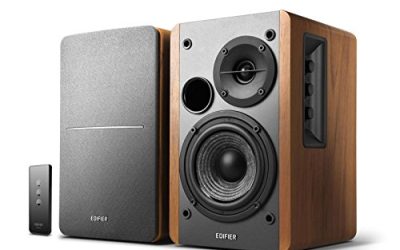
 Edifier R1280T Powered Bookshelf Speakers -2.0 Near Field6.9 x 9.5 x 5.8 Inches10.8 PoundsCheck on Amazon


Top 3 picks at a glance
Quick Picks
As an Amazon Associate we earn from qualifying purchases at no extra cost to you.




| Product | Best for | Key spec from the title |
|---|---|---|
| PreSonus Eris 3.5 | Small desks and first rigs | 3.5″ active near-field pair, 50W |
| Edifier MR3 | Wireless-friendly desktops | Hi-Res Audio certified, Bluetooth V5.4, active 2.0 |
| PreSonus Eris E4.5 | Step-up size for mixing | 4.5″ 2-way near-field pair |
| JBL 305P MkII | Reference-style mixing | 5″ 2-way active powered monitors, pair |
| Edifier R1280T | Budget bookshelf-style listening | 2.0 active near-field, wooden enclosure, 42W |
How to Choose
Driver size, room size, and bass reach
Woofer diameter sets how low and how loud a monitor can play without strain. Three- to four-inch woofers suit desks where you sit a few feet away; five-inch units like the JBL 305P MkII reach deeper and fill a medium bedroom or home studio more easily. Bigger is not automatically better, though. In a small, untreated room, large woofers excite room modes and muddy the low end, so a smaller monitor placed well can sound clearer than a larger one placed badly. As a rule of thumb, pick a three- or four-inch model for a desk under about five feet wide, and move to five inches if you sit farther back or work on bass-heavy music.
Active versus passive, and what the wattage means
Every pair here is active (powered), meaning the amplifier lives inside the speaker, so you do not need a separate amp. Wattage ratings such as 50W or 42W describe amplifier output, not loudness in a room. For near-field listening, 40 to 50 watts is plenty, because you rarely play louder than moderate levels at close range. Ignore peak-power claims and look for whether the amp drives each driver separately, since a two-way design with dedicated amps usually stays cleaner at volume. Also check that the pair includes both speakers: the JBL listing is written as two units, while the Eris titles name a pair.
Inputs and connectivity
Production gear needs balanced connections: TRS or XLR inputs reduce hum between an audio interface and the speakers. Consumer desktop use is easier with RCA, 3.5mm aux, or Bluetooth. The Edifier MR3 leans toward the wireless side with Bluetooth 5.4 and Hi-Res Audio certification, which is convenient for casual listening but irrelevant to mixing, where a wired connection is preferred. Before you buy, count the sources you plan to connect: an interface, a computer, a phone. If your interface only has TRS outputs, confirm your chosen pair accepts them, because the titles do not always spell out every input.
Placement, isolation, and what to ignore
Even the best monitors disappoint when placed on a cluttered desk. Put them at ear height, angled toward your head, with the tweeters facing you and a few inches of space behind them, particularly if the speakers have rear ports. Isolation pads cut desk vibration and help clarity. What should you ignore? Marketing about audiophile sound, huge frequency ranges, and fashionable finishes. Prioritize driver size, amplifier design, and inputs. Budget models usually cut corners on cabinet bracing, on amplifier headroom, and on the quality of the tweeter dome, which shows up as harshness at high volume. Fortunately, the pairs on this list are widely used in desktop studios, so these compromises are modest at their respective tiers.
Think too about the ear fatigue factor. A speaker that sounds exciting for ten minutes can become tiring over a long session, particularly if the tweeter is bright. Monitors with gentler high-frequency behavior let you work for hours without feeling worn out, so if you spend all day editing audio or video, pay attention to how the manufacturer describes the voicing. Likewise, keep the volume modest: working at moderate levels protects your hearing and gives a more reliable sense of balance, because the ear changes its response as sound gets louder.
One more consideration is how you listen most. If you mix music, favor a flatter, neutral voicing and use reference tracks you know well. If you game or watch movies, you may prefer a slightly warmer speaker. Monitors reveal flaws in poorly recorded material, which can be uncomfortable at first. That is not a defect; it is the point, and it gets easier once you adjust.
The 5 Best Options
PreSonus Eris 3.5
The Eris 3.5 is sold as a pair of powered near-field desktop speakers with 3.5-inch drivers and 50W of power. The title positions it for music production, gaming, movies, and hi-fi, and mentions a woven driver design. It is a natural first step for a small desk, especially if the same speakers must handle a mix in the morning and a game in the evening. Buyers in this tier should treat the pair as a learning tool: it shows you how your tracks translate, even if it will not shake the room.
- Strength: the compact 3.5-inch size fits a tight desk without dominating it.
- Strength: the multi-use positioning covers production, gaming, and movies.
- Trade-off: a small woofer limits deep bass and volume in a larger room.
Skip it if you sit far back or mix bass-heavy genres.
Edifier MR3
The MR3 is a powered studio monitor speaker with Hi-Res Audio certification, Bluetooth V5.4, and an active 2.0 layout for computers. It suits people who want a monitor look with easy wireless playback. In practice that means a desk where a phone streams background music all day and a laptop handles video calls, with occasional production work on the side. The monitor styling is part of the appeal for buyers who like a clean, studio-style desk.
- Strength: Bluetooth 5.4 allows quick phone streaming without cables.
- Strength: Hi-Res Audio certification signals support for higher-resolution files.
- Trade-off: wireless convenience is less important when you mix, and the title does not detail balanced inputs.
Skip it if you need balanced connections for an audio interface.
PreSonus Eris E4.5
The Eris E4.5 is a pair of 4.5-inch, 2-way active near-field monitors, aimed at music production, gaming, movies, and hi-fi. The larger woofer gives more bass reach than the 3.5 model while staying desk friendly. It is a sensible middle rung for people who have outgrown a compact pair but do not want to commit to five-inch cabinets. Think of it as the size that works for most spare bedrooms turned home studios.
- Strength: the 4.5-inch woofer improves low-end reach over smaller desk speakers.
- Strength: a two-way design separates highs and lows for clearer sound.
- Trade-off: it takes more desk depth than the 3.5-inch Eris.
Skip it if your desk is shallow or you rarely play at volume.
JBL 305P MkII
This listing covers two JBL 305P MkII monitors, each a five-inch, 2-way active powered reference speaker. It is the biggest and most reference-minded option here, suited to producers who mix in a medium room. Because the listing covers a pair, you receive both speakers, which matters when comparing against single-unit prices. Expect to spend a little time on placement and isolation to get the best from the larger cabinets.
- Strength: five-inch woofers provide the deepest bass reach on this list.
- Strength: it is described as a reference monitor, matching mixing needs.
- Trade-off: it needs more desk space and a bit more placement care in small rooms.
Skip it if you want Bluetooth or a compact desktop size.
Edifier R1280T
The R1280T is a 2.0 powered bookshelf speaker pair described as a near-field studio monitor, with a wooden enclosure and 42 watts. It leans toward casual listening and entertainment, giving a warm, living-room-friendly approach with a studio-monitor label. For buyers who mostly watch videos and play music, that blend of looks and price is the draw, and the wooden cabinet adds a furniture-like finish.
- Strength: the wooden enclosure helps reduce resonance compared with thin plastic cabinets.
- Strength: it is a budget-friendly route into active speakers.
- Trade-off: the 42W rating and consumer layout make it less of a precise mixing tool.
Skip it if your priority is accurate mixing for release.
Which One Fits Your Situation
You are building a first home studio on a small desk
Choose the PreSonus Eris 3.5. It is compact, labeled for production and listening, and leaves room for an interface and keyboard.
You mix regularly in a medium-sized room
The JBL 305P MkII is the strongest match. Five-inch woofers give you deeper bass reach, and the reference label suits a mixing workflow.
You want a bit more bass without going full size
The PreSonus Eris E4.5 sits in the middle: a 4.5-inch woofer improves low-end reach while still fitting most desks.
You mostly stream music and watch videos
The Edifier MR3 offers Bluetooth 5.4 and Hi-Res Audio certification, so playback from a phone or laptop is easy. For a wired, budget-conscious setup, the Edifier R1280T is a sensible alternative.
Common Mistakes
- Buying the biggest monitors for a small, untreated room, then fighting boomy bass.
- Judging power by wattage alone instead of driver size and amplifier design.
- Placing the speakers against a wall or on a cluttered desk, which muddies the sound.
- Choosing a Bluetooth-first model for mixing, when wired balanced connections are preferable.
- Forgetting cables: some monitors need TRS, XLR, or RCA leads that are not always included.
Related guides
- When I Turn On Record Game In Background On Gamebar. Gamebar Crashes, What Do I Do?
- How To Reduce Background Noise On A Streaming Microphone
- Poly Computer Accessories Company Streaming Evaluation
Frequently Asked Questions
Do I need a subwoofer with studio monitors?
Not usually. Small monitors are designed to be accurate rather than deep, and adding a sub in an untreated room can blur your mix. If you want more weight for movies, a sub can be added later.
Are studio monitors good for gaming and movies?
Yes, they are clear and precise, which helps with positional cues in games and dialogue in films. They can sound less forgiving than consumer speakers, but many people enjoy the detail.
How far apart should I place them?
Form an equilateral triangle with your head: the distance between speakers roughly matches the distance from each speaker to your ears. Angle the tweeters toward you at ear height.
Is 2026 a good time to buy a first pair?
Entry-level monitors have been stable for years, so there is little reason to wait. Pick the driver size that fits your room and the inputs that fit your gear.