Working from home changes what you need from a laptop. You are not hauling it through airports every week, so weight matters less than it used to. What matters is eight or more hours at the same desk: a screen you can read without squinting, a keyboard that does not fatigue your wrists, steady Wi-Fi for back-to-back video calls, and enough memory that the spreadsheet, the chat app, and the browser do not fight each other. Lenovo is a natural brand to shop in this situation because its IdeaPad and Essential families are built around exactly that mid-priced, desk-friendly use.
The seven laptops below are all 15.6-inch Lenovo models, which is the size most remote workers settle on once they have a monitor or a stand. We compare them using only the details in each listing, such as processor, memory, storage, and software, and we say plainly when a title does not tell you something. As you read through the 2026 lineup, notice how much the storage figure varies from model to model; that, more than the processor, is what separates them.
Our Top Picks

Top 3 picks at a glance
Quick Picks
As an Amazon Associate we earn from qualifying purchases at no extra cost to you.



| Product | Best for | Key spec from the title |
|---|---|---|
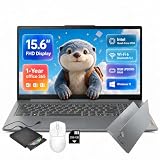
| Lenovo 15.6-Inch FHD Business Laptop | Cloud-first remote work | 8GB DDR5, 128GB, 1TB cloud, Office 365 |
| Lenovo IdeaPad Slim-3i (N150, SD Card) | Extra file space and USB-C | 8GB LPDDR5, 128GB UFS plus 256GB SD card |
| Lenovo IdeaPad Slim 3 (Ryzen 5) | Most storage on an internal drive | Ryzen 5, 8GB DDR5, 256GB SSD |
| Lenovo IdeaPad Slim 3i (N150) | Simple setup with Microsoft 365 | N150, 8GB RAM, 128GB SSD |
| Lenovo Essential 15.6 (500GB External HDD) | Backups and archives | 8GB DDR5, 128GB plus 500GB external HDD |
| Lenovo V15 15.6-Inch | Balanced office laptop | 8GB DDR5, 256GB SSD, WiFi 6 |
| Lenovo Essential 15.6 (Bluetooth 5.2) | Wireless headsets and peripherals | 8GB DDR5, WiFi 6, Bluetooth 5.2 |
How to Choose
Memory and storage for a day of calls and documents
All seven models list 8GB of RAM, which is the right floor for a work-from-home laptop running a browser, video conferencing, and office apps together. Storage is where they diverge. A 128GB drive leaves little room once updates and work files pile up; 256GB is a safer minimum. Treat cloud storage and SD cards as backup layers, not as a replacement for a fast internal drive, since files you open daily should live on the SSD.
Connectivity: Wi-Fi, Bluetooth, and ports
Video calls depend on a stable connection. Look for Wi-Fi 6 in the title, which handles busy home networks better than older Wi-Fi 5. Bluetooth 5.2 helps with wireless headsets and mice. A USB-C port is handy for docks and monitors, and an HDMI port saves an adapter when you connect a second display. If a title leaves out ports, check the listing before you order. Remote workers who use a dock or a second monitor should treat the port list as a requirement, not a bonus.
Screen and comfort over long sessions
Full HD at 15.6 inches is the standard for this class and enough for side-by-side windows. An anti-glare finish cuts reflections from a desk lamp or window and reduces eye strain across a long day. Avoid judging on size alone: a numeric keypad, key travel, and screen brightness shape comfort more than inches. When a title does not state brightness or keyboard details, treat them as unknown. A separate keyboard and a laptop stand are cheap fixes that matter more than the exact screen size.
Processors, bundles, and what to ignore
The Intel N150 handles office software and calls; a Ryzen 5 offers more headroom for heavier spreadsheets. Do not pay extra for “AI” wording unless a listing explains the hardware. Included Office or Microsoft 365 saves money but is often a one-year term. Budget models save money by shipping smaller drives and basic processors, so make storage your first comparison and processor your second. If two models look equal, the one with the larger internal SSD is usually the better long-term buy.
The 7 Best Options
Lenovo 15.6-Inch FHD Business Laptop
This model targets cloud-first workers. The title lists an Intel processor, 8GB of DDR5 memory, 128GB of storage, 1TB of cloud storage, Copilot AI, and Office 365 in a slim body. It suits someone whose files already live in online folders, such as a team that shares everything through a company drive. The slim design suits a desk that shares space with a monitor and a notebook.
- Strength: 8GB of DDR5 memory is a healthy base for remote work.
- Strength: Office 365 and cloud storage are both bundled.
- Trade-off: only 128GB of local storage, so rely on the cloud for archives.
Skip it if your connection is unreliable or you work with large local files.
Lenovo IdeaPad Slim-3i (N150, SD Card)
The IdeaPad Slim-3i lists a quad-core Intel N150, 8GB of LPDDR5 memory, 128GB of UFS storage, and a 256GB SD card, along with one year of Office 365, an FHD display, Wi-Fi 6, USB-C, and Windows 11. For a home office that leans on video meetings, that connectivity list is the most complete in this group on paper.
- Strength: Wi-Fi 6 and USB-C are both named, helpful for calls and docks.
- Strength: the SD card adds file space for documents and backups.
- Trade-off: UFS and SD card storage are not the same as a full-speed SSD.
Skip it if you want one fast internal drive for everything.
Lenovo IdeaPad Slim 3 (Ryzen 5)
This IdeaPad is the only AMD option in the group, with a Ryzen 5 processor, 8GB of DDR5 memory, a 256GB SSD, and a 15.6-inch FHD display running Windows 11. It is positioned as a business laptop, and it is the one to look at if your workday involves large workbooks, shared reports, or a lot of tabs.
- Strength: a Ryzen 5 chip gives extra processing room for spreadsheets.
- Strength: 256GB of SSD storage is double the 128GB drives on several rivals here.
- Trade-off: the title does not mention a bundled Office subscription.
Skip it if you want software included at purchase, or specific port details in the title.
Lenovo IdeaPad Slim 3i (N150)
The Slim 3i pairs an Intel N150 with 8GB of RAM and a 128GB SSD, adds Microsoft 365, and ships in Arctic Grey with Windows 11. It is a plain, low-fuss pick for email, documents, and meetings, and a reasonable choice for a part-time remote worker or a household shared laptop.
- Strength: Microsoft 365 is listed, so office apps are ready.
- Strength: an SSD rather than a slower storage type is stated.
- Trade-off: 128GB of storage will feel tight within a year.
Skip it if you store large attachments, project files, or media on the machine.
Lenovo Essential 15.6 (500GB External HDD)
This Essential model bundles a 500GB external hard drive with the laptop’s own 128GB of storage, and lists an Intel processor, 8GB of DDR5 memory, an FHD anti-glare display, long battery life, and Office. It makes sense for people who want a physical backup next to the computer instead of relying only on online storage.
- Strength: the external drive is useful for backups and old files.
- Strength: an anti-glare Full HD display is stated.
- Trade-off: external hard drives are slow and need a free USB port.
Skip it if you want a tidy desk without extra cables, or if you prefer cloud backups.
Lenovo V15 15.6-Inch
The V15 lists an Intel processor, 8GB of DDR5 RAM, a 256GB SSD, Copilot AI, Wi-Fi 6, Office 365, long battery life, and a portable design. It is the middle ground between the 128GB options and the larger-drive models, and a sensible choice for steady all-day use without extra accessories.
- Strength: 256GB of SSD storage with Wi-Fi 6 suits daily calls.
- Strength: Office 365 is included, saving a separate purchase.
- Trade-off: the processor model is not named in the title.
Skip it if you need to confirm the exact chip before buying.
Lenovo Essential 15.6 (Bluetooth 5.2)
This Essential unit lists an Intel processor, 8GB of DDR5 memory, 128GB of storage, 1TB of cloud storage, Office 365, Copilot AI, Wi-Fi 6, Bluetooth 5.2, and an anti-glare screen. It is the pick for workers who live in a wireless headset all day and want the connection standards spelled out.
- Strength: Bluetooth 5.2 and Wi-Fi 6 support wireless headsets and routers.
- Strength: an anti-glare screen and cloud allowance are listed.
- Trade-off: like others here, only 128GB sits on the laptop itself.
Skip it if local storage is your priority.
Which One Fits Your Situation
You spend the day on video calls
Choose the Lenovo Essential with Bluetooth 5.2. Its Wi-Fi 6 and Bluetooth support suit wireless headsets and busy home networks. Pair it with a quiet room and a wired backup connection and your meetings become much less stressful.
You need the most local storage
The Lenovo IdeaPad Slim 3 with Ryzen 5 and a 256GB SSD, or the V15 with the same drive size, keep files on fast internal storage. That matters when you open the same project folders dozens of times a day and do not want to wait on a sluggish card or a network sync.
You work with spreadsheets and data
The Ryzen 5 IdeaPad Slim 3 offers the strongest processor family named in the group, which helps larger workbooks open and recalculate smoothly. Analysts, bookkeepers, and anyone who lives in pivot tables will notice the difference sooner than casual users.
You keep a lot of backups
The Lenovo Essential bundled with a 500GB external drive gives a built-in backup path, though a cloud backup is still wise. Keep the drive plugged in only when needed, since an always-connected backup offers little protection against a spill or a power surge.
Common Mistakes
- Buying a 128GB laptop for a full remote job and running out of space in months.
- Counting SD cards and external drives as fast internal storage.
- Overlooking Wi-Fi 6 when video calls are the main task.
- Assuming included Office has no expiry date.
- Ignoring ergonomics: a laptop on a desk still needs a stand and a separate keyboard for long days.
Related guides
- When I Turn On Record Game In Background On Gamebar. Gamebar Crashes, What Do I Do?
- How To Reduce Background Noise On A Streaming Microphone
- Poly Computer Accessories Company Streaming Evaluation
Frequently Asked Questions
Is 8GB of RAM enough for working from home?
For email, documents, browsing, and video calls, yes. If you also run large spreadsheets, 16GB is more comfortable, though all seven models here list 8GB.
Do I need Wi-Fi 6 for video meetings?
It is not mandatory, but it manages crowded home networks better. If your router supports it, a Wi-Fi 6 laptop gives steadier calls.
Should I pick Intel or AMD?
Either works for office tasks. The Ryzen 5 model offers more headroom, while the N150 models handle lighter workloads. For a home-office routine of email, chat, and documents, either choice is reasonable; storage should drive the decision.
Can I use these Lenovo laptops with an external monitor?
Many can, usually through HDMI or USB-C, but the titles do not always list video outputs. Check the full listing for the port you need before buying.