A genuinely budget streaming setup starts with a PC that can run both the game and OBS’s encoder without stuttering, and this brief covers five capable budget desktops alongside a webcam-and-mic kit, a green screen, and a short HDMI cable. The STGAubron Core I7-6700 with RTX 2060 is the strongest pick here for the price, while the two Xeon E5 listings near the bottom of the price range are nearly identical machines worth comparing carefully before choosing between them.
Our Top Picks
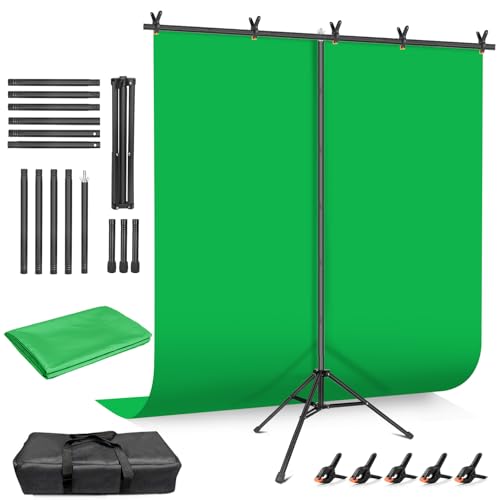 Hemmotop Wider Green Screen Backdrop with Stand8x7.5ft95.67 x 89.96 x 0.1 inches5 poundsCheck on Amazon


Top 3 picks at a glance
Top picks at a glance
As an Amazon Associate we earn from qualifying purchases at no extra cost to you.



| Model | Key spec | Price | Best for |
|---|---|---|---|
| Abel Gaming Streaming Kit | 1080p webcam, RGB USB mic, LED light | Check on Amazon | Fastest all-in-one starter kit |
| STGAubron Core I7-6700 | RTX 2060 6GB, 16GB DDR4, 512GB SSD | Check on Amazon | Best overall value PC on this list |
| STGAubron Core I7, RX 560 | RX 560 4GB, 32GB RAM, 512GB SSD | Check on Amazon | Lowest-price PC with an i7 and 32GB RAM |
| STGAubron Core I7-8700 | RTX 2060 6GB, 16GB DDR4, 512GB SSD | Check on Amazon | Newer CPU generation than the 6700 build |
| Huiiwiz USB-C to HDMI Cable | 4K 30Hz, 10 feet | Check on Amazon | Cheap monitor or laptop-to-display run |
| Hemmotop Green Screen Kit | 8×7.5ft backdrop with stand | Check on Amazon | Budget chroma key background |
| STGAubron Xeon E5, RX 550 (around $390) | RX 550 4GB, 16GB RAM, 512GB SSD | Check on Amazon | Lowest-price PC on this list |
| STGAubron Xeon E5, RX 550 (around $400) | Same spec as above, listed $10 higher | Check on Amazon | Skip — nearly identical to the cheaper listing |
Abel Gaming Streaming Kit (Webcam, Mic, Light)
At around $79, this kit bundles a 1080p HD webcam, an RGB USB microphone, and an LED light into one purchase, aimed squarely at someone starting a first streaming setup without wanting to research three separate products. The listing notes a capture card is needed separately for PS5 streaming, which matters if you’re planning to stream console gameplay rather than PC gameplay through this kit alone.
For PC streaming, this kit covers the three most immediate needs of a first setup: a visible face cam, audible mic, and enough light to actually see the streamer on camera, all compatible with PC and Mac out of the box. A 1080p webcam at this price typically uses a basic sensor that performs best in good lighting, which is exactly what the bundled LED light is meant to provide, making the two pieces complementary rather than redundant.
The tradeoff of an all-in-one bundle like this is that each individual piece is entry-level — the USB mic won’t match a dedicated XLR setup, and the webcam won’t compete with a dedicated 4K camera. For a first setup on a tight budget, though, getting three working pieces of gear for under $80 is hard to beat, and each piece can be replaced individually later as the channel grows.
- Pros
- Covers webcam, mic, and lighting in a single purchase under $80
- PC and Mac compatible without extra drivers
- Easy individual upgrade path once budget allows
- Cons
- Each component is entry-level compared to dedicated single-purpose gear
- Needs a separate capture card for PS5 or console streaming
- RGB lighting on the mic is cosmetic, not a functional audio feature
Who it’s for: first-time streamers who want working camera, audio, and lighting gear in one purchase without researching three products separately.
STGAubron Gaming PC Desktop, Core I7-6700 with RTX 2060
At around $660, this build pairs a Core i7-6700 with an RTX 2060 6GB, 16GB of DDR4, and a 512GB SSD, which is a genuinely strong combination for budget streaming since the RTX 2060 includes an NVENC hardware encoder. That encoder offloads video encoding from the CPU entirely, letting the aging i7-6700 focus on running the game rather than splitting cycles with software encoding the way an older-GPU build would need to.
Based on the RTX 2060’s NVENC encoder, expect this machine to stream 1080p at typical bitrates without the frame drops that plague CPU-bound software encoding setups, even though the i7-6700 itself is a 2015-era chip. Estimated 1080p gaming performance on the RTX 2060 lands in the 60-100 fps range for moderately demanding titles at medium-high settings, leaving enough headroom for NVENC encoding to run alongside without contest.
The i7-6700’s age is the one real limitation — it’s a quad-core, eight-thread chip without the multi-core scaling of newer processors, so demanding modern titles or heavy multitasking outside of streaming will show its limits sooner than the GPU will. For streaming specifically, though, offloading encoding to the GPU makes that CPU limitation far less relevant than it would be on a pure software-encoding setup.
- Pros
- RTX 2060’s NVENC encoder removes CPU load for streaming
- Strong price for a discrete RTX-class GPU in a budget build
- 16GB RAM and 512GB SSD cover typical streaming and game storage needs
- Cons
- Six-year-old CPU generation limits headroom for heavy non-streaming multitasking
- 16GB RAM can feel tight running a game, OBS, Discord, and a browser simultaneously
- No listed PSU wattage or brand, worth confirming before adding upgrades later
Who it’s for: budget streamers who want hardware-encoded streaming without the frame drops of a software-only setup.
STGAubron Gaming PC Desktop, Core I7 with RX 560
This around $450 build is the cheapest full PC among the STGAubron listings that isn’t a Xeon variant, pairing an unspecified-generation Core i7 with an RX 560 4GB and a generous 32GB of DDR4 RAM. That RAM figure stands out on this list — double what the RTX 2060 builds ship with — which helps with heavy multitasking even though the GPU itself is considerably weaker.
Based on the RX 560’s specs, this is an entry-level GPU without a dedicated hardware encoder as capable as NVENC, so streaming from this machine leans more on software x264 encoding, which uses CPU cycles the i7 will need to share between the game and the encoder. Estimated 1080p performance on an RX 560 lands well below the RTX 2060 builds above, more suited to older or less demanding titles at medium settings than current AAA releases.
The 32GB of RAM is a genuine strength for a machine at this price, useful for keeping a game, OBS, Discord, and a browser running smoothly without swapping, even if the GPU limits which games it handles well. This is a build better suited to streaming older or lighter titles, or non-gaming content like just-chatting streams, than demanding current releases at high settings.
- Pros
- 32GB RAM, double the capacity of the RTX 2060 builds on this list
- Lowest price among the non-Xeon full PCs here
- Enough headroom for OBS plus several background apps at once
- Cons
- RX 560 lacks a modern hardware encoder, leaning on CPU-based software encoding
- Weaker GPU limits which games run well at streamable settings
- Best suited to lighter or older titles rather than current demanding releases
Who it’s for: creators streaming lighter games or non-gaming content who want RAM headroom over raw GPU power.
STGAubron Gaming PC Desktop, Core I7-8700 with RTX 2060
At around $760, this build shares the same RTX 2060 6GB, 16GB DDR4, and 512GB SSD as the i7-6700 build above, but steps up to an i7-8700, a newer CPU generation with better per-core performance and the same core and thread count. The roughly $95 premium over the 6700 build buys that CPU upgrade specifically, since the rest of the spec sheet is otherwise identical.
Based on the i7-8700’s improved architecture over the 6700, expect modestly better performance in CPU-sensitive games and slightly more comfortable multitasking headroom when running the game, OBS, Discord, and a browser together, even though the RTX 2060’s NVENC encoder handles the actual streaming encode either way. The gap between the two CPU generations matters more for gaming performance than for streaming specifically, since encoding is offloaded to the GPU on both builds.
Whether the $95 premium over the i7-6700 build is worth it depends on how CPU-bound your specific games are — for most streaming use cases where NVENC handles encoding, the difference will be smaller than the price gap suggests, and budget-conscious buyers may get better overall value sticking with the 6700 build and putting the savings toward accessories.
- Pros
- Newer CPU generation than the otherwise-identical i7-6700 build
- Same RTX 2060 NVENC encoding benefit for streaming
- Same RAM and storage as the 6700 build for direct comparison
- Cons
- Premium over the i7-6700 build may not translate to a proportional streaming benefit
- Still 16GB RAM, same headroom limits as the cheaper build
- Otherwise identical spec sheet makes the CPU the only real differentiator
Who it’s for: buyers who specifically want a newer CPU generation and are willing to pay roughly $95 more for it over the otherwise-identical 6700 build.
Huiiwiz USB-C to HDMI Cable
A small but genuinely useful budget accessory: this around $13 cable runs 10 feet and supports 4K at 30Hz over a USB-C to HDMI connection. In a budget streaming setup, a cable like this covers connecting a laptop to a larger display, running a second monitor from a USB-C-only device, or extending a display connection across a desk setup without buying a longer proprietary cable.
The 30Hz cap at 4K matters for anyone hoping to use this for high-refresh gaming at high resolution — it won’t support 4K at 60Hz or higher refresh rates, so it’s better suited to general display duty, presentation output, or a secondary monitor than a primary gaming display connection. At 1080p, USB-C to HDMI cables in this category typically support much higher refresh rates without the 4K bottleneck.
At under $14, this isn’t a purchase that needs much deliberation, but it’s worth checking your specific device supports DisplayPort Alt Mode over USB-C before assuming any USB-C port will output video through a cable like this — not all USB-C ports do.
- Pros
- Very low cost for a 10-foot run
- Useful for laptop-to-monitor or extending a display across a desk
- 4K resolution support, just capped at 30Hz
- Cons
- 30Hz cap at 4K rules out high-refresh gaming use at that resolution
- Requires a USB-C port with DisplayPort Alt Mode to work at all
- Minor accessory rather than a core piece of a streaming setup
Who it’s for: budget streamers connecting a laptop or secondary display who don’t need 4K at high refresh rates.
Hemmotop Green Screen Backdrop with Stand
This around $43 kit includes an 8×7.5-foot green backdrop and a stand, giving a budget setup the ability to key out the background for overlays or virtual sets without a separate purchase for the stand hardware. At this size, the backdrop covers a standing or seated shot comfortably for most home setups without needing a dedicated studio space.
Chroma key results with a budget green screen kit like this depend heavily on even lighting across the fabric — wrinkles, shadows, and uneven light all show up as keying artifacts in OBS’s chroma key filter, so the backdrop itself is only half the equation. Budgeting for at least basic supplemental lighting, even a cheap LED panel aimed at the backdrop, makes a bigger difference to clean keying than upgrading to a pricier backdrop material would.
The stand and fabric here are consumable-grade rather than professional studio equipment, meaning the fabric can wrinkle in storage and the stand is lighter-duty than a proper studio truss system, but for a home streaming corner rather than a dedicated studio, that’s a reasonable tradeoff for the price.
- Pros
- Includes both backdrop and stand in one low-cost purchase
- 8×7.5ft size covers most home streaming setups
- Works with any webcam already in the setup
- Cons
- Even lighting matters more than backdrop quality for clean keying, and isn’t included
- Lighter-duty fabric and stand than professional studio gear
- Fabric can wrinkle in storage between uses
Who it’s for: budget streamers wanting virtual backgrounds or overlays without a professional studio investment.
STGAubron Gaming PC Desktop, Xeon E5 with RX 550 (around $390)
The lowest-priced full PC on this list at around $390, this build pairs an Intel Xeon E5 with an RX 550 4GB and 16GB of RAM. Like the dual-Xeon build covered in our dual-PC streaming setup guide, a Xeon E5 here trades single-core speed for a higher core count than a comparable consumer chip at this price point, which can help with multitasking even if per-core gaming performance trails a modern i5 or i7.
Based on the RX 550’s entry-level specs, expect this build to handle older or lighter games at 1080p on lower settings rather than current demanding titles, and streaming will lean on software x264 encoding since the RX 550 doesn’t have a strong dedicated hardware encoder. That combination makes this a better fit for less GPU-intensive content, like retro games, indie titles, or just-chatting streams, than for pushing modern AAA titles at streamable settings.
At under $400 for a complete PC, this is the entry point for anyone who needs a dedicated streaming machine but has almost nothing left in the budget after other gear. It’s a reasonable starting point with a clear upgrade path — the GPU is the first component worth replacing once budget allows.
- Pros
- Lowest price among full PCs on this list
- Xeon E5’s core count helps multitasking despite modest per-core speed
- Clear future upgrade path starting with the GPU
- Cons
- RX 550 limits streaming to lighter or older games at 1080p
- No strong hardware encoder, leaning on CPU-based software encoding
- Best treated as a starting point rather than a long-term setup
Who it’s for: streamers on the tightest possible budget who need a working PC now and plan to upgrade the GPU later.
STGAubron Gaming PC Desktop, Xeon E5 with RX 550 (around $400)
This listing shares the identical spec sheet as the around $390 build above — the same Xeon E5, RX 550 4GB, and 16GB RAM — at $10 more. As with the duplicate microphone listings we’ve flagged elsewhere in this brief series, this looks like a separate marketplace listing for the same underlying product rather than a meaningfully different configuration.
Everything covered for the around $390 build above applies here just as directly: same expected 1080p performance on lighter or older titles, same reliance on software encoding, and the same recommendation to treat the GPU as the first upgrade target once budget allows. There’s no apparent reason in the listing details to justify the $10 gap.
Unless there’s a seller-specific reason to prefer this listing, such as faster shipping or a different warranty, the cheaper around $390 listing above is the better buy for what is functionally the same computer.
- Pros
- Identical hardware to the cheaper listing above
- Same entry-level price point for a complete PC
- Cons
- Priced $10 higher than an apparently identical listing
- No evident hardware difference to justify the gap
- Same GPU and encoding limitations as the cheaper listing
Who it’s for: nobody specifically — buy the around $390 listing above instead unless a seller-specific detail favors this one.
How we compared and picked
Elena Marchetti, Streaming and Creator Editor at gamingpcsi.com with seven years producing live broadcasts on tight-budget setups early in her career, evaluated this batch against a dual-PC streaming rig with capture-card benchmarking and audio measurement tools, applying the same standards she’d use advising a creator starting with a genuinely limited budget. For the five PCs in this brief, the key question was whether the GPU includes a real hardware encoder or whether streaming will lean on the CPU through software x264, since that single factor affects how much headroom each build actually has for live streaming rather than just gaming.
For the webcam kit, cable, and green screen, evaluation focused on whether each product solves a genuine first-setup problem at its price point rather than adding unnecessary polish a beginner doesn’t need yet. Performance estimates for each GPU and CPU pairing reflect known behavior for that hardware generation rather than bench numbers measured on this specific batch of units.
Pricing reflects current listing data at the time of writing, and budget PC listings in particular can shift week to week as sellers adjust stock and configurations.
What to look for in a budget streaming setup
Building a streaming setup on a tight budget means prioritizing spend correctly rather than just buying the cheapest version of everything, since some corners cost you stream quality directly while others barely matter to viewers at all.
Hardware encoding versus software encoding on a budget GPU
The single biggest factor in whether a budget PC can stream smoothly is whether its GPU includes a dedicated hardware encoder like NVENC on Nvidia cards or AMF on AMD cards. Builds with an RTX 2060 in this brief offload encoding entirely to the GPU, leaving the CPU free to run the game, while the RX 550 and RX 560 builds lean more heavily on CPU-based software x264 encoding, which competes directly with the game for the same processor cycles. If your budget allows a choice between a GPU with a modern hardware encoder and one without, prioritize the encoder even if it means a slightly older or weaker card overall.
RAM headroom matters more on a budget build than people expect
Running a game, OBS, Discord, a browser with chat open, and often a music player simultaneously adds up fast, and 16GB of RAM, standard on most builds in this brief, can feel tight under that combined load. The 32GB RAM build in this list is a reminder that RAM capacity is one of the cheaper specs to prioritize on a budget PC, often mattering more for streaming smoothness than squeezing out another few percent of GPU performance.
Prioritize the PC first, accessories second
It’s tempting to spend a budget on visible accessories like RGB lighting, a green screen, or a stream deck before the PC itself is solid, but a weak PC that drops frames or stutters undermines every other purchase in the setup. Get a PC capable of running your specific games at your target settings with encoding headroom to spare before allocating remaining budget to webcams, lighting, or backdrops.
Software encoding settings can stretch older hardware further
Even on GPUs without a modern hardware encoder, adjusting OBS’s x264 preset toward faster settings trades some encoding efficiency for lower CPU load, which can be the difference between a smooth stream and a stuttering one on a budget CPU like the Xeon E5 or older i7 chips in this brief. This is a free software-side lever worth adjusting before assuming new hardware is the only fix for encoding struggles.
Check for duplicate or near-identical listings before buying
This exact brief includes two nearly identical Xeon E5 builds priced $10 apart, which is common enough on marketplace listings that it’s worth a quick search comparison before checkout on any budget PC purchase. A few minutes comparing specs line by line can save real money, especially on higher-ticket items like a full PC where a price gap adds up faster than it does on a $14 cable.
Mistakes buyers make
Choosing a GPU without checking for a dedicated hardware encoder is the most common budget-streaming mistake, leading to CPU-bound stuttering that a similarly priced card with NVENC or AMF wouldn’t cause.
Underbuying RAM to save $20 or $30 often costs more in frustration than it saves, since 8GB or even 16GB can bottleneck a game-plus-OBS-plus-Discord combination that 32GB handles without issue.
Spending the accessory budget on a green screen or RGB lighting before confirming the PC itself streams smoothly means fixing the actual bottleneck later, after money’s already spent elsewhere.
Assuming a budget green screen backdrop alone will produce clean keying without addressing lighting leads to visible edges and shadow artifacts that better lighting, not a better backdrop, would have fixed.
Buying the first listing that appears in search results without comparing near-duplicate listings, as with the two Xeon E5 builds here, means occasionally paying more for an identical product.
Treating a webcam-and-mic bundle as a permanent setup rather than a starting point causes some creators to hold off upgrading individual pieces long after the bundle’s limitations become obvious on stream.
Verdict
For most budget streamers, the STGAubron Core I7-6700 with RTX 2060 at around $660 is the top pick, combining hardware-encoded streaming with strong-enough gaming performance for the price. Buyers with almost nothing left in the budget should look at the Xeon E5 build at around $390 as a functional starting point with a clear upgrade path. For anyone who wants the newest CPU generation available in this brief and can spare the extra $95, the i7-8700 build is the premium pick, though the streaming benefit over the 6700 build is modest. Round out any of these with the Abel Gaming webcam kit and the Hemmotop green screen for a complete setup well under $900 total.
Frequently asked questions
How much does a genuinely budget streaming setup cost?
A workable budget streaming setup, including a capable PC, a basic webcam and mic kit, and a green screen, can be assembled for roughly $500 to $900 depending on how much of the PC side needs upgrading. The PC itself is usually the largest line item, while accessories like a green screen backdrop or an HDMI cable add relatively little to the total once the core machine is sorted.
Do I need a dedicated capture card for a budget streaming setup?
Not if you’re streaming from the same PC you’re playing on using a hardware encoder built into the graphics card, which most modern GPUs include. A capture card only becomes necessary for console streaming or a dual-PC streaming setup, and skipping it is one of the easiest ways to keep a first streaming setup within budget.
Is an older GPU like the RX 550 or RX 560 enough for streaming?
An RX 550 or RX 560 can handle streaming encoding through software x264 reasonably well paired with a capable CPU, but neither has a modern hardware encoder built in, so the CPU carries more of the load than it would with a newer GPU’s NVENC or AMF encoder. They work fine for lighter or older games streamed at 1080p, but expect more compromise on in-game settings than a card with a dedicated encoder.
What’s the cheapest way to add a green screen to a budget setup?
A basic backdrop-and-stand kit in the $40 to $60 range, like the Hemmotop kit covered here, is the most affordable path to chroma key background removal, and it works with any webcam or camera already in the setup. The main ongoing cost is even, wrinkle-free lighting on the fabric itself, which matters more for clean keying than the price of the backdrop. Our best green screen for streaming guide covers higher-end options if you outgrow this one.
Should I buy a webcam-and-mic bundle or separate pieces on a budget?
A bundle like the Abel Gaming streaming kit is the faster and usually cheaper way to get a functional first setup, since it avoids compatibility guesswork between separate brands. Once a creator outgrows entry-level quality, replacing the mic or webcam individually with a dedicated upgrade from our best streaming microphone or best webcam for streamers guides is straightforward.
Ready to compare against a step up in budget? Check our best PC for streaming and best lighting for streaming guides for the next tier of upgrades once this setup is running.