
Our Top Picks
 Cosmos 1 Pc Green Screen Backdrop 43 in43 inches diameter43 x 43 x 0.1 inches0.7 PoundsCheck on Amazon
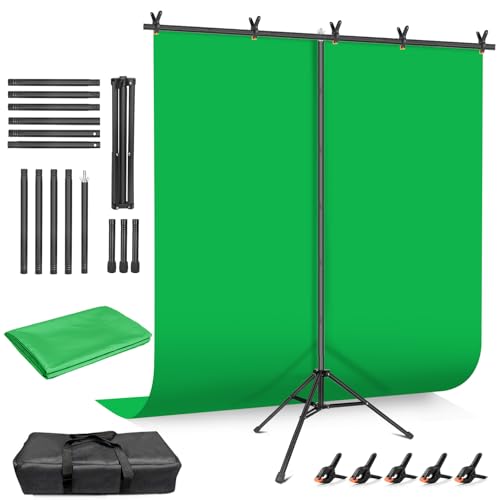 Hemmotop Wider Green Screen Backdrop with Stand8x7.5ft95.67 x 89.96 x 0.1 inches5 poundsCheck on Amazon


Top 3 picks at a glance
The Short Answer
For full body streaming, choose a green screen that is at least 7 feet wide by 7 feet tall, with 8 feet wide by 7.5 to 8 feet tall being the most practical size for most adults. That gives you enough green coverage around your arms, legs, and head without requiring extremely tight camera framing.
If you stream standing, dancing, exercising, gaming with VR, or demonstrating products, an 8 x 7.5-foot backdrop is a strong all-around choice. It accommodates a person up to about 6 feet tall when the camera is positioned roughly 6 to 9 feet away. Taller streamers, wide gestures, or two-person streams benefit from an 8 x 10-foot or 10 x 10-foot screen.
As an Amazon Associate we earn from qualifying purchases at no extra cost to you.


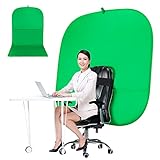
Small circular or chair-mounted green screens are useful for seated webcam calls, but they are not large enough for reliable full body keying. A 43-inch round screen, for example, covers only the head-and-shoulders area. For a full body setup, prioritize backdrop width first, then make sure the screen is tall enough to reach from above your head to below your feet in the camera frame.
Standard Sizes
| Green Screen Size | Dimensions in Inches | Dimensions in Centimeters | Best For | Full Body Streaming? |
|---|---|---|---|---|
| Small circular screen | 43 in diameter | 110 cm diameter | Head-and-shoulders calls, desktop streaming | No |
| Chair-mounted screen | 59 in wide | 150 cm wide | Seated streaming and video meetings | No |
| Compact portrait backdrop | 60 x 72 in | 152 x 183 cm | Seated or kneeling content | Only with very tight framing |
| Small full-length backdrop | 72 x 84 in | 183 x 213 cm | Single person standing still | Borderline |
| Recommended minimum | 84 x 84 in | 213 x 213 cm | Standing streams in modest rooms | Yes, for one person |
| Most versatile home size | 96 x 90 in | 244 x 229 cm | Full body streaming, movement, fitness | Yes |
| Wide collapsible screen | 78.7 x 82.7 in | 200 x 210 cm | Single-person standing streams with controlled framing | Yes, with limited side-to-side movement |
| Large studio backdrop | 96 x 120 in | 244 x 305 cm | Tall users, wide poses, two people | Yes |
| Studio-width backdrop | 120 x 120 in | 305 x 305 cm | Fitness, dance, groups, product demonstrations | Yes, with generous coverage |
The best size is not simply the biggest one that fits your budget. A larger screen needs more wall width, more floor clearance, and more even lighting. For most home streamers, a freestanding 8 x 7.5-foot kit strikes the best balance between coverage and manageability. These kits commonly sell from about $35 to $90, while premium collapsible panels can cost roughly $180 to $250.
How to Measure Your Space
- Measure the usable wall width. Measure the clear area behind your streaming position, excluding doors that open into the space, radiators, shelves, and furniture. For an 8-foot-wide backdrop stand, aim for at least 9 feet of clear wall width so the stand feet and adjustment knobs are not pressed against obstacles.
- Measure ceiling height. A 7.5-foot-high screen needs a room with at least an 8-foot ceiling, and preferably 8.5 feet. The crossbar, clamps, and stand hardware add height above the fabric. In a low-ceiling basement or apartment, a 7-foot-tall screen may be easier to set up.
- Mark where you will stand. Place tape on the floor at your normal streaming position. For a clean chroma key, stand about 3 to 6 feet in front of the green screen. This separation reduces green light reflecting onto your clothing and skin.
- Measure camera-to-subject distance. Full body framing generally requires the camera to sit 6 to 10 feet from the streamer, depending on the lens and whether you use a phone, webcam, or mirrorless camera. A wider-angle lens can work in a smaller room, but avoid going so wide that the image noticeably distorts at the edges.
- Allow room for lighting. Plan for at least 1 to 2 feet between the screen and its lights. Two LED lights placed at roughly 45-degree angles help illuminate the backdrop evenly. Basic LED panels commonly draw about 20 to 60 watts each; brighter COB-style video lights may use 60 to 150 watts.
- Check the floor area in frame. If viewers need to see your feet, the green material must continue behind and below them. Use a screen that reaches the floor, or add a matching green floor cloth. A wall-only backdrop can leave an unkeyed strip of carpet or flooring at the bottom of the image.
By Room or Use Case
Small Bedroom or Apartment Corner
Choose a 7 x 7-foot screen if your room has an 8-foot ceiling and limited floor depth. This is the practical minimum for a single adult who mostly stands in one spot. Keep your arms reasonably close to your body and use a camera distance of about 6 to 7 feet. If the backdrop is only 6 feet wide, it may work for a narrow vertical video, but it will be frustrating for landscape streaming or expressive gameplay.
A collapsible 78.7 x 82.7-inch panel can fit this category well. It is nearly 6.6 feet wide and 6.9 feet tall, so it can handle a carefully framed full-body shot for an average-height streamer. However, it does not leave much room for lunges, jumping, or wide arm movements.
Standard Home Office or Spare Room
An 8 x 7.5-foot backdrop is the best choice for a typical home office or spare room. It provides enough width for a natural standing pose and enough height for most users without placing the crossbar too close to the ceiling. A backdrop kit in this size is also usually easier to store than a 10-foot-wide muslin or paper roll.
Look for a stand with an adjustable width of at least 8 feet and a maximum height of at least 7.5 feet. Fabric backdrops are usually the most practical for home use because they fold away, though they should be steamed or tensioned to reduce wrinkles. Expect basic fabric-and-stand kits to weigh approximately 5 to 12 pounds, depending on the stand material and carrying case.
Fitness, Dance, VR, or Active Streaming
For active content, start at 8 x 10 feet and consider 10 x 10 feet if the room allows it. Your backdrop should extend at least 2 feet beyond each side of your widest expected movement. If you raise both arms, turn sideways, use workout equipment, or move across the frame, a standard 7-foot-wide screen can reveal the room behind you.
You also need more floor coverage. Use a green floor mat or a sweep of fabric that runs from the wall under your feet toward the camera. Keep the floor material smooth and secure it with gaffer tape or non-slip weights so it does not bunch up during movement.
Tall Streamers Over 6 Feet
If you are 6 feet 2 inches or taller, choose a screen at least 8 feet high for full body shots. You need green space above your head as well as below your shoes, especially when the camera is angled slightly downward or positioned at chest height. A 7-foot backdrop can still work if you frame tightly, but it leaves little flexibility for headroom, footwear, or posture changes.
For a streamer around 6 feet 5 inches, an 8 x 10-foot screen is more comfortable than an 8 x 7.5-foot model. Be sure to account for ceiling height before buying: a 10-foot-tall setup is not realistic in a conventional 8-foot room.
Two-Person Streams and Product Demonstrations
Use at least a 10 x 10-foot screen for two adults standing side by side. For a presenter plus a desk, chair, exercise bike, or large product, 10 to 12 feet of width is often necessary. The camera should be farther back—typically 10 to 14 feet—to frame the added width without using an excessively wide lens.
Common Sizing Mistakes
- Buying a screen based on seated streaming needs. A 43-inch circular screen is convenient and inexpensive, often around $20, but it is intended for webcam framing rather than full body video.
- Ignoring the screen’s width. Many shoppers focus on height, then discover their elbows, hands, or props extend beyond the green background. For landscape video, width is usually the first limitation.
- Measuring only the wall. A backdrop may fit the wall but still fail because there is not enough depth for the streamer, lights, and camera. A comfortable full body setup often needs 10 to 16 feet of total room depth.
- Standing too close to the fabric. Even a correctly sized screen can create poor keying when green light reflects onto your shoulders or clothing. Leave 3 feet of separation when possible.
- Forgetting about feet and flooring. If your content includes full-length shots, the screen must cover the lower frame. Add green floor material rather than relying on editing to hide exposed flooring.
- Using a wrinkled screen without lighting it evenly. Size alone does not guarantee a clean result. Tension the fabric, remove creases, and light the green surface as evenly as possible.
FAQ
Is a 6 x 9-foot green screen big enough for full body streaming?
It can work for one person in a controlled setup, but the 6-foot width is restrictive for landscape video. A 6 x 9-foot screen is better for a tall, narrow frame or someone who stands mostly still. For typical full body streaming with arm movement, 7 to 8 feet of width is safer.
What size green screen do I need for a 6-foot-tall person?
Choose at least 7 feet wide by 7.5 feet high, and preferably 8 x 8 feet. That leaves room above the head and around the body without forcing an overly tight camera composition. A person taller than 6 feet 2 inches should consider an 8-foot-high or 10-foot-high backdrop.
How far should I stand from a green screen?
Stand 3 to 6 feet from the screen whenever possible. This helps prevent green spill, reduces visible shadows, and gives you room to light the screen separately from your face and body. In very small rooms, 2 feet can work, but lighting and clothing choices become more important.
Do I need a green floor for full body streaming?
You need green floor coverage if your feet appear in frame and you want the entire background replaced. A backdrop that ends at the wall will leave the real floor visible. For stationary standing streams, a green mat approximately 4 x 6 feet may be enough; active streams often need a larger 6 x 8-foot or 8 x 10-foot floor area.
For most buyers in 2026, the simplest recommendation remains an 8 x 7.5-foot green screen kit paired with two adjustable LED lights. Upgrade to 8 x 10 feet or 10 x 10 feet when your content involves vigorous movement, a taller streamer, multiple people, or visible floor space.









