This review analyzes published product information. We have not performed detailed research of this unit.
As an Amazon Associate, we earn from qualifying purchases.
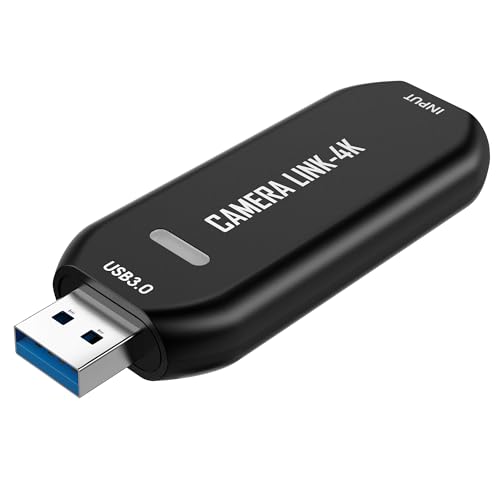
The DigitPro Cam Link 4K USB Capture Card is listed as an HDMI-to-USB 3.0 interface for bringing a microscope, DSLR, action camera, or another HDMI source into computer software. Its most interesting use case is not simply adding a camera to a stream: it is making a close-up inspection view available for teaching, repair demonstrations, or recorded precision work.
This review evaluates the supplied retailer specifications, not detailed research. One distinction matters immediately: although the product name includes 4K, the stated capture modes are 1080p60 and up to 2K50. The listing does not establish 4K recording, and that name should not be treated as a capture specification.
What the USB 3.0 configuration actually establishes
The supplied variant is identified as USB3.0, with HDMI-to-USB conversion stated in the title. That gives it a clear intended position between an HDMI source and a computer. However, the available information is much less detailed about the signal formats and connections needed to complete that path.
| Specification | Supplied listing detail |
|---|---|
| Product identity | DigitPro Cam Link 4K USB Capture Card |
| Interface configuration | HDMI to USB 3.0; variant size listed as USB3.0 |
| Advertised capture modes | 1080p60 and up to 2K50 |
| Named source devices | Microscopes, DSLR cameras, action cameras, and other HDMI devices |
| Named applications | OBS and Zoom |
| Operating systems | Windows and Mac named in the title; versions unspecified |
| Setup claim | Plug-and-play operation without drivers |
| Unspecified details | Exact 2K dimensions, accepted HDMI input modes, audio support, latency, and HDMI passthrough |
The 1080p60 claim is the more interpretable capture target. The 2K50 claim lacks pixel dimensions, so it is not enough to plan a particular editing canvas or promise a specific resolution increase. Neither claim supplies a full compatibility matrix linking HDMI input timing to the resulting USB capture format.
Build the signal path around the source, not its category
For a repair bench or teaching desk, the intended arrangement is straightforward: an HDMI-capable inspection device or camera feeds the DigitPro unit, which connects to the computer over USB. The seller explicitly includes microscopes among compatible source categories, making this a relevant option for close-up work rather than only face-camera streaming.
That category-level compatibility still needs checking against the actual instrument. Confirm that your microscope or camera provides an HDMI output and determine its output resolution and frame rate before buying. The supplied listing does not show which incoming HDMI modes the card accepts. A device being described as a microscope or DSLR is therefore not, by itself, enough to establish a working combination.
Also check whether the source can deliver the view you want without unwanted display overlays. Clean HDMI output, camera power arrangements, and continuous-use behavior are not documented here. Those are source-side questions that this capture card’s broad compatibility claim does not answer.
OBS and Zoom convenience, with setup details still missing
The seller advertises driver-free setup and compatibility with OBS and Zoom, while the title names Windows and Mac. For a creator moving between a recorded demonstration and an interactive lesson, that is a useful intended workflow: the same HDMI source could serve capture software or a conferencing application.
These remain listing claims rather than verified software tests. No operating-system versions, capture protocol, or application-specific modes are provided. Before committing this device to a scheduled teaching session, verify recognition on the intended computer and check which resolutions the chosen application exposes. Compatibility with an application does not establish that every advertised mode will be available within it.
Audio deserves a separate plan. The evidence does not specify HDMI audio capture, microphone connectivity, or audio formats. If your workflow needs camera audio and spoken commentary, confirm the relevant audio path rather than assuming the video connection covers both. There is also no stated latency figure or synchronization information, so this listing cannot establish how closely sound and movement will align.
A close-up video feed is not a confirmed low-delay monitor
Recording small components and using a computer preview to guide precise hand movements are different demands. The listing promotes electronics repair and precision work, but it supplies no measured delay or preview-performance data. This makes the card easier to assess as a proposed recording interface than as a dependable real-time viewing solution.
HDMI passthrough is not documented either. If your desk requires a separate monitor alongside the captured feed, do not assume the card provides an HDMI output. Establish how that display will receive its signal before reorganizing the workspace around this unit.
The same caution applies to physical integration. Cable lengths, included adapters, connector form factors, and dimensions are not supplied. Those omissions matter when the camera sits above a work mat and the computer is under the desk: plan the cable route, then verify the actual package and connection requirements.
Where to focus your upgrade checks
Start with the output mode of the source you already own. Next, verify accepted HDMI formats, the USB connection requirements, and the capture modes available in your chosen software. After that, prioritize audio support or monitoring delay according to whether the job is narrated recording, live instruction, or visually guided bench work.
If confirmed 4K recording is essential, the supplied evidence is insufficient to select this product. If 1080p60 is the intended target, the listing is more relevant, but still leaves compatibility questions open. Our capture card guide offers a broader starting point for comparing options around those requirements.
Frequently asked questions
Does the DigitPro Cam Link 4K capture 4K video?
The article does not establish 4K recording. Although 4K appears in the product name, the supplied listing states capture modes of 1080p60 and up to 2K50. The 2K50 claim also lacks pixel dimensions. If confirmed 4K recording is essential, the available evidence is insufficient to select this product.
What devices is the capture card intended to connect?
The capture card is intended to connect HDMI-capable microscopes, DSLR cameras, action cameras, or other HDMI devices to a computer through USB 3.0. The source must provide an HDMI output, and its output resolution and frame rate should be checked first. The article says that category-level compatibility alone does not establish a working combination.
Will it work with OBS and Zoom?
The seller advertises compatibility with OBS and Zoom, and the title names Windows and Mac. However, the article treats these as listing claims rather than verified software tests. Operating-system versions, capture protocols, and application-specific modes are not provided. Before a scheduled session, verify computer recognition and which resolutions the chosen application exposes.
Does the listing confirm audio capture?
No, the listing does not confirm audio capture. It does not specify HDMI audio capture, microphone connectivity, or audio formats. If the workflow needs camera audio and spoken commentary, the relevant audio path should be confirmed separately. The article also notes that no latency or synchronization information is supplied, so sound and movement alignment remains unknown.
Does the capture card provide HDMI passthrough?
The article says HDMI passthrough is not documented. You should not assume the card provides an HDMI output for a separate monitor. If the workspace requires a display alongside the captured feed, establish how that monitor will receive its signal before reorganizing the setup. The listing also does not supply cable lengths, included adapters, connector form factors, or dimensions.
Verdict: a plausible inspection interface with important unknowns
The DigitPro Cam Link 4K USB 3.0 configuration has a coherent advertised purpose: bringing HDMI inspection or camera footage into OBS, Zoom, and similar workflows without driver installation. Its stated 1080p60 capture support is more useful buying information than the 4K name. Consider it only after confirming source timing, software modes, and any audio or monitoring needs; the listing does not resolve those dependencies.
Sources: Supplied retailer listing for the DigitPro Cam Link 4K USB Capture Card.
Check the exact product and current offer on Amazon