This review analyzes published product information. We have not performed detailed research of this unit.
As an Amazon Associate, we earn from qualifying purchases.
A capture card for the computer that stays at your desk
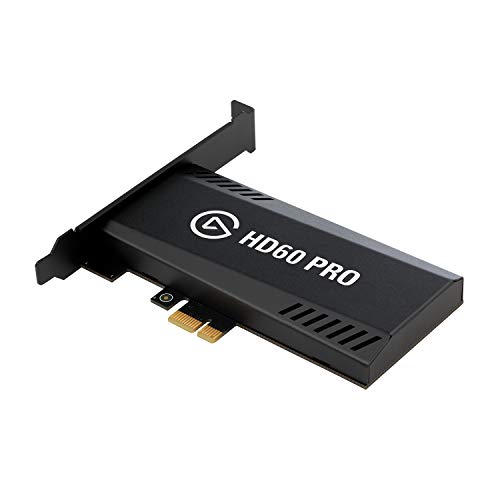
The Elgato HD60 Pro makes the most sense as part of a permanent streaming workstation. The supplied listing identifies this exact model as a PCIe capture card with 1080p60 capture and passthrough. That internal connection is the important distinction from the previously covered external HD60 S: similar recording features do not make their installation requirements interchangeable. The HD60 Pro is also a separate model from the 4K Pro, not another cosmetic version of it.
This review is based on the retailer’s specifications and feature descriptions, not detailed research. On that evidence, the HD60 Pro is a candidate for creators who want Full HD console footage routed into a desktop computer. Its appeal is less clear if your next upgrade depends on higher-resolution capture or a display mode beyond the one documented here.
The documented hardware and recording features
| Item | Listed specification or feature |
|---|---|
| Model | Elgato HD60 Pro |
| Computer connection | PCIe; internal capture card |
| Capture format | 1080p60 |
| Passthrough format | 1080p60 in the listing title |
| Console references | PS5, PS4, Xbox Series X/S and Xbox One |
| Preview feature | Instant Gameview, advertised as low latency |
| Recording features | Direct-to-drive recording and Flashback Recording |
| Dimensions | 4.8 × 0.55 × 2.2 inches |
| Listed weight | 0.35 kilograms |
Keep the gameplay path separate from the capture target
The central signal-path question is whether both your recording target and your gaming display can use the documented 1080p60 mode. The listing presents capture and passthrough together, so a Full HD workflow is the supported basis for assessing this card. It does not establish higher-resolution passthrough, HDR handling, variable refresh rate support or other display modes.
That matters even if your stream itself only needs Full HD. A creator may want one format for viewers and a different one at the gaming screen. Do not assume that lowering the recording resolution preserves every capability of the source console or monitor. Before choosing this card, verify the complete source-to-display route against the mode you actually intend to play in.
The title names PS5, PS4, Xbox Series X/S and Xbox One. Those references are useful compatibility signals, but they are not a detailed console-mode matrix. They should not be read as confirmation that every output setting available on those systems passes through this card. The supplied evidence also lacks connector details, cable requirements and an audio-routing specification, leaving important setup questions unresolved.
PCIe changes the desk workflow—and the installation checklist
An internal card is an attractive configuration when the capture computer stays in one place. It can keep the capture hardware itself off the desktop, although that does not eliminate the cabling needed to connect the rest of the setup. For a fixed creator desk, that is a practical reason to consider the HD60 Pro rather than an external unit.
The tradeoff is host compatibility. You need a desktop installation capable of accommodating this PCIe card; it is not presented as a direct USB capture accessory for a laptop. The supplied dimensions give you a starting point for checking physical space, but they do not answer every installation question. Required slot characteristics, bracket provisions, operating-system support and host-computer requirements are not provided.
Check those details before reorganizing a streaming PC around the card. In particular, confirm that the intended slot is accessible in your actual build rather than relying on the motherboard having an unused slot somewhere. For creators who frequently move capture hardware between computers, the internal configuration is a less convenient fit by design, not evidence of a product defect.
Preview and recording tools: useful promises with limits
Elgato’s listing promotes low-latency preview through Instant Gameview and makes a stronger latency claim for passthrough. Those are seller claims, not measurements established by this review. Treat the gameplay-display path and the computer preview as separate considerations rather than assuming they provide an identical experience. If you intend to play from the preview window, verify that workflow specifically before committing.
Direct-to-drive recording is another listed feature. It supports the idea of using the HD60 Pro for longer recording sessions rather than only live broadcasts. However, the listing’s open-ended recording language should not be interpreted as infinite storage or guaranteed session duration. File formats, recording bitrates, storage requirements and software constraints are not documented in the supplied material.
Flashback Recording is the more distinctive editing convenience: the listing says it can recover earlier gameplay moments retroactively. That could suit a creator who notices a useful clip only after it happens. The evidence does not specify the available history length, configuration requirements or compatible software versions, so confirm those before making it central to your clip workflow.
What to verify before choosing an upgrade
Prioritize compatibility checks over feature names. First, establish your required gameplay display mode. Next, confirm PCIe installation and software support on the capture computer. Finally, investigate audio routing, recording formats and the implementation of Flashback Recording. None of those gaps should be filled by borrowing specifications from another Elgato model.
If your aim is a stable Full HD capture station, the documented feature set is relevant. If your priority is preserving more demanding display capabilities or moving easily between host computers, compare configurations before deciding. Our capture card buying guide provides a broader starting point for that selection.
Frequently asked questions
Can the Elgato HD60 Pro be used with a laptop?
The article does not establish that it can. The HD60 Pro is identified as an internal PCIe capture card rather than a direct USB capture accessory for a laptop. Before choosing it, verify the capture computer’s host requirements, operating-system support, required slot characteristics and whether the intended desktop build can accommodate the card.
Which consoles are named in the product information?
The listing names PS5, PS4, Xbox Series X/S and Xbox One. These references indicate the consoles discussed in the compatibility information, but the article cautions that they are not a detailed console-mode matrix. They do not confirm that every output setting available on those systems will pass through the card.
Does the HD60 Pro support HDR or variable refresh rate?
The article does not confirm HDR handling or variable refresh rate support. The documented basis is 1080p60 capture and 1080p60 passthrough. If your gaming setup depends on HDR, variable refresh rate or another display mode, verify the complete source-to-display route rather than assuming those capabilities are preserved.
What information is missing about audio and recording files?
The supplied material does not provide an audio-routing specification, file formats, recording bitrates or storage requirements. It lists direct-to-drive recording, but that feature does not establish infinite storage or a guaranteed session duration. Those details should be investigated before planning longer recording sessions or a specific production workflow.
What is the card’s listed size and weight?
The listed dimensions are 4.8 × 0.55 × 2.2 inches, and the listed weight is 0.35 kilograms. These measurements provide a starting point for checking physical space inside a desktop, but they do not answer every installation question, including slot characteristics or bracket provisions.
Verdict
The HD60 Pro is a focused option for a fixed desktop workflow built around 1080p60 capture and passthrough. Internal installation and retroactive recording are its clearest practical attractions. The main reservation is incomplete compatibility detail: buy on verified host, display and software requirements, not on broad console references or unmeasured latency promises.
Sources: Elgato HD60 Pro retailer listing, the supplied basis for the specifications and attributed feature claims above.
Check the exact product and current offer on Amazon