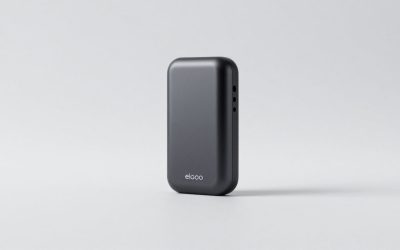
This review analyzes published product information. We have not performed detailed research of this unit.
As an Amazon Associate, we earn from qualifying purchases.
A capture upgrade that starts with your connections
The Elgato 4K X is worth considering when the capture device needs to accommodate an ambitious video signal without turning your recording setup into an internal-card installation project. Its listing combines HDMI 2.1 input and output, USB 3.2 Gen 2 connectivity, and variable refresh rate passthrough. Those are the defining specifications here: the buying decision should begin with the source, display, and capture computer rather than the headline resolution alone.
This is a specification-based review of the 4K X, not a hands-on latency or recording test. The supplied retailer listing establishes its main connections and advertised capabilities, but leaves important operating conditions unspecified. It is a distinct model from the previously covered 4K Pro: the 4K X listing identifies a USB connection, whereas that product is an internal capture card. That difference changes installation planning and the host compatibility questions a buyer needs to answer.
The listed hardware at a glance
| Item | Supplied specification or claim |
|---|---|
| Model | Elgato 4K X |
| Video connections | HDMI 2.1 input and output |
| Computer connection | USB 3.2 Gen 2 |
| Headline capture mode | 4K144 advertised by the listing; operating conditions not supplied |
| Display feature | VRR passthrough advertised |
| Latency | Marketed as very low; no measured value supplied |
| Listed size | 4.4 × 2.8 × 0.7 inches |
| Listed weight | Approximately 0.198 pounds |
| Named software examples | OBS, Streamlabs, Restream, Zoom, and Teams |
Separate the display path from the recording path
HDMI input and output establish the intended signal arrangement: feed the source into the capture device, then continue the HDMI path to a display. The USB connection provides the computer-facing side of the workflow. Thinking of these as separate paths helps avoid a common purchasing mistake: assuming that every feature preserved for the screen must also appear identically in the recorded file.
Elgato advertises VRR passthrough through this listing. For a creator who wants a variable-refresh display experience while capturing, that is a meaningful feature to investigate. However, the evidence does not provide a supported VRR range, a source-and-display compatibility matrix, or configuration-specific restrictions. Treat it as a stated capability, not proof that every VRR combination will work.
The advertised 4K144 capture mode deserves the same care. The published listing information does not specify the associated pixel formats, bit depth, HDR behavior, or software settings. It therefore cannot establish that every desirable image-quality option is available simultaneously. Before choosing the 4K X for one particular recording format, verify that exact combination rather than interpreting the headline mode as an unrestricted specification.
USB makes the host computer the next checkpoint
The listing explicitly ties the 4K X to USB 3.2 Gen 2. That makes the computer connection a purchase prerequisite, not a detail to sort out after arranging the desk. Check the intended computer port and connection path against that standard. The evidence does not establish fallback behavior on slower connections, so there is no sound basis here for promising equivalent operation through an unspecified port or hub.
Its listed dimensions suggest a compact device that should be relatively easy to position near the source or capture computer. The desk-space tradeoff is still worth acknowledging: this arrangement places a separate capture device and its connections outside the computer rather than containing the capture hardware internally. Plan where the HDMI routes and computer connection will meet before deciding that the small enclosure alone solves cable management.
Package contents, connector placement, and supplied cable lengths are not documented in the evidence. Those unknowns matter if the computer sits below the desk or the source and display are widely separated. Measure the intended route and confirm what comes in the package rather than assuming the included accessories will fit it.
Software support is a starting point, not a complete workflow
The seller names recording, streaming, and conferencing applications, including OBS, Streamlabs, Zoom, and Teams. That breadth makes the 4K X relevant beyond a single broadcast application, but it does not establish identical capabilities in each program. The listing supplies neither application-version requirements nor operating-system requirements, and it does not map specific capture modes to particular software.
Likewise, the latency language is promotional rather than quantified. It is insufficient evidence for judging preview responsiveness or synchronization in a finished production. If your workflow depends on playing from a software preview, or aligning separately captured microphone audio with video, seek configuration-specific documentation before committing. The supplied facts also leave audio routing and headset-chat handling unresolved.
Frequently asked questions
Is the Elgato 4K X an internal capture card?
No, the Elgato 4K X is an external capture device that connects to the computer through USB 3.2 Gen 2. That distinguishes it from the previously covered 4K Pro, which the article identifies as an internal capture card. Installation planning therefore focuses on the available computer connection, HDMI routing, desk placement, and cable reach rather than installing hardware inside the computer.
What should I verify before buying the Elgato 4K X?
Verify the complete signal chain, including the source, display, capture computer, intended recording format, and available computer connection. The article specifically recommends checking the intended port and connection path against USB 3.2 Gen 2. You should also confirm any required VRR behavior, image-quality settings, audio routing, headset-chat handling, software support, and cable requirements before committing.
Does the 4K X record every 4K144 signal with all image-quality features?
The article does not establish that every 4K144 signal can be recorded with every desirable image-quality option. The listing advertises 4K144 capture, but the published listing information does not specify associated pixel formats, bit depth, HDR behavior, or software settings. Verify the exact recording combination you need instead of treating the headline mode as unrestricted.
Can the 4K X preserve variable refresh rate in every setup?
No, the article does not establish that every variable-refresh-rate combination will work. The listing advertises VRR passthrough, but it provides no supported VRR range, source-and-display compatibility matrix, or configuration-specific restrictions. Treat VRR passthrough as a stated capability and verify compatibility for the particular source, display, and setup you plan to use.
Which software applications are named for the 4K X?
The listing names OBS, Streamlabs, Restream, Zoom, and Teams as software examples. However, those names do not establish identical capabilities across each application. The article notes that application-version requirements, operating-system requirements, and mappings between specific capture modes and particular software are not supplied. Configuration-specific documentation may therefore be necessary for your intended workflow.
Verdict: choose it for a verified signal chain
The 4K X has a compelling specification-led role: HDMI 2.1 capture with advertised VRR passthrough and a USB computer connection. It is most persuasive when those features answer an identified workflow requirement. It is less convincing as an automatic upgrade when your host compatibility, audio needs, or recording format remain undecided. Resolve those questions first; a headline capture mode cannot substitute for a compatible end-to-end setup.
For broader selection guidance, see our capture card buying guide.
Sources: This analysis uses the supplied Elgato 4K X retailer listing. Advertised capabilities are listing claims, not independently measured results.
Check the exact product and current offer on Amazon