
Once you add a second or third camera to your stream, you hit a fork in the road: buy a hardware switcher like a Blackmagic ATEM Mini, or keep everything inside OBS as software scenes. Both cut cleanly between angles, but they solve the problem in very different ways, and picking wrong means either wasted money or a machine gasping under the load.
As an Amazon Associate we earn from qualifying purchases at no extra cost to you.


Our Top Picks


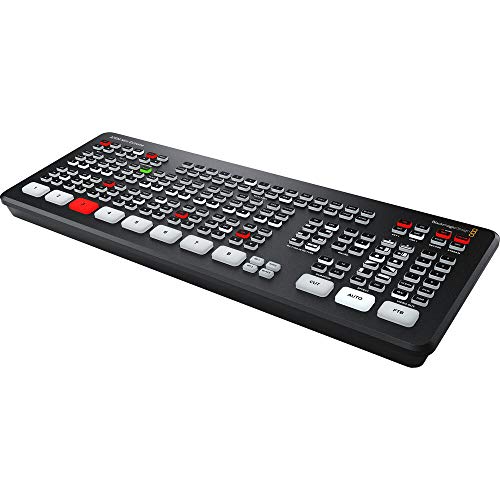
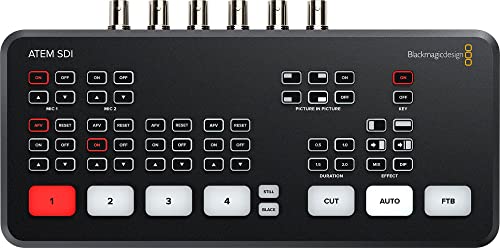
Top 3 picks at a glance
How each approach works
An ATEM Mini is a dedicated box: your cameras plug in over HDMI, the unit mixes them internally, and a single clean feed goes to your PC through a USB capture connection. All the switching, keying, and transitions happen on the hardware, so your computer barely notices.
OBS switching keeps every source virtual. Each camera arrives as a capture device, and you cut between scenes with hotkeys or a Stream Deck. There is no extra box to buy, but your CPU and USB bus carry the entire burden of decoding multiple video streams at once.
Head-to-head comparison
| Factor | ATEM Mini (hardware) | OBS (software) |
|---|---|---|
| Camera inputs | 4 HDMI (8 on Pro) | Limited by USB bandwidth and CPU |
| Switching latency | Near-instant, frame-accurate | Small delay; can stutter under load |
| PC load | Very low (one clean feed) | High with 3+ HD cameras |
| Price range | ~$250–$600+ | Free software |
| Portability | Excellent – runs off one box | Tied to your full PC |
| Flexibility | Fixed inputs and features | Unlimited scenes, filters, browser sources |
When the ATEM wins
Hardware pulls ahead when reliability and CPU headroom matter more than flexibility. If you run three or four real cameras, stream from a modest laptop, or take the rig on the road for events, an ATEM offloads all the heavy lifting and gives you rock-solid, frame-accurate cuts. It also survives OBS crashes, since the switch lives outside your computer.
When OBS wins
Software wins on budget and creativity. If you mostly cut between one or two cameras plus gameplay, browser alerts, and image overlays, OBS does it all for free and lets you build unlimited scenes with filters an ATEM cannot match. On a strong build—say an 8-core CPU with 32 GB RAM—two to three 1080p cameras are comfortable. Push past that and you start fighting dropped frames. Software also updates constantly, so new features, codecs, and community plugins arrive for free, whereas a hardware switcher is frozen at whatever it shipped with. For a solo creator experimenting with layouts week to week, that flexibility is worth more than pristine frame-accurate cuts.
Don’t overlook audio and control
Switching video is only part of a multi-camera show. An ATEM Mini also mixes audio from its HDMI inputs plus a 3.5 mm line, and it exposes physical buttons you can hit without touching a mouse—handy when you are on camera and cannot fumble through menus. OBS, by contrast, gives you a far deeper audio mixer with per-source filters, noise suppression, and compression, but you drive it through hotkeys or a Stream Deck rather than tactile hardware.
Think about failure modes too. If OBS crashes mid-broadcast, a software-only rig goes dark until it relaunches. With an ATEM handling the cameras, a crash only interrupts your overlays while the core multi-camera feed keeps running from the hardware. For paid gigs, weddings, or conference streams where a black screen is unacceptable, that isolation alone can justify the price of the box.
Frequently asked questions
Can I use an ATEM Mini and OBS together?
Yes, and many creators do. The ATEM handles camera switching and feeds one clean input into OBS, where you layer alerts, overlays, and gameplay. You get hardware reliability plus software flexibility, at the cost of buying the box.
Will OBS switching hurt my game’s frame rate?
It can, because decoding several camera feeds competes with your game for CPU and USB bandwidth. A dual-PC setup or an ATEM removes that contention, which is exactly why competitive streamers offload capture and switching to separate hardware.
Bottom line
Choose an ATEM Mini when you have three or more cameras, limited PC power, or a portable, high-stakes production that cannot afford a stutter. Stick with OBS when you are on a budget, run one or two cameras, and want limitless scene flexibility. Many creators eventually land on the hybrid path—let the hardware switch cameras and let OBS handle the show.









