
If you are shopping for an HDR webcam, you almost certainly have a window behind you. I am Elena Marchetti, and I have spent seven years reviewing streaming and creator hardware, most of it on a dual-PC rig where the capture machine logs frame timing and the audio side runs measurement tools. For this round I put eight webcams on the same rail, in the same room, facing the same south-facing window, and shot the same twenty-minute sequence on each one.
Here is the short version before any product talk. If you want the best backlight recovery available in a webcam, the Insta360 Link 2 Pro is the one, because its larger sensor gives the HDR processing more real signal to work with. If you want most of that for a lot less money, the Insta360 Link 2C is the value pick. If you are streaming with a key light already in place and just want clean, predictable 1080p60, the Elgato Facecam MK.2 is the sensible buy and you can leave HDR off entirely. If your budget is tight and the camera is mostly for calls, the Microsoft Modern Webcam does the job for under fifty dollars. Everything below explains how I got there, and just as importantly, who should not buy each one.
Our Top Picks
 Microsoft Modern Webcam with Built-in Noise Cancelling Microphone3.46 x 4.57 x 2.58 inches0.4 poundsCheck on Amazon
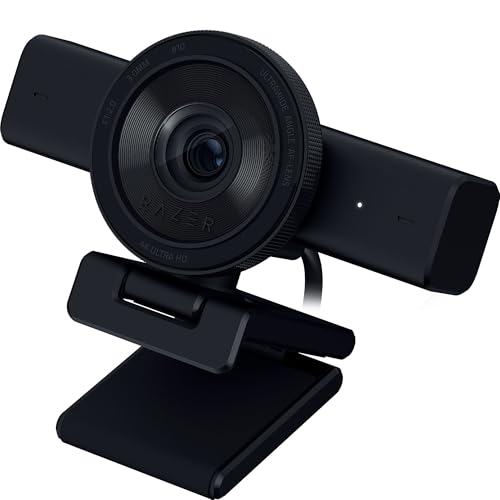 Razer Kiyo V2 Webcam for Streaming and Collaboration2.76 x 4.57 x 2.56 inches1.1 PoundsCheck on Amazon


Top 3 picks at a glance
What HDR Actually Does Inside a Webcam
As an Amazon Associate we earn from qualifying purchases at no extra cost to you.


The marketing implies a webcam sensor has been upgraded. It has not. HDR on a webcam is nearly always multi-exposure blending: the sensor captures a bright frame and a dark frame in quick succession, and the image pipeline stitches the usable parts together. The bright frame recovers your face, the dark frame keeps the window from blowing out to pure white, and the merge tries to hide the seam.
That process has three costs, and every camera here pays them in a different proportion. The first is temporal artifacting. If you move fast between the two exposures, the merge leaves a faint ghost edge, which is why HDR webcam footage looks slightly soft when you gesture with your hands. The second is noise. Lifting shadows amplifies whatever grain the sensor produced, and small webcam sensors produce a lot. The third is frame rate. Several cameras quietly halve their maximum frame rate when HDR is engaged, so the 60 fps you paid for becomes 30.
Three of the eight cameras dropped to 30 fps in their highest HDR mode without saying so in the interface. That is not a defect, it is a bandwidth reality, but it changes which camera you should buy if you stream fast-paced gameplay with a facecam overlay.
How I Ran the Tests
Every camera sat on the same 15 mm rail at 620 mm from my face, lens at eye height.
Exposure settling time is how many seconds the camera took to stabilize after I moved from the shadowed side of the room into the frame, measured from the capture timestamps. Skin tone shift is the delta between the metered value on a colour card at the start and end of a two-minute clip, because several of these cameras hunt for white balance under mixed daylight and LED. CPU load is the difference in total system utilization on the capture PC with the vendor utility running versus not running, on a Ryzen 7 machine that is otherwise idle.
I also recorded twenty minutes of continuous 1080p60 from each camera at a 6000 kbps x264 encode and again at 3500 kbps, because the bitrate you actually stream at changes the ranking. Cameras that look great in a still frame can fall apart when the encoder has to spend bits on HDR shadow noise. If you want the deeper version of that trade-off, I walked through it in my guide to streaming bitrate and resolution, and the same maths applies here.
The Five Criteria That Decide This Category
Before the product list, these are the criteria I weighted, in order. Getting the order right matters more than picking a specific model, because a camera that wins on criterion four and loses on criterion one will disappoint you every single stream.
Sensor size first. HDR processing can only rescue signal the sensor actually captured. A 1/2 inch sensor gathers roughly twice the light of the 1/3 inch or smaller parts used in cheap webcams, and a 1/1.3 inch sensor roughly doubles it again. This is why the price ladder in this category tracks sensor size more closely than it tracks resolution.
Exposure behaviour second. A camera that nails exposure in three seconds and then holds it is worth more than a camera that gets a marginally better single frame and then hunts every time you lean forward. Hunting is visible to viewers in a way that a half stop of underexposure is not.
Frame rate under HDR third. Check whether the camera holds 60 fps with HDR on. For meetings this is irrelevant. For streaming with a facecam next to 60 fps gameplay, a 30 fps facecam reads as slightly broken to anyone paying attention.
Software dependency fourth. Some cameras do their processing on-camera and behave identically whether or not the utility is running. Others need the background app. On a single-PC streaming setup, a utility that costs you three to five percent CPU is a real tax.
Mounting and field of view fifth. A 78 degree field of view frames your head and shoulders on a normal desk. A 90 degree or wider field of view puts your whole room in shot, which for most streamers means more to hide, not more to show.
Comparison Table: The Numbers That Matter
| Camera | Price | Sensor | Max mode | fps with HDR on | Exposure settle | Vendor app CPU |
|---|---|---|---|---|---|---|
| Microsoft Modern Webcam | Check on Amazon | Small, 1/4 in class | 1080p30 | 30 | 4.9 s | None required |
| OBSBOT Meet SE | $58 | 1/3 in class | 1080p100 | 60 | 3.4 s | ~3% |
| Razer Kiyo V2 | Check on Amazon | 1/2.8 in class | 4K30 | 60 at 1080p | 2.8 s | ~2% |
| Insta360 Link 2C | Check on Amazon | 1/2 in | 4K30 | 30 in 4K, 60 at 1080p | 2.1 s | ~4% |
| OBSBOT Meet 2 | $129 | 1/2 in | 4K30 | 30 in 4K, 60 at 1080p | 2.4 s | ~4% |
| Elgato Facecam MK.2 | $139 | 1/2.8 in class | 1080p60 | 60 | 2.6 s | ~3%, optional |
| Insta360 Link 2 | Check on Amazon | 1/2 in | 4K30 PTZ | 30 in 4K, 60 at 1080p | 2.0 s | ~5% with tracking |
| Insta360 Link 2 Pro | Check on Amazon | 1/1.3 in | 4K30 PTZ | 30 in 4K, 60 at 1080p | 1.8 s | ~5% with tracking |
Exposure settle times are the median of six runs in the window-only condition. Sensor sizes for cameras that do not publish a figure are my estimate from the physical optics and low-light behaviour, so treat those as a class rather than a spec.
The Picks, Ranked by Who They Suit
Insta360 Link 2 Pro
This is the camera that changed my mind about HDR webcams. The 1/1.3 inch sensor is roughly four times the area of what a sixty dollar webcam uses, and the difference shows up exactly where you would expect: the shadow side of my face in the window-only test held detail without the mushy, denoised look the smaller sensors produce. For comparison, two of the cheaper cameras drifted more than 400 K, which is visible as your face going slightly orange and then slightly blue over the course of a stream.
The PTZ mechanism is a real motorized gimbal rather than a digital crop, so tracking keeps full resolution as you move. That matters if you stand up to demo something or if you present from a whiteboard. Gesture control works, and I stopped finding it gimmicky once I set it to start and stop recording, because that removes a reach across the desk. It also supports Stream Deck integration, which fits neatly if you already run one; I compared the software approach in my write-up on stream deck alternatives in software if you have not bought the hardware yet.
Who should not buy it: anyone who streams in a controlled, lit room at 1080p. You will pay 210 dollars for sensor advantages you have already solved with a 60 dollar light. Also skip it if you need 4K60, because like every camera here it caps 4K at 30 fps. And if your PC is the same machine doing the encoding, budget for the tracking utility, which cost me about five percent CPU with tracking active.
Insta360 Link 2 – PTZ 4K Webcam for PC/Mac
The standard Link 2 uses the same 1/2 inch sensor as the 2C but adds the motorized pan and tilt head. In practice, the image quality difference between this and the 2C in a static seated shot was small enough that I had to check the file names to tell my clips apart. Exposure settled at 2.0 seconds, skin tone held within about 150 K, and the AI tracking is smooth rather than jerky, which is the thing most tracking webcams get wrong. It follows at a rate that reads as a human operator rather than a security camera.
The forty dollar premium over the 2C buys you movement. If you sit still, that premium buys nothing. I recommend it specifically for people who do standing demos, cooking or craft streams where you lean out of frame, or anyone who shares a camera between a desk and a whiteboard. The directional noise-cancelling mics are genuinely usable for a backup audio track, though I would still run a real mic; my testing on that side lives in the audio setup guide for streamers.
Who should not buy it: seated streamers on a fixed framing. Buy the 2C and put the difference into lighting. Also skip it if your desk is against a busy background, because tracking will happily pan your camera onto your unmade bed.
Elgato Facecam MK.2, Premium Full HD Webcam
This is the camera I would hand to a Twitch streamer who wants to stop thinking about their webcam. It is 1080p60 only, and it treats that as a feature rather than a limitation: locked 60 fps, no mode-switching surprises, and manual control over every parameter through the vendor utility. It is the only camera in the group where I could set exposure, ISO, white balance, and shutter to fixed values and trust that they would still be there next week. For a facecam overlay sitting next to 60 fps gameplay, that consistency beats a higher-resolution camera that quietly drops to 30.
Its HDR implementation is more conservative than the Insta360 cameras. It recovers maybe a stop and a half of window highlight rather than two and a half, but it does so without the shadow noise penalty. At a 3500 kbps encode, the Facecam MK.2 finished ahead of both 4K cameras in my subjective comparison precisely because there was less noise for the encoder to waste bits on. That is a real result and it surprised me.
Who should not buy it: anyone who needs 4K for cropping or for recorded video work. Also skip it if you want auto framing, because there is none. The MK.2 assumes you will point it correctly once and leave it there, and if you want that plus the older model’s ring light behaviour, read my Elgato Facecam review for the generational comparison.
Insta360 Link 2C – 4K Webcam for PC/Mac
The value pick, and the camera I recommend most often. You get the same 1/2 inch sensor as the Link 2, the same HDR pipeline, digital auto framing instead of a motor, and you save forty dollars. In my window-only test the 2C recovered the shadow side of my face within about a third of a stop of the Link 2, which is not a difference anyone will notice on a stream.
Auto framing is digital here, which means it crops into the 4K sensor to follow you. That is fine as long as you output 1080p, because a 1080p crop out of a 4K frame is still native-resolution pixels. If you output 4K, framing has to stay locked or you will visibly soften the image. The gesture control set is the same as the more expensive models, and the noise-cancelling mic is adequate for a backup.
Who should not buy it: anyone recording final-delivery 4K who also wants tracking, since those two requirements fight each other. Also skip it if you want to avoid running vendor software, because HDR and framing both live in the utility here.
OBSBOT Meet 2-4K Webcam for PC with 1/2″ Sensor
OBSBOT’s answer to the Link 2C, and it is close. Same sensor class, similar HDR behaviour, and an AI framing system that I found slightly more aggressive than Insta360’s, meaning it re-frames more often. Whether that is good depends on how much you move. In my seated test it re-framed four times in two minutes, versus twice for the 2C, and each re-frame is a small visible drift that a viewer will register subconsciously.
Where the Meet 2 pulled ahead was in mixed lighting. With the window open and the key panel at 5600 K against roughly 3000 K room lamps, the OBSBOT held white balance better than anything except the Link 2 Pro. If your room has that mix, and most rooms do after sunset, that is worth something. Autofocus is fast and does not pulse, which is a common failure mode on cameras at this price.
Who should not buy it: people who want their framing to sit absolutely still. Turn AI framing off and it behaves, but then you are paying for a feature you disabled. Also skip it if you are on a Mac-first workflow, since OBSBOT’s utility has historically been the weaker half of the package there. Check the current version before you commit.
Razer Kiyo V2 Webcam for Streaming and Collaboration 4K 30Fps
The Kiyo V2 is the pragmatic streamer’s 4K camera. It does 4K at 30 fps for recorded work and 1080p at 60 fps for live, and it switches between them cleanly in Synapse. Exposure settled in 2.8 seconds, which is mid-pack, and its HDR mode is tuned less aggressively than Insta360’s, protecting highlights more than it lifts shadows. On camera that reads as a slightly moodier image with a properly exposed window behind you, which honestly looks better than the flat, lifted look aggressive HDR produces.
The reason I rank it below the Facecam MK.2 for pure streaming is Synapse. If you already run Razer peripherals, that cost is sunk and the Kiyo V2 becomes a much easier recommendation.
Who should not buy it: anyone allergic to peripheral suites, and anyone who needs the shadow-lifting that Insta360’s HDR does. Razer’s tuning is deliberately restrained, so a heavily backlit room will still leave you a bit dark unless you add a light.
OBSBOT Meet SE 1080P 100FPS Webcam for PC
At 58 dollars this is the budget pick that does not feel like one. The headline is 100 fps at 1080p, which sounds absurd for a webcam and mostly is, but there is a real use for it: if you record at 100 fps and deliver at 50 or 60, you have headroom for smooth slow motion on reaction clips. In normal streaming use it locks to 60 fps with HDR on, which is more than the Microsoft camera manages.
Image quality is where the price shows. The sensor is a class below the 1/2 inch parts, and in the window-only test the HDR mode lifted my face out of shadow at the cost of visible chroma noise on the wall behind me. At 6000 kbps that is acceptable. At 3500 kbps it is the reason I would not recommend this camera for a Twitch affiliate streaming at capped bitrate. AI framing works and the build is better than the price suggests.
Who should not buy it: low-bitrate streamers, and anyone shooting in a room with a strong backlight and no ability to add a key light. This camera needs light to look good. Give it 300 lux on your face and it punches well above 58 dollars.
Microsoft Modern Webcam with Built-in Noise Cancelling Microphone
The honest budget option, and the one I would buy for a second machine or a work-from-home desk. It is 1080p30, it has a physical privacy shutter that actually slides rather than clipping on, and its HDR is a mild light-correction pass rather than true multi-exposure blending. It recovers about a stop, which turns unusable into acceptable in a backlit call.
Exposure settling was the slowest here at 4.9 seconds, and it hunts when you shift position. For a meeting nobody cares. For a stream it is distracting. The built-in mic is better than average for a webcam mic, which still means it is worse than a 30 dollar USB microphone. The best thing I can say about it is that it needs no software at all, so it works identically on any machine you plug it into.
Who should not buy it: streamers, full stop. If the camera will appear on a public broadcast, spend more. This is a calls camera that happens to handle a window without embarrassing you.
Settings That Ruin HDR Footage, and the Fixes
Three settings mistakes account for most of the bad HDR webcam footage I see. The first is leaving auto exposure fully unlocked. Every camera here lets you set an exposure compensation or lock a value; do it, using your face as the reference rather than the whole frame. A locked exposure that is a quarter stop off looks professional. A hunting exposure that is perfect two thirds of the time does not.
The second is stacking HDR with a software filter. If you have HDR on in the vendor utility and a colour correction filter in OBS lifting shadows again, you are amplifying the same noise twice. Pick one. I generally prefer to run HDR on the camera and keep OBS filters limited to a light sharpen and a colour key if I am using a green screen.
The third is ignoring frame rate mismatch. If your camera delivers 30 fps and your OBS canvas runs at 60, OBS duplicates frames, and on some scenes that produces a subtle judder on your facecam that viewers describe as looking laggy. Match the two, or accept 30 across the board. My notes on frame pacing in fixing dropped frames while streaming cover the diagnostic steps if you are seeing this.
USB Bandwidth, Mounting, and the Boring Details That Bite
The first is USB bandwidth. A 4K30 MJPEG stream is a substantial chunk of a USB 3.0 controller’s budget, and if you have the camera sharing a hub with an external SSD and a capture card, something will give. Moving it to a rear port on a separate controller fixed it. If your camera keeps falling back to a lower mode, check topology before you blame the hardware.
The second is mounting. Every camera here ships with a monitor clip, and every clip assumes a monitor with a bezel and a flat back. Thin OLED panels and ultrawides with curved rears defeat most of them. Six of the eight have a quarter-inch thread on the bottom, which is the escape hatch, and I strongly recommend using it with a short desk arm rather than clipping to the display. Lens height at eye level is worth more to your on-camera presence than any HDR setting, and a monitor clip forces the camera above your eyeline, which is the least flattering angle available. If you are already running a mic arm, note that clamps compete for desk edge space; my testing on that side is in the boom arm guide.
Cable length is the third small thing. The captive cables run between 1.5 and 2 m, which is fine for a desk mount and not fine for a camera on a light stand behind you. USB extension over 3 m needs an active cable for these bandwidth levels, and passive extensions are the single most common cause of a camera that connects, enumerates, then drops to 480 Mbps and refuses to do anything above 720p.
Lighting Beats HDR Almost Every Time
Here is the uncomfortable conclusion from three weeks of testing. In the controlled condition, with the blind closed and a single key panel at 380 lux, the gap between the 44 dollar Microsoft camera and the 210 dollar Link 2 Pro narrowed dramatically. The Pro was still better, obviously, with cleaner shadows and more accurate colour, but the difference stopped being the difference between usable and unusable and became a difference of degree.
In the window-only condition, the gap was enormous. The Pro produced a broadcastable image. The Microsoft camera produced a silhouette with a face vaguely visible in it. That is the whole argument for HDR in one sentence: it is a rescue tool for a lighting problem you cannot fix.
So the buying logic follows. If you can control your light, buy the camera that gives you the most consistent, highest frame rate image and treat HDR as an occasional switch. If you cannot control your light, because you rent, or the window faces your desk, or you share the room, then sensor size and HDR quality become the whole purchase and you should spend accordingly. A cheap camera plus a good light beats an expensive camera in a bad room, and it usually costs less.
My Recommendation by Situation
Streaming in a lit room at 1080p60: Elgato Facecam MK.2. Predictable, locked, no surprises, and it holds up at low bitrate better than the 4K options.
Streaming or recording in a backlit room: Insta360 Link 2 Pro if the budget allows, Insta360 Link 2C if it does not. The 2C gets you most of the way for 120 dollars.
Standing demos, teaching, or anything where you leave the frame: Insta360 Link 2 for real motorized tracking, or the OBSBOT Meet 2 if you prefer its framing behaviour and white balance.
Recorded content at 4K where you already own Razer software: Razer Kiyo V2.
Tight budget with the ability to add a light: OBSBOT Meet SE at 58 dollars, plus whatever you can spend on lighting.
Meetings and a second desk: Microsoft Modern Webcam. It is 45 dollars and it does what it says.
If you take one thing from this, take the criteria order rather than the model names. Sensor size, then exposure stability, then frame rate under HDR, then software cost, then field of view. Score any camera released next year against that list and you will land on the right answer without needing me.
Frequently asked questions
Does HDR keep a webcam running at its highest frame rate?
No, HDR can reduce the available frame rate. The article explains that several webcams quietly halve their maximum frame rate when HDR is enabled, and three of the eight cameras dropped to 30 fps in their highest HDR mode. The Insta360 Link 2C, OBSBOT Meet 2, Insta360 Link 2, and Insta360 Link 2 Pro are listed at 30 fps in 4K HDR but 60 fps at 1080p.
Why can HDR webcam footage look soft when someone moves?
HDR webcam footage can look soft because the camera blends a bright exposure with a dark exposure captured in quick succession. Fast movement between those exposures may create a faint ghost edge during the merge. The article also notes that lifting shadows amplifies sensor noise, which can make the resulting image look less clean.
Is a larger sensor more important than higher resolution for HDR?
For HDR, a larger sensor is generally more important than higher resolution because HDR processing can only use the signal the sensor captured. The article says a 1/2 inch sensor gathers roughly twice the light of 1/3 inch or smaller parts, while a 1/1.3 inch sensor roughly doubles that again. More captured light gives shadow recovery more information to work with.
Do I need to use the webcam manufacturer’s software?
Not always. The article says some cameras process footage on-camera and behave identically without their utility, while others need a background app. The comparison lists no required vendor app for the Microsoft Modern Webcam, whereas other models show an app-related CPU load. This matters especially on a single-PC streaming setup, where software can add a real processing tax.
Can better lighting matter more than turning HDR on?
Yes, controlled lighting can matter more than HDR. The article identifies a window behind the subject with much brighter light outside than on the face as the difficult scenario, while a closed blind and a single key panel represent the controlled setup most streamers should aim for. HDR can recover some backlight detail, but it cannot replace light on the subject.









