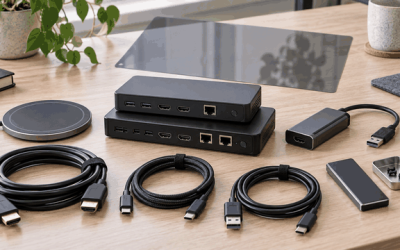
Streamers, educators, and archivists all hit the same wall: getting a clean signal from an external source into a computer without adding visible delay. The search phrase “capture card software” typically points at that pairing — a hardware capture card running alongside applications like OBS or Streamlabs to record or broadcast from consoles, cameras, or legacy VHS decks. The right card turns your PC into a dependable production station; the wrong one introduces lag, dropped frames, or driver conflicts that degrade your output.
Separating a solid capture card from a mediocre one is narrower than most buyers expect. Published latency at target resolution, supported frame rates, USB protocol generation, and whether the device requires proprietary drivers all shape daily experience. Aggregated owner feedback confirms a pattern: the cheapest units handle casual sessions but break down under sustained load or when HDR passthrough is involved. This 2026 roundup compares eight widely purchased options across those dimensions so you can match a card to your workflow.
As an Amazon Associate we earn from qualifying purchases at no extra cost to you. Product prices and availability are accurate as of the date shown and are subject to change.






Top 3 picks at a glance
Quick Picks
| Product | Best for | Price |
|---|---|---|
| 4K HDMI Video Capture Card | Budget console streaming | $25.89 |
| Guermok Video Capture Card | Lowest entry price | $18.99 |
| Elgato 4K X | Pro-grade 4K/144Hz streaming | $249.99 |
| 4K HDMI USB 3.0 Capture Device | Minimalist 1080P setup | $19.87 |
| VHS TO Digital Converter | Family tape archiving | $45.99 |
| USB Video Capture Card (RCA to USB) | Oldest-format digitizing | $12.99 |
| PORTTA DX20R | HDR and VRR gaming passthrough | $119.99 |
| VHS to Digital with HDMI Loop Out | Hybrid analog and digital capture | $32.99 |
How We Picked
We ranked cards on four criteria drawn from manufacturer specs and aggregated owner reviews: native latency at the stated resolution, maximum input resolution and frame rate, driver dependency versus true plug-and-play behavior, and price-to-feature ratio. Devices with consistent complaints about frame drops or thermal throttling during continuous capture were excluded. We gave extra weight to units that integrate cleanly with OBS and Streamlabs, since those dominate the streaming software market.
The 8 Best Capture Card Software in 2026
4K HDMI Video Capture Card, 1080P 60FPS
Best for beginners who want a no-frills HDMI-to-USB path into OBS without spending much. Owner reports praise the plug-and-play USB 3.0 connection and stable 1080P/60FPS output across Xbox, PS5, and PC sources.
- Pro: True plug-and-play with Windows and macOS, no driver download required.
- Pro: Handles 4K input with reliable 1080P/60FPS downscale for streaming.
- Con: No hardware loop-out, so gameplay preview depends on software encoding and adds perceptible delay.
Skip this if you need zero-latency passthrough for competitive play or HDR content.
Guermok Video Capture Card
The lowest-priced functional HDMI capture option here, aimed at hobbyists testing whether capture suits their setup. Published specs list 1080P/60FPS and 2K/30FPS, and the USB-C connector adds modern laptop compatibility.
- Pro: USB-C output pairs directly with newer laptops that lack full-size USB-A ports.
- Pro: 2K/30FPS mode useful for screen recording at higher-than-HD detail.
- Con: Owner feedback notes occasional USB handshake failures requiring a replug after sleep.
Skip if reliability during unattended recording sessions is critical to you.
Elgato 4K X Capture Card
The premium pick for streamers who demand HDMI 2.1 input at 4K144Hz with ultra-low latency passthrough. Elgato’s ecosystem integrates with its own software suite and OBS through well-maintained drivers.
- Pro: HDMI 2.1 passthrough delivers 4K at 144Hz to your monitor with near-zero added delay.
- Pro: Mature firmware and driver support reduce long-term compatibility headaches.
- Con: The $249.99 price is nearly ten times what a casual streamer needs to spend.
Skip if your maximum capture target is 1080P or you stream occasionally rather than daily.
4K HDMI USB 3.0 1080P 60FPS Capture Device
Essentially a second-source alternative to the first entry, targeting the same budget buyer. Specs mirror competitors at $25, and it serves users who need a spare card or want to compare firmware behavior across vendors.
- Pro: Under $20 pricing makes it the cheapest 4K-input option in this roundup.
- Pro: Compact form factor fits behind a laptop without blocking adjacent ports.
- Con: Limited brand documentation means troubleshooting falls on community forums.
Skip if you prefer manufacturer-backed technical support out of the box.
VHS TO Digital Converter, USB Video Capture Card
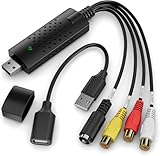
Built for people digitizing family VHS, Hi8, or Mini DV tapes. RCA input converts analog signals to a digital file on Windows or macOS, and the included software handles basic capture and export to DVD-compatible formats.
- Pro: Dedicated analog-to-digital pipeline with software tuned for tape sources.
- Pro: Broad OS compatibility including older Windows versions still common on archive machines.
- Con: No HDMI input, so it cannot serve as a general-purpose streaming card.
Skip if your primary use case is game console capture rather than tape archiving.
USB Video Capture Card, RCA to USB
The absolute floor price for analog conversion at $12.99. It converts VHS, Mini DV, and Hi8 via RCA to a USB signal for PC recording. Suitable for one-off archiving projects where software bundling is not important.
- Pro: Lowest cost of entry for anyone testing whether tape digitizing is worth pursuing.
- Pro: Works with third-party capture software like VirtualDub or OBS for advanced control.
- Con: Owner reports mention audio desync on longer recordings without manual offset correction.
Skip for high-volume archiving where consistent A/V sync matters across dozens of tapes.
PORTTA DX20R HDMI Video Capture Card
Targets gamers who want HDR and VRR passthrough alongside 4K/60Hz recording. Loop-out preserves 1080P/240Hz or 2K/120Hz on your display while the card records at 4K/60Hz to the PC via USB 3.0.
- Pro: HDR and VRR passthrough keeps your gaming experience intact during capture.
- Pro: Ultra-low-latency passthrough suits fast-paced competitive titles.
- Con: Price sits high relative to cards that lack passthrough entirely.
Skip if you do not play HDR-enabled titles and can tolerate software-only preview.
VHS to Digital Capture Card with HDMI Loop Out
The one card here bridging analog and digital worlds: RCA input for old tapes plus an HDMI loop-out for connecting a monitor. Records at 1080P/30FPS, making it a flexible archival tool with a modern preview path.
- Pro: HDMI loop-out lets you watch the source on a TV while recording on PC.
- Pro: Handles both legacy analog decks and newer HDMI sources in one unit.
- Con: 30FPS ceiling on the HDMI path limits it for fast-motion digital capture.
Skip if you need 60FPS or higher from your digital inputs.
Buying Guide
Latency and passthrough
Latency is the delay between what happens on your console or camera and what appears in your software preview. Cards without a hardware loop-out route everything through your PC’s encoder, adding 40-100 milliseconds of visible lag. If you play fast-paced games and want to see your own screen in real time, prioritize a card with dedicated HDMI passthrough such as the Elgato 4K X or PORTTA DX20R. For static camera sources like webcams or DSLRs, software-only latency is negligible.
Resolution and frame-rate ceiling
Match the card’s maximum capture resolution to your output target, not your input resolution. A console can output 4K, but if you stream at 1080P, a card that downscales internally saves money without quality loss. Check whether the listed “4K support” means passthrough only or actual capture. Several budget cards pass a 4K signal to your monitor while capturing at 1080P or lower, which is fine for streaming but misleading in product titles.
Driver model and software compatibility
Plug-and-play cards using the UVC standard work immediately in OBS, Streamlabs, and Zoom without installing anything. Cards requiring proprietary drivers offer extra features like hardware encoding but add a failure point during OS updates. For archive work with older PCs, confirm the driver supports your Windows version before purchasing. Mac compatibility also varies; many budget cards list Windows only, so verify macOS support in the product listing if you use a MacBook.
Our Verdict
The Elgato 4K X is the clear top pick for anyone streaming professionally from modern consoles, thanks to HDMI 2.1 passthrough and mature software integration. The Guermok at $18.99 earns the budget slot for casual users who need 1080P/60FPS and USB-C connectivity without driver hassles. However, if competitive HDR gaming passthrough matters more than 4K recording, the PORTTA DX20R wins at half the Elgato’s price.
FAQ
Do I need a capture card if my console has a built-in share button?
Console share features push low-resolution streams directly to Twitch or YouTube with minimal encoding control. A capture card lets you route the feed through OBS for overlays, multiple sources, and higher bitrate, which matters if you want a polished production.
Can a capture card work without installing software?
UVC-compliant cards work as generic webcam devices in any application that accepts a video input, including OBS, Zoom, and Teams, with no proprietary driver required. Cards with passthrough or advanced encoding may still need the manufacturer’s utility to configure features.
Is 1080P/60FPS enough for streaming in 2026?
For most platforms, yes. Twitch and YouTube both cap viewer-facing bitrates so aggressively that 4K capture adds negligible visual benefit unless you record locally at high resolution for later editing.
Will an analog capture card damage my VCR or camcorder?
No. Analog capture cards contain passive input stages that draw minimal current from the source device. The tape deck simply outputs its signal as it always has; the card digitizes on its own side without sending anything back.