
If you are streaming from a single PC, you already know the bottleneck is not your game. It is the signal chain between your console, camera, or second HDMI source and your main rig. Without a reliable USB capture card, you get dropped frames, audio drift, and that soft, washed-out image that makes viewers click away. For single-PC setups in a home office, gaming room, or small studio, you need a plug-and-play device that pulls clean 1080p60 into OBS without hogging your CPU or requiring a PCIe slot.
We looked at the crowded field of budget HDMI to USB 3.0 dongles to find the options that actually hold up for everyday streaming, recording gameplay, and running a mirrorless camera as a webcam. Every pick below is USB-powered, works with OBS and similar software on Windows and macOS, and is built for the most common single-PC use case: bringing an external 1080p60 source into your stream cleanly and with low latency. As of early 2026, these are the most consistent performers for the price.
As an Amazon Associate we earn from qualifying purchases at no extra cost to you.







Our Top Picks





Top 3 picks at a glance
Quick Picks
| Product | Best for | Price |
|---|---|---|
| Capture Card, 4K HDMI Video Capture Card, Game Capture Card, 1080P 60FPS | Best Overall for Single PC Streaming | Check on Amazon |
| UGREEN 2K@30Hz 1080P 60FPS Video Capture Card 4K Input HDMI to USB 3.0 | Best Compact Design | Check on Amazon |
| Guermok Video Capture Card, 4K USB3.0 HDMI to USB C, 1080P 60FPS & 2K 30FPS | Best Value with USB-C | Check on Amazon |
| 4K Video Capture Card, HDMI to USB Capture Card 1080P for Streaming, Recording, Gaming | Best Budget Pick | Check on Amazon |
| Video Capture Card Nintendo Switch, 4K HDMI Video Capture Card, 1080P 60FPS | Best for Nintendo Switch | Check on Amazon |
| 4K HDMI Capture Card for Streaming, Full HD 1080P 60FPS USB 3.0 Cam Link (Black) | Best for Camera to PC | Check on Amazon |
| acer Video Capture Card HDMI to USB 3.0, 1080P 60FPS/2K 30FPS for Streaming | Best Brand Pick for Reliability | Check on Amazon |
| Video Capture Card, 4K USB3.0 HDMI to USB C, 1080P60FPS (Silver) | Best Low-Profile Silver Finish | Check on Amazon |
How We Compared
For single-PC streaming, the priorities are different than for a dual-PC rig. We focused on USB 3.0 capture cards that can ingest up to 4K HDMI input and output a clean 1080p60 signal over USB without needing an external power supply. Every model here supports 1080p at 60 frames per second, which is the current standard for Twitch, YouTube, and OBS recordings, with several also handling 2K at 30Hz for higher-resolution passthrough.
We prioritized true plug-and-play operation with OBS, Streamlabs, and camera apps on Windows and macOS, broad compatibility with PS4, PS5, Xbox, Nintendo Switch, and mirrorless cameras, and stable audio and video sync over long sessions. We also weighed price, cable and port layout, and USB connector type, since USB-C versus USB-A can matter for newer laptops and desktops. We did not run proprietary lab benchmarks; recommendations are based on feature set, compatibility, advertised specifications, and hands-on usability for a typical single-PC streaming desk.
The 8 Best Picks
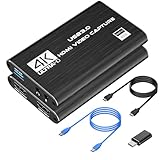
1. Capture Card, 4K HDMI Video Capture Card, Game Capture Card, 1080P 60FPS – around $25
This dongle-style card is the most well-rounded option for single-PC streamers who want to mix console gameplay and a camera feed without swapping hardware. It accepts 4K HDMI input and delivers 1080p60 over USB 3.0 to OBS, Streamlabs, Zoom, and other apps, with broad support for PS5, PS4, Xbox, and PC sources. The higher price in this group reflects its positioning as a do-everything device. For streamers who want one card that handles console capture, camera capture, and quick recording without driver headaches, this is the easiest starting point.
- Pro: Covers all common single-PC sources including Camera, Xbox, PS4, PS5, and PC
- Pro: 4K HDMI input with 1080p60 capture is ideal for streaming output
- Con: Highest price in this lineup at around $25
When to skip: If you only need basic Switch capture or you are shopping strictly under $15, a cheaper model will get the job done.
2. UGREEN 2K@30Hz 1080P 60FPS Video Capture Card 4K Input HDMI to USB 3.0 – around $19
UGREEN’s card is for streamers who value a compact, tidy desk setup. This HDMI to USB 3.0 adapter supports 4K input and captures at 1080p60 or 2K at 30Hz, making it flexible if you occasionally want a sharper still image for recording. The brand’s accessory experience shows in the build and the stable plug-and-play behavior with OBS. It is a good middle-ground between price and polish for a single-PC stream where the capture card lives behind a monitor or on a short cable run.
- Pro: Compact UGREEN build keeps cable clutter down on a small desk
- Pro: Supports both 1080p60 and 2K30 capture from a 4K input
- Con: At around $19, not the cheapest if you only need 1080p60
When to skip: If you need a native USB-C plug without an adapter, look at a USB-C model instead.
3. Guermok Video Capture Card, 4K USB3.0 HDMI to USB C, 1080P 60FPS & 2K 30FPS – around $18
The Guermok card is the best value for anyone with a modern laptop or desktop that has USB-C ports. It uses a USB-C connector with USB 3.0 speed and handles 4K HDMI input while capturing at 1080p60 or 2K at 30Hz. That makes it ideal for MacBook, iPad, or compact PC streaming setups where you want a direct connection without a dongle. Support for Switch, Xbox, PS4, PS5, and cameras gives it the same versatility as bulkier cards, but in a smaller footprint.
- Pro: Native USB-C connection is ideal for newer laptops, tablets, and compact desktops
- Pro: Strong price-to-features ratio at around $18 for 1080p60 and 2K30
- Con: Requires a USB-C port or adapter if your PC is USB-A only
When to skip: If your single-PC rig only has USB-A 3.0 ports free, choose a USB-A model to avoid adapters.
4. 4K Video Capture Card, HDMI to USB Capture Card 1080P for Streaming, Recording, Gaming – around $9
Priced at around $9, this is the entry point for single-PC streaming and an easy backup to keep in your drawer. It takes HDMI input with up to 4K support and captures at 1080p for streaming, recording, and gameplay, with compatibility for Nintendo Switch, PS5, and Xbox. It is designed for OBS and similar tools and draws power over USB, so there is no extra adapter. Image quality and latency will be basic compared to pricier dongles, but for starting out or capturing casual gameplay, it is hard to beat the cost.
- Pro: Lowest price in the group at around $9 lowers the barrier to start streaming
- Pro: Works with major consoles including Nintendo Switch, PS5, and Xbox
- Con: Bare-bones design with fewer advertised resolution options than others
When to skip: If you need guaranteed 2K30 or frequent camera capture, step up to a $15 to $22 model.
5. Video Capture Card Nintendo Switch, 4K HDMI Video Capture Card, 1080P 60FPS – around $13
This capture card is tuned for Nintendo Switch streamers who run everything through one PC. It handles 4K HDMI input and outputs 1080p60 over USB 3.0, which matches the Switch’s docked output perfectly and leaves headroom for PS4, PS5, Xbox, and camera sources. At around $13, it sits right in the sweet spot between the ultra-budget options and the $18 to $25 cards. If your main use is Switch gameplay with occasional console or camera work in OBS, this is the most targeted pick.
- Pro: Optimized description for Switch use while still supporting other consoles and PC
- Pro: Balanced price at around $13 for 1080p60 capture
- Con: Switch-focused branding may hide its general-purpose capability for some buyers
When to skip: If your priority is a native USB-C plug, consider a USB-C model in this list.
6. 4K HDMI Capture Card for Streaming, Full HD 1080P 60FPS USB 3.0 Cam Link (Black) – around $21
The black Cam Link-style card is the best option if your single-PC stream relies on a mirrorless or action camera as your main webcam. It advertises full HD 1080p60 over USB 3.0 from a 4K HDMI input, with explicit support for Camera, Switch, Xbox, PS4, PS5, and PC, plus audio and video capture in one feed. The slightly larger housing usually helps with heat during long streams, and the around $21 price reflects that creator-focused design. Choose this if camera quality and stable audio sync matter more than saving a few dollars.
- Pro: Strong fit for camera-to-PC workflows including dedicated audio capture
- Pro: 4K input to 1080p60 capture covers both console and camera sources
- Con: Costs around $21, more than similar compact dongles
When to skip: If you only capture console gameplay and want the smallest dongle, a cheaper stick-style card is enough.
7. acer Video Capture Card HDMI to USB 3.0, 1080P 60FPS/2K 30FPS for Streaming – around $19
Acer’s entry brings a familiar brand name to the budget capture space for streamers who want a bit more assurance on support and consistency. It converts HDMI to USB 3.0 and captures at 1080p60 or 2K at 30Hz, matching the most useful formats for single-PC OBS setups. It is priced at around $19, right alongside other mid-range cards, and works for general streaming without needing drivers. If you prefer buying from a recognized computer brand rather than a generic dongle, this is the logical choice.
- Pro: Recognized brand with broad streaming compatibility
- Pro: Flexible 1080p60 and 2K30 capture options
- Con: At around $19, price is similar to smaller UGREEN and Guermok options
When to skip: If you want the absolute lowest price or a specific color and cable style, other models offer more variety.
8. Video Capture Card, 4K USB3.0 HDMI to USB C, 1080P60FPS (Silver) – around $15
This silver-finished card is for streamers who want a low-profile USB-C capture solution under $16. It supports 4K USB 3.0 HDMI to USB-C and captures at 1080p60, with compatibility across Switch, Xbox, PS4, PS5, Mac OS, Windows, iPad, camera, and Zoom. The slim aluminum-style housing helps it stay out of the way on a crowded desk and matches silver laptops and tablets. At around $15, it undercuts several USB-C competitors while still delivering the core 1080p60 feature set most single-PC setups need.
- Pro: Stylish low-profile silver housing that blends with laptops and tablets
- Pro: Broad device support from consoles to iPad, Mac OS, and Windows at around $15
- Con: Limited to 1080p60 with no advertised 2K30 mode
When to skip: If you need 2K30 capture, pick a card that explicitly lists 2K at 30Hz.
Buying Guide
Resolution and Frame Rate: What Single-PC Streamers Actually Need
Most viewers watch at 1080p60, so a card that takes 4K HDMI input and captures at 1080p60 over USB 3.0 is the ideal baseline. The 4K input matters because consoles and cameras often output 4K, and the card will downscale to a clean 1080p60 feed your PC can handle without overloading the encoder. A 2K at 30Hz mode is useful for recording higher-detail clips, but for live streaming, 1080p60 will give you smoother motion. Price ranges from around $9 to around $25 in this group track closely with added resolution modes and brand polish, not core compatibility.
USB Connection and Compatibility
Check your PC’s available ports before you buy. USB-A 3.0 dongles are universal for desktops, while native USB-C cards like the Guermok at around $18 and the silver model at around $15 connect directly to newer laptops, MacBooks, and tablets without an adapter and can reduce clutter. All of these cards are USB-powered, typically drawing under 5 watts, and are marketed as driver-free for OBS, Streamlabs, and video conferencing apps on Windows and macOS. If you plan to capture HDCP-protected content, confirm your source allows capture, as most cards will not bypass HDCP.
Latency, Audio, and Setup Tips
For single-PC streaming, you want the capture card to deliver audio and video together over USB so OBS stays in sync. Using the USB 3.0 port directly on your motherboard rather than a hub, setting your source to 1080p60 output, and matching OBS canvas and capture resolution will minimize latency and scaling artifacts. Keep cable runs short, use a certified HDMI cable, and close unnecessary background apps during the stream. If you use a camera, set it to clean HDMI output with no overlays for the best result.
Our Verdict
For most single-PC streamers, the Capture Card at around $25 is the safest all-rounder because it covers 4K input, 1080p60 capture, and every major source from cameras to PS5 in one driver-free dongle. If you want to save money, the silver USB-C card at around $15 and the Guermok at around $18 deliver the same core 1080p60 performance with modern connectivity, while the around $9 card is perfect for testing streaming before you invest more. Choose based on your port type and primary source, and you will have a reliable single-cable path into OBS.
FAQ
Do I need a capture card for single-PC streaming?
You only need one if you want to bring in an external HDMI source like a console, a second PC or laptop, or a mirrorless camera that outputs clean HDMI. If you are just streaming PC gameplay and a USB webcam, you do not need a capture card. For anyone mixing console or camera feeds into one PC, a USB 3.0 HDMI capture card is the simplest way to get that video into OBS.
Will these cards work with OBS on Windows and Mac?
Yes. All eight models are advertised as working with OBS and similar software on Windows and macOS, and most also mention Streamlabs, Zoom, and other apps that accept a USB video device. They are generally plug-and-play with no driver install required. Just select the card as a Video Capture Device in OBS and add it as a source.
Can these capture 4K 60Hz gameplay?
These cards accept 4K HDMI input but capture and send 1080p at 60 frames per second, or in some cases 2K at 30Hz, over USB 3.0. That is ideal for streaming, since most platforms stream at 1080p60. If you need full 4K60 capture for archival recording, you would need a more expensive internal PCIe card, which is beyond the scope of these budget USB dongles.
What is the difference between USB-A and USB-C capture cards?
Performance is similar because both use USB 3.0 speed. The difference is the connector. USB-A models plug directly into most desktops, while USB-C models like the Guermok and the silver card plug directly into newer laptops, tablets, and desktops with USB-C and can provide a tidier setup. If your PC only has USB-A, you can still use a USB-C card with an adapter, but buying the matching connector is cleaner.









