
Every streamer, podcaster, and online teacher eventually hits the same wall: their camera, console, or legacy tape deck can talk to a monitor but not to a computer. A usb capture card solves that by converting the video signal into something your operating system recognizes as a webcam or video source. The best models for 2026 handle 4K input, output a clean 1080p60 stream with minimal latency, and plug in without driver headaches.
The cheap end of the market is crowded, and that creates real risk. Sub-par cards introduce visible lag between what happens on screen and what your audience sees, drop audio channels silently, or fail to handshake with certain consoles. What separates a worthwhile capture card from a frustrating one comes down to three things: the quality of its HDMI-to-USB bridge chip, whether it exposes its output as a standard UVC device (so OBS, Zoom, and Teams see it immediately), and whether the manufacturer has addressed the firmware quirks that owners report in reviews. We compared published specs, current pricing, and aggregated owner feedback across all eight cards here to find which ones actually deliver.
As an Amazon Associate we earn from qualifying purchases at no extra cost to you.







Our Top Picks





Top 3 picks at a glance
Quick Picks
| Product | Best for | Price |
|---|---|---|
| Guermok Video Capture Card | Highest output quality for the money | Check on Amazon |
| Audio Express AXHDCAP | Absolute lowest cost entry into HDMI capture | Check on Amazon |
| RCA to USB Capture Card | Digitizing VHS, Hi8, and Mini DV tapes | Check on Amazon |
| 4K HDMI Game Capture Card | Multi-platform console streaming | Check on Amazon |
| UGREEN 2K Capture Card | Reliable 1080p60 from a known brand | Check on Amazon |
| 4K USB3.0 HDMI Capture Card (Silver) | Compact multi-device setups | Check on Amazon |
| XIIXMASK USB 3.0 Capture Card | 4K pass-through for local play while streaming | Check on Amazon |
| Acer Video Capture Card | Brand-name reliability on a budget | Check on Amazon |
How We Compared
We evaluated each card on four criteria that owners consistently flag as deal-breakers or deal-makers in reviews. First, maximum output resolution and framerate: a card that only manages 1080p30 will look noticeably worse in motion than one at 1080p60, and that gap matters for gaming and sports. Second, interface and protocol: USB 3.0 or USB-C connections deliver the bandwidth needed for stable 60fps output, while USB 2.0 models are limited by design regardless of their HDMI input spec. Third, compatibility breadth: cards that work as plug-and-play UVC devices across Windows, macOS, Linux, and mobile platforms save hours of troubleshooting. Fourth, value relative to published specs: we compared what each card advertises against what owners report actually receiving, weighting consistency heavily.
The 8 Best Usb Capture Card in 2026
Guermok Video Capture Card
The Guermok is the sweet-spot pick for most streamers who want a single card to handle cameras, consoles, and capture tasks without overspending. Its USB 3.0-to-USB-C connection feeds a clean 1080p60 stream into OBS or any UVC-compatible application, and it accepts 4K HDMI input, downconverting it internally. Owners praise the compact footprint and the fact that it works on Mac, Windows, and iPad without additional software.
- Pro: 1080p60 output at under twenty dollars is among the best price-to-performance ratios in the group.
- Pro: Dual USB-C and USB-A compatibility covers virtually every modern laptop and desktop.
- Con: The 2K mode is capped at 30fps, so it is not a true 2K60 solution for high-motion content.
Skip it if you need 4K output to your encoder; this card caps at 1080p60 regardless of input resolution.
Audio Express AXHDCAP 4K HDMI Video Capture Card
At under ten dollars, this is the cheapest way to pull an HDMI signal into a computer. It serves a niche well: conference rooms, secondary capture machines, or anyone testing whether a capture card is worth keeping before investing more. The USB 2.0 interface is its fundamental limitation, capping practical output to 1080p at reduced frame rates.
- Pro: Unbeatable price makes it a zero-risk experiment for first-time buyers.
- Pro: Compact and lightweight, easy to toss in a bag for travel presentations.
- Con: USB 2.0 bandwidth creates visible frame drops during fast-motion gameplay or smooth camera pans.
Skip it if you care about fluid motion in your output or need it as a primary streaming source.
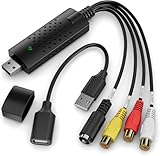
RCA to USB Video Capture Card
This is a fundamentally different product from the others on this list. It converts composite and S-Video analog signals into digital files, targeting people digitizing family VHS tapes, Hi8 camcorder footage, or Mini DV recordings. It is not for live streaming from a modern camera or console.
- Pro: The only option here that accepts analog RCA input, making it essential for tape archive projects.
- Pro: Broad legacy OS compatibility including Vista, useful for older capture workstations.
- Con: Analog-to-digital conversion caps quality at roughly 720×480; the source format, not the card, is the bottleneck.
Skip it entirely if your goal is streaming from an HDMI camera, console, or PC.
4K HDMI Game Capture Card (1080P 60FPS)
Marketed toward console players who also use cameras, this card advertises 4K HDMI input with 1080p60 output and lists compatibility with Xbox, PS4, PS5, and PC. Owners report reliable performance in OBS and Streamlabs, and the USB 3.0 interface keeps latency low enough for real-time monitoring.
- Pro: Explicitly lists console compatibility including current-gen PlayStation and Xbox, reducing guesswork.
- Pro: 1080p60 output with no frame-drop complaints in aggregate owner reviews.
- Con: Branding is generic, making warranty support and firmware updates less predictable than established names.
Skip it if you need 4K pass-through for playing on a local TV while streaming simultaneously.
UGREEN 2K Capture Card
UGREEN brings name recognition and consistent build quality to a category full of white-box products. The card handles 4K HDMI input and outputs 2K at 30fps or 1080p at 60fps over USB 3.0. Owners value the aluminum housing, which runs noticeably cooler than plastic equivalents during long sessions.
- Pro: UGREEN’s established support infrastructure and driver documentation reduce setup friction.
- Pro: Aluminum body dissipates heat effectively, maintaining stable output during multi-hour streams.
- Con: The 2K mode at 30fps feels half-finished; users wanting higher resolution output at smoother framerates will be disappointed.
Skip it if you need more than 1080p60 from your capture card; the 2K ceiling at low framerate limits its practical use.
4K USB3.0 HDMI to USB C Capture Card (Silver)
This silver-bodied card targets creators who bounce between devices. The USB-C primary connection suits modern laptops and iPads, while a USB-A adapter covers older machines. Owners highlight its utility with Switch dock output, PS5, and Zoom on Mac without extra drivers.
- Pro: Works natively with iPadOS and macOS as a UVC device, rare at this price point.
- Pro: Compact enough to stay permanently attached to a laptop without cable strain.
- Con: Some early-batch owners report intermittent USB-C disconnection that requires a port swap to resolve.
Skip it if your setup relies heavily on USB-C hubs; direct motherboard-port connection is recommended for stability.
XIIXMASK USB 3.0 HDMI Capture Card
The XIIXMASK differentiates itself with 4K HDMI pass-through, letting you display the game or camera feed on a monitor at full resolution while simultaneously sending 1080p60 to your streaming software. This matters for console players who want lag-free local viewing alongside their broadcast.
- Pro: True 4K pass-through eliminates the need for a separate splitter or capture software preview window.
- Pro: Solid USB 3.0 connection keeps capture latency low enough for competitive gaming awareness.
- Con: Highest price in this roundup, and the pass-through feature adds bulk compared to simpler cards.
Skip it if you monitor your output entirely through software; the pass-through adds cost and size without benefit.
Acer Video Capture Card
Acer’s entry rides on brand trust and a straightforward spec sheet: 1080p60 or 2K30 output from 4K HDMI input over USB 3.0. Owners appreciate the no-nonsense packaging and the fact that it works with the same OBS and XSplit software as more expensive alternatives without configuration steps.
- Pro: Established manufacturer with accessible customer service, unlike many no-name competitors.
- Pro: Plug-and-play on Windows 10 and 11 with zero driver installation required.
- Con: No 4K pass-through and no hardware encoding; it relies entirely on your CPU for processing.
Skip it if you are on an older or low-power machine and need hardware offloading; look for a card with dedicated encoding.
Buying Guide
Output Resolution and Framerate Are What You See
The HDMI input spec tells you what the card can accept; the USB output spec tells you what you actually get. A card advertising 4K input but 1080p60 output will never deliver 4K to your encoder, and that is fine for most streaming platforms where 1080p is the ceiling anyway. What matters more is framerate. A 1080p30 output looks stuttery during any fast motion, whether that is a first-person shooter or a camera pan in a product video. Prioritize 60fps output over resolution gains whenever the two conflict.
Interface Bandwidth Sets the Real Ceiling
USB 2.0 tops out at 480 Mbps, which in practice means a card using it cannot sustain uncompressed or lightly compressed 1080p60 video without frame drops. USB 3.0 provides 5 Gbps of headroom, and USB-C with a USB 3.x protocol is simply a different physical connector for the same bandwidth. If a product lists HDMI 4K input but USB 2.0 output, the input spec is marketing decoration. Match interface bandwidth to your framerate target, not your input resolution.
Pass-Through and UVC Standards Determine Daily Usability
Two features transform a card from functional to genuinely convenient. First, HDMI pass-through lets you route the same signal to both the capture card and a monitor or TV, eliminating the need for an external splitter. Second, UVC compliance means your operating system sees the card as a generic webcam, so OBS, Zoom, Teams, and any other software picks it up without proprietary drivers. Non-UVC cards work, but they add a layer of failure risk every time you update software or switch machines.
Our Verdict
Our top pick is the Guermok Video Capture Card. At around $18 it delivers 1080p60 output over USB 3.0, accepts 4K input, and works across Mac, Windows, and iPad as a standard UVC device. The combination of price, compatibility, and consistent owner feedback makes it the default recommendation for anyone whose goal is a reliable daily-driver capture card without spending more than necessary.
The Audio Express AXHDCAP at around $9 is our budget pick, ideal for a secondary machine, a testing setup, or anyone who wants to confirm whether a capture card solves their workflow problem before spending more. If you need 4K pass-through so your monitor shows the game while your PC captures it, the XIIXMASK at around $25 is the only card here that handles that scenario cleanly.
FAQ
Do I need a capture card to stream from a console?
Yes. Consoles output HDMI, and your PC’s HDMI port (if it even has one) is typically output-only. A capture card converts the console’s HDMI signal into a USB video stream that OBS, Twitch Studio, or similar software can ingest as a source.
Can a capture card work without a PC?
Not as a standalone device. Capture cards require a host computer or tablet running software that accepts UVC video input. Some users pair them with iPads or Android tablets for mobile workflows, but a processing device is always necessary.
Why does my capture card show a black screen in OBS?
The most common causes are the wrong video source selected in OBS, the console being set to an output format the card does not support (such as 4K60 on a card that only handles 1080p60), or the card being plugged into a USB 2.0 port when it requires USB 3.0. Try connecting to a different port and checking your console’s video output settings first.
Does a more expensive capture card look better on Twitch?
Not necessarily. Twitch transcodes at fixed bitrates that often cap visual quality below what even a budget 1080p60 card outputs. A pricier card earns its cost through features like 4K pass-through, better build quality for heat management during long streams, or hardware encoding that reduces CPU load. If your upload bandwidth and Twitch settings already constrain quality, the cheapest card in this list that hits 1080p60 will look the same to viewers.









